
 WhatsApp: +86 16626708626
 Email:
  Phone: +86 16626708626
Description
Key Technical Specifications
- Article Number: 3BSE016237R1
- ABB Type Designation: SC520M
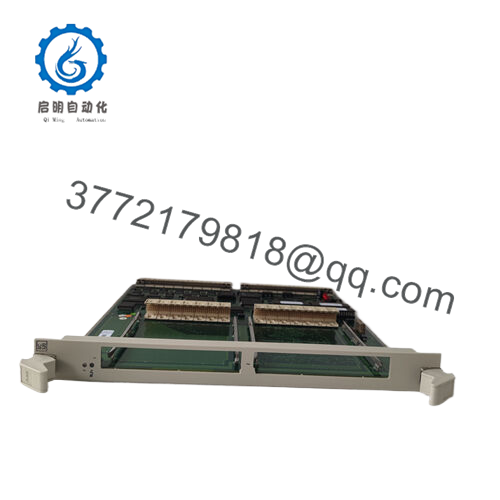
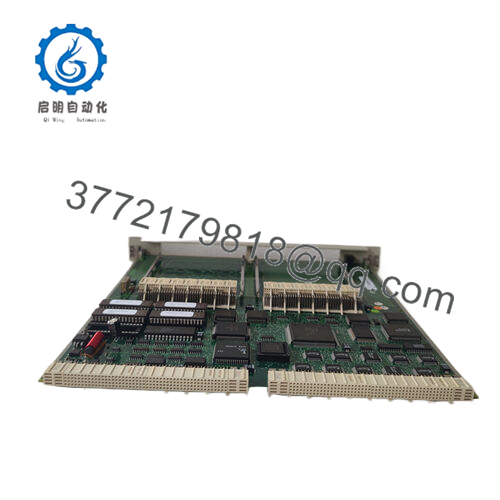
- Description: Submodule Carrier Incl. Local CPU, Marine version
- Supported Submodules: MB300 and MB300E series
- Local CPU: 32-bit RISC (typically ~120 MHz)
- Memory: 512 KB program + 512 KB data (approximate from similar models)
- Communication: Integrated support for MB300/MB300E protocols
- Power Supply: 24 V DC (via system bus; confirm site voltage)
- Dimensions (W × H × D): 30 mm × 300 mm × 291 mm
- Weight: Approximately 0.742 kg
- Operating Temperature: -25 to +70 °C (marine hardened; verify exact rating)
- Environmental: Marine classified, RoHS exempted per ABB declaration
- Mounting: Rack-mounted in Advant Controller 450RMC or compatible chassis
Product Introduction
The ABB SC520M (3BSE016237R1) is a submodule carrier with integrated local CPU, part of the Advant OCS / Advant Master AC 400 family. It serves as a dedicated carrier for MB300/MB300E communication submodules in marine and offshore applications, providing protocol handling and local processing in harsh environments such as ships and platforms.
This marine-hardened version offers vibration and environmental resistance beyond standard SC520 units. Plants stick with it for backward compatibility in existing Advant Controller 450RMC setups, avoiding full system rip-and-replace when only carrier or submodule faults occur.

- 3BSE016237R1 SC520M
Installation & Configuration Guide
Stage 1: Pre-Installation Preparation (10–15 minutes) ⚠️ Safety First: Alert operations to downtime. Confirm process in safe state. Lock out/tag out power to the rack. Discharge capacitors—wait 5 minutes minimum. Tools Required: ESD wrist strap, PH1/PH2 screwdriver, multimeter, wire labels, smartphone for photos. Data Backup: Export controller configuration using Advant Master tools or equivalent. Document submodule addresses, jumpers, and cabling. Photograph existing SC520M DIP switches, jumpers, and submodule seating.
Stage 2: Removing the Old Module (5–10 minutes)
- Power down the entire rack or segment.
- Remove front cover if fitted.
- Label and disconnect any front wiring or submodule cables carefully—avoid straining connectors.
- Release rack locking mechanisms and pull module straight out to avoid damaging bus pins.
- Check backplane for dust, corrosion, or bent pins; clean if necessary with approved tools. ⚠️ Note: Retain the old unit on ESD surface for comparison until new one operates fault-free.
Stage 3: Installing the New Module (10–15 minutes)
- Ground via ESD strap. Verify replacement is exactly SC520M (3BSE016237R1).
- Configuration Clone (Crucial): Match DIP switches, jumpers, and any hardware settings from photos—node address, baud rates, termination. Insert any existing MB300/MB300E submodules into slots.
- Slide into rack slot; ensure full seating and secure locks/levers.
- Reconnect wiring and submodules; torque terminals to 0.5–0.6 Nm. Self-Checklist: [ ] Model and revision match, [ ] Jumpers/DIPs identical, [ ] Submodules seated, [ ] Wiring tight and labeled.
Stage 4: Power-On & Testing (15–25 minutes) Pre-Power Check: Multimeter scan for shorts on power rails (24 V typical). Power-On Steps:
- Apply power to rack only (isolate field I/O initially).
- Monitor status LEDs: Power green, CPU RUN green, no critical faults (red).
- Connect engineering station; verify module detection in Advant tools. Check firmware/local CPU status.
- Reload configuration if required; test submodule communications (MB300/MB300E ping/handshake).
- Run dry tests on connected protocols and I/O signals. ⚠️ Troubleshooting Note: No RUN LED? Check power, seating, or submodule mismatch. Communication faults often stem from jumper errors or protocol config drift—reverify against old photos.
Frequently Asked Questions (FAQ)
Is the SC520M hot-swappable? No. Power must be removed from the rack before insertion or removal. Live swapping risks backplane damage or submodule corruption in marine systems where uptime matters.
Is this model obsolete, and is the stock genuinely new? Yes, SC520M is legacy in the Advant OCS family (as of 2026). Stock is new surplus from OEM excess or decommissioned marine projects—full traceability, anti-counterfeit checks, and 24+ hour functional testing on Advant racks. Test reports/photos on request.
What is the direct replacement if this is out of stock? ABB no longer produces new units; check for remanufactured SC520 variants or migrate to modern 800xA/S800 I/O. For like-for-like, source surplus SC520M or consult ABB for last-time-buy options in Advant Controller 450RMC systems.
Will I lose my submodule configuration or logic when swapping? Configuration resides in the main controller (e.g., AC 450) or submodules—not the carrier itself. Swap preserves settings if you reload the project. Export everything first; I’ve seen hours lost from skipped backups.
Why is the price lower than historical ABB list? Genuine new surplus—no manufacturing markup. Units undergo full inbound inspection, electrical tests (Megger >10 MΩ), and load burn-in. Same performance as factory fresh, backed by our 1-year warranty.
Does this support redundancy or special marine certifications? It carries marine classification for vibration/shock/EMC per ABB Advant marine specs. No built-in module redundancy—use dual carriers if required by class rules. Verify exact compliance with your vessel’s notation.



