
 WhatsApp: +86 16626708626
 Email:
  Phone: +86 16626708626
Description
- Key Technical Specifications
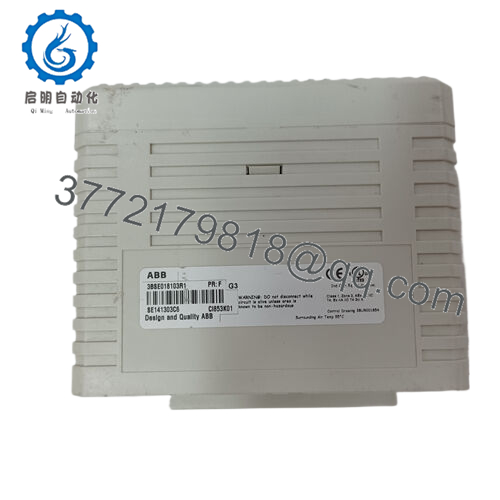
- Part Number: 3BSE018106R1
- Alternate Designation: CI855K01 with TP853 baseplate
- Protocol: MasterBus 300 (MB 300)
- Transmission Speed: 10 Mbit/s
- Ports: Dual Ethernet (for line redundancy)
- Role: Master (for AC 800M connectivity to legacy networks)
- Supply Voltage: 24 V DC (from AC 800M rack)
- Operating Temperature: 0 to +55 °C (typical AC 800M range)
- Storage Temperature: -40 to +70 °C
- Mounting: CEX-bus on AC 800M DIN rail baseplate TP853
- Dimensions: Standard AC 800M comm module size (approx. 54 mm width)
- Weight: Approx. 0.6–0.8 kg (module + baseplate)
- Redundancy Support: Yes, network line redundancy

- CI855K01 3BSE018106R1
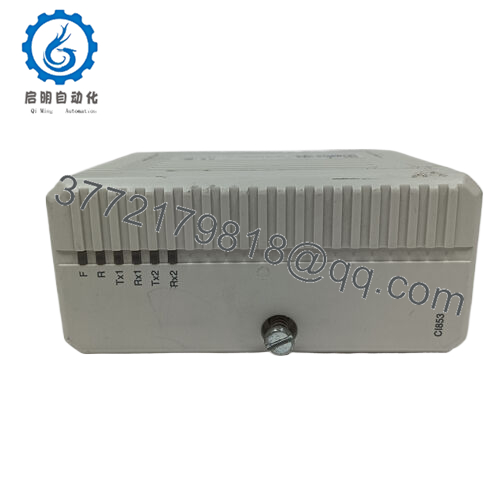
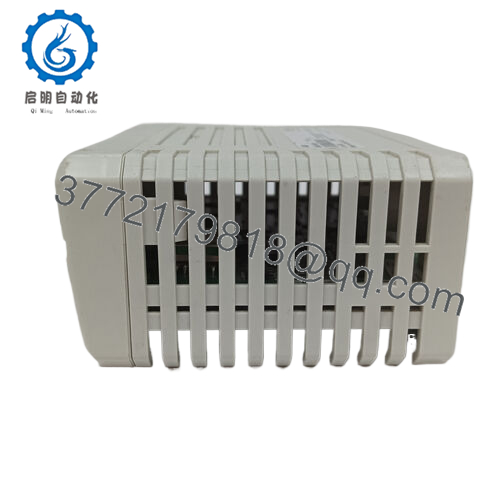
- Product Introduction The ABB CI855K01 (3BSE018106R1) is a CEX-bus mounted communication interface that links AC 800M controllers to MasterBus 300 networks. It is used in process industries for peer-to-peer data exchange between AC 800M and older ABB systems like AC 400, or for connecting new plant sections in System 800xA environments without full rip-and-replace.
This module delivers reliable 10 Mbit/s communication with built-in line redundancy via dual Ethernet ports. Plant teams select it for backward compatibility in brownfield upgrades—preserving existing MB 300 infrastructure while integrating modern AC 800M logic. Availability is limited to surplus since it’s legacy hardware not in active production.
- Installation & Configuration Guide
Stage 1: Pre-Installation Preparation (10–15 minutes) ⚠️ Safety First: Schedule downtime with operations. Confirm process safe state. Lock out/tag out 24 V DC to the AC 800M rack. Discharge capacitors (wait 5 minutes). Tools Required: ESD wrist strap, PH1 screwdriver, Fluke multimeter, wire labels, smartphone for photos. Data Backup: Use Control Builder M to export project (hardware config, logic, communication settings). Document current CI855 slot, photograph Ethernet connections, cable routing, and any rotary switches (if present on older units). Note MB 300 network addresses and redundancy setup.
Stage 2: Removing the Old Module (5–10 minutes)
- Remove front cover if fitted.
- Label and disconnect Ethernet cables (TX/RX pairs for redundancy)—note which port is primary/secondary.
- Loosen baseplate screws if needed; release CEX-bus locking mechanism. Pull module straight out to protect pins.
- Inspect CEX-bus connector and TP853 baseplate for dust, bent pins, or oxidation—clean gently with compressed air. ⚠️ Note: Retain the old unit for comparison until the replacement proves stable.
Stage 3: Installing the New Module (10–15 minutes)
- Apply ESD strap. Verify new unit is CI855K01 3BSE018106R1 with matching TP853 baseplate.
- Configuration Clone (critical): Match any address settings or jumpers from photos (MB 300 node/address rarely configurable on CI855, but confirm). Ensure baseplate alpha code compatibility (A E for CI855).
- Align with CEX-bus guides; insert firmly until seated (audible click). Secure baseplate screws.
- Reconnect Ethernet cables exactly as labeled—primary/secondary ports must match original for redundancy. Torque RJ45 connectors lightly. Self-Checklist: [ ] Baseplate seated, [ ] Ethernet ports wired per original, [ ] CEX-bus locked, [ ] No strain on cables.
Stage 4: Power-On & Testing (15–25 minutes) Pre-Power Check: Multimeter test 24 V rail for shorts; verify ground continuity. Power-On Steps:
- Power rack only (isolate field/network initially).
- Watch LEDs: Power green, status indicators for comms activity (refer to module LEDs—typically RUN green, ERR off).
- Connect Control Builder; confirm CI855 detected in hardware tree, check firmware (if visible), verify MB 300 link status.
- Download config if changed; monitor peer-to-peer or legacy comms.
- Enable network and test data exchange (force variables if safe). ⚠️ Troubleshooting Note: ERR LED or no link? Check Ethernet cable continuity, port assignment, or network termination. Firmware mismatch rare but possible in mixed AC 800M generations—verify versions. No detection on CEX-bus? Reseat module and check alpha code match.
- Frequently Asked Questions (FAQ)
Can this module be hot-swapped? No. Inserting or removing under power risks CEX-bus damage or transient faults across the rack. Always power down the controller rack. I’ve seen live swaps cause comms lockup on adjacent modules—hours of troubleshooting.
Is this model obsolete, and is your stock new? Yes, legacy—not in current ABB production. We source new surplus from decommissioned systems or excess OEM inventory. Each undergoes visual inspection, 24+ hour powered test in AC 800M rack simulation (MB 300 ping test), insulation resistance (>10 MΩ at 500 V), and firmware/version check. Photos/videos of test setup available on request.
What is the direct replacement if out of stock? No exact drop-in; migration paths depend on your network. For new installations, consider Ethernet-based alternatives like CI867 (Modbus TCP) or CI873 (EtherNet/IP), but MB 300 requires protocol converters or full system upgrade to 800xA Ethernet. Check ABB migration docs for your AC 400/AC 800M setup.
Will swapping the CI855 lose my communication configuration? No—the config lives in the AC 800M CPU project. The module handles physical/link layer. After swap, re-download hardware config if needed; comms should resume once ports match. Backup project first.
Why is the price lower than original ABB quote? Surplus stock from phased-out systems, not factory-fresh production. We perform full functional verification to match original performance, backed by our 1-year warranty on tested operation—not ABB’s factory coverage.
How do you test before shipping? Each unit powers up in a real AC 800M rack for >24 hours, runs MB 300 network simulation (peer ping, data throughput), thermal checks, and electrical isolation test. Firmware documented. Test report ships with unit—full transparency.
Photograph old wiring and settings before removal. Match them exactly and test comms dry before going live—you’ll cut most issues short.



