

 WhatsApp: +86 16626708626
 Email:
  Phone: +86 16626708626
Description
2. Product Core Brief
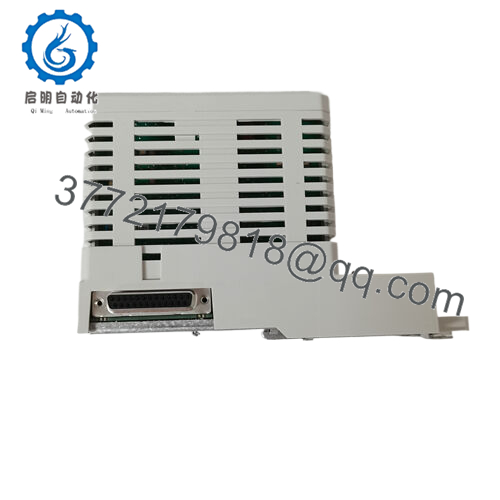
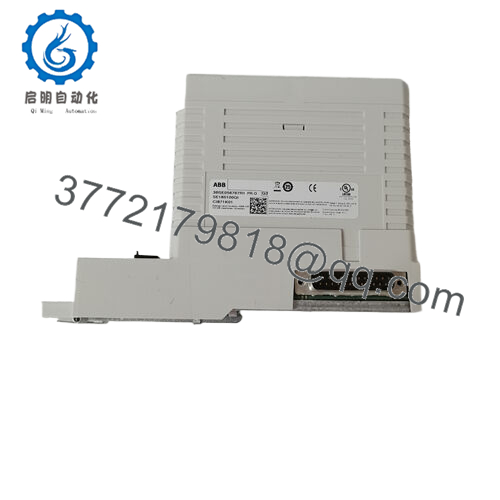
- Model: 3BSE056899R1 CI873K01
- Brand: ABB
- Series: AC 800M I/O / Communication Modules
- Core Function: Ethernet field communication interface
- Product Type: Network/Interface Module
- Key Specs: Ethernet I/O; TCP/IP support; dual ports
- Condition: New Original / New Surplus
3. Key Technical Specifications
| Parameter | Value |
|---|---|
| Part Number | 3BSE056899R1 CI873K01 |
| Module Type | Ethernet Interface / I/O Communication Module |
| Series | ABB AC 800M |
| Network Protocol | Ethernet (TCP/IP) |
| Ports | Dual Ethernet RJ45 |
| Speed | 10/100 Mbps |
| Power Supply | Derived from AC 800M rack bus |
| Mounting | AC 800M I/O rack |
| Operating Temp | −25 °C to +60 °C (verify datasheet) |
| Communication | Field device I/O over Ethernet |
| Indicators | Status/Link/Activity LEDs |
| Compliance | IEC 61131, ISA-88/95 networking support |
⚠️ Verify specific network stack support (Modbus TCP, Profinet, etc.) in the official ABB documentation for your controller firmware version.
4. Product Introduction
The ABB 3BSE056899R1 CI873K01 is an Ethernet communication interface module engineered for the AC 800M distributed control and I/O system. It provides dual 10/100 Mbps Ethernet connectivity for field I/O distribution, controller integration, and plant network segmentation.
This module is typically selected when Ethernet-based I/O communication is required between AC 800M controllers and field devices or supervisory systems. It supports standard TCP/IP traffic with diagnostic LEDs for link/activity visualization. Confirm the exact protocol stacks supported by your controller firmware before commissioning.
5. Installation & Configuration Guide
This section assumes familiarity with AC 800M rack architecture and safety practices.
Stage 1: Pre-Installation Preparation (10–15 minutes)
⚠️ Safety First
- Notify operations and schedule control system downtime.
- Lock out/tag out all control power to the AC 800M rack (typically 24 V DC).
- Wear an ESD wrist strap and work on an ESD-protected surface.
Tools Required
- ESD wrist strap
- Multimeter (verify 24 V DC off/on)
- PH0/PH1 and flat screwdrivers
- Smartphone (for wiring photos)
- Cable labels and markers
Documentation
- Photograph the existing I/O rack layout.
- Label Ethernet cables and any jumpers before removal.
Stage 2: Removing the Old Module (5–10 minutes)
- Confirm control power (24 V DC) is off.
- Label and disconnect Ethernet cables and any jumpers.
- Release module from rack guide rails and pull straight out.
- Inspect adjacent modules for dust, corrosion, or bent connectors.
⚠️ Keep the old module until the new one is fully tested and operational.
Stage 3: Installing the New Module (10–15 minutes)
- ESD Prep: Wear a grounded wrist strap.
- Verification: Confirm 3BSE056899R1 CI873K01 matches BOM.
- Insert the module into the designated I/O rack slot; press until seated firmly.
- Reconnect Ethernet cables using original labels; ensure proper port assignments.
- Self-Checklist:
- Part number confirmed
- Rack slot correct
- Ethernet cable polarity and labeling confirmed
- Module seated flush

- CI873K01 3BSE056899R1
Stage 4: Power-On & Testing (10–20 minutes)
Pre-Power Validation
- Verify 24 V DC sources at rack backplane are stable.
- Inspect cable terminations.
Power-On Sequence
- Apply 24 V DC control power.
- Observe module status LEDs (Power, Link, Activity).
- Connect the engineering workstation to the controller.
- Verify module detection in diagnostics.
- Confirm Ethernet link to field devices or upper-level systems.
⚠️ If the status LED indicates fault (steady red), recheck cabling and slot alignment. If communication fails, verify IP addressing and protocol configuration in the controller.
6. Frequently Asked Questions (FAQ)
Q1: Can this module be hot-swapped?
No. AC 800M Ethernet/communication modules require the rack control power to be off. Attempting to hot-swap under power can cause backplane faults or damage connectors.
Q2: Is this model obsolete?
The CI873K01 variant may not be actively carried in all regional ABB inventories; many units are available as surplus stock. Confirm long-term availability if spares strategy matters.
Q3: What does “New Original / New Surplus” mean?
Unused, factory-manufactured ABB stock, often from excess inventory. Units are original and uninstalled; packaging may show age. Request traceability documentation.
Q4: Will swapping this module erase controller logic?
No. Logic and configurations reside in the controller CPU. However, incorrect Ethernet cabling or IP settings can disrupt network communication, which may appear as logic faults.
Q5: What protocols does this interface support?
Primarily standard Ethernet/TCP/IP. Protocol support (Modbus TCP, Profinet, etc.) is defined by controller firmware and network configuration. Always verify protocol stacks supported in your controller’s version.
Q6: Why might your price be lower than OEM list?
Surplus inventory often lists below new OEM pricing due to market availability. Always verify authenticity, condition, and traceability before committing to procurement.



