
 WhatsApp: +86 16626708626
 Email:
  Phone: +86 16626708626
Description
2. Product Core Brief
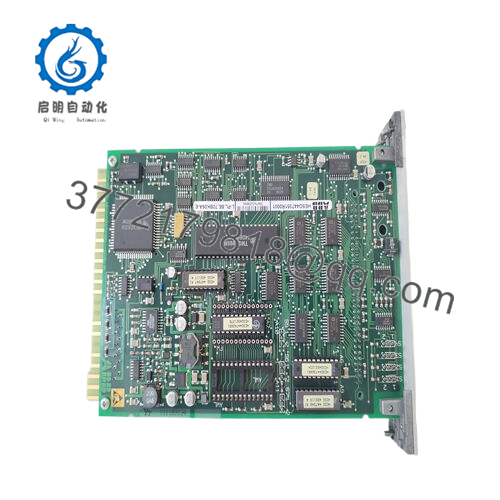
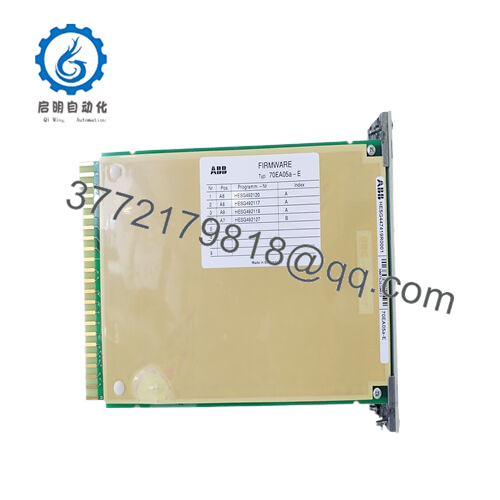
- Model: HESG447419R0001 (70EA05A-E / 70EA05a-E)
- Brand: ABB
- Series: Procontrol P13
- Core Function: Multi-channel analog signal input processing
- Product Type: Analog Input Module
- Key Specs: Multiple analog inputs (typically 8–16 channels, voltage/current/thermocouple), high isolation, P13 bus interface
- Condition: New Original / New Surplus
- ⚠️ Obsolete Model – Limited Stock Available
3. Key Technical Specifications
- Channels: Multiple analog inputs (exact count varies by config; commonly 8–16 in P13 setups)
- Input Types: Voltage (±10 V typical), current (4–20 mA), thermocouple (types J, K, etc.), RTD
- Resolution: 12–16 bits (depending on channel type and firmware)
- Accuracy: Typically 0.1–0.25% of span
- Input Impedance: High (e.g., >1 MΩ for voltage, 250 Ω for current loops)
- Isolation: Galvanic isolation between channels and system bus
- Power Consumption: Approx. 2–5 W from P13 rack supply
- Operating Temperature: –20°C to +60°C (common field rating; verify site extremes)
- Update Rate: 100–250 ms per channel (system scan dependent)
- Mounting: Procontrol P13 I/O rack (specific slot/adapter)
- Weight: Approx. 0.6–1 kg
- Country of Origin: Often Switzerland (common for Procontrol parts)

- 70EA05A-E
4. Product Introduction
The ABB HESG447419R0001 (70EA05A-E) is an analog input module in the Procontrol P13 control system. It processes field analog signals for turbine governors, boiler controls, and other critical power plant applications where precise sensor data feeds into closed-loop regulation.
In Procontrol P13 deployments I’ve commissioned (mostly gas turbine packages), this module excels at handling noisy plant environments with strong isolation and drift stability. It remains a reliable spare for aging systems, though full migrations to newer platforms like Symphony Plus or AC 800M are increasingly common to avoid parts scarcity.
5. Installation & Configuration Guide
Replacement in a live Procontrol P13 rack requires careful planning—downtime 30–90 minutes typical, longer if turbine trip involved. No hot-swap capability.
Stage 1: Pre-Installation Preparation (15–30 min) ⚠️ Safety First: Coordinate with operations for controlled shutdown or bypass if possible. Lock out/tag out rack power and field supplies. Discharge any stored energy; verify 0 V on inputs. Tools Required: ESD wrist strap, PH1/PH2 screwdriver, multimeter, wire labels/markers, camera/phone. Data Backup: Upload controller configuration/parameters. Photograph module labeling, slot position, channel wiring (terminal assignments), and any jumpers/settings.
Stage 2: Removing the Old Module (10–20 min)
- Power down the P13 rack (or affected section if segmented).
- Remove front cover or bezel.
- Label and disconnect field wiring (note polarity; torque ~0.5 Nm).
- Release rack locking mechanism and withdraw module straight out.
- Inspect backplane pins/connectors for damage, oxidation, or debris.
⚠️ Note: Keep the old module labeled and stored until full system verification—useful for diagnostics or RMA.
Stage 3: Installing the New Module (15–30 min)
- Apply ESD precautions. Confirm exact match: HESG447419R0001 / 70EA05A-E.
- Set any jumpers or address selectors to duplicate old unit (photo reference critical; P13 modules may have channel-type configs).
- Align and insert into correct slot; ensure firm seating on backplane.
- Secure locking tabs/levers.
- Reconnect field wiring precisely as documented (check shielding/grounding).
Self-Checklist: [ ] Jumpers match, [ ] Wiring polarity/terminals correct, [ ] Module seated fully, [ ] No loose wires.
Stage 4: Power-On & Testing (20–40 min) Pre-Power Check: Multimeter for shorts on input terminals to ground/common. Power-On Steps:
- Restore rack power gradually.
- Monitor module status LEDs (if equipped; green healthy, red fault).
- Access engineering station or local HMI; verify module online in I/O list.
- Check raw input values against known field signals.
- Force test points if available; calibrate/trim channels as needed per P13 manual.
- Resume operation; watch for alarms (e.g., open circuit, out-of-range).
⚠️ Troubleshooting Note: Red fault LED or no detection? Reseat module, check backplane continuity. Erratic readings? Inspect wiring for ground loops or noise; verify input type config matches sensor.
6. Frequently Asked Questions (FAQ)
Can this module be hot-swapped in a Procontrol P13 rack? No. P13 I/O is not hot-pluggable. Power down the rack/section first—live insertion risks bus faults, module damage, or spurious trips in turbine apps.
Is the HESG447419R0001 / 70EA05A-E obsolete? Yes, Procontrol P13 is long legacy. No new production; spares are surplus, service stock, or refurbished. Stock is finite—source early for critical spares.
What is the direct replacement for this module? No exact drop-in due to P13-specific bus and form factor. For upgrades, migrate to ABB Symphony Plus or 800xA with equivalent AI modules (e.g., via gateways or full rack swaps). Consult ABB turbine service for engineered alternatives.
Will swapping the module erase process parameters or tuning? No—configuration lives in the controller CPU, not the I/O module. Inputs retain scaling and alarm limits post-swap. Still, upload/download config before/after as standard practice.
Why is the price lower than ABB OEM? Sourced from new surplus or excess inventory that meets spec but skips factory distribution overhead. Units pass visual inspection, power-up comms test on P13 simulation rack, and basic input checks. Not factory-recertified unless noted.
What testing is performed on these modules? Inbound: traceability check, visual (no damage, corrosion), power-on in test rack (LEDs, bus handshake), input simulation/verification across ranges. Insulation resistance tested. Detailed photos/data on request. No full environmental chamber testing here.
How do I verify compatibility with my Procontrol P13 system? Match part number exactly against BOM or existing modules. Confirm rack slot type and firmware revision support (most P13 versions do). If channel types differ (e.g., TC vs. 4-20 mA), check jumpers. Pull old label photo and cross-reference ABB Procontrol docs when possible.



