
 WhatsApp: +86 16626708626
 Email:
  Phone: +86 16626708626
Description
2. Product Core Brief
- Model: IMICV01
- Brand: ABB
- Series: S800 I/O / ABB DCS architecture
- Core Function: Profibus-DP interface for remote I/O stations
- Product Type: Fieldbus Communication Module
- Key Specs: Profibus-DP slave, up to 12 Mbps, RS-485 interface
- Condition: New Original (New Surplus)
3. Key Technical Specifications
| Parameter | Value |
|---|---|
| Model | IMICV01 |
| Manufacturer | ABB |
| Product Type | Profibus-DP Communication Interface Module |
| System Compatibility | ABB S800 I/O stations |
| Fieldbus Protocol | Profibus-DP (EN 50170 compliant) |
| Bus Role | DP Slave |
| Data Transfer Rate | Up to 12 Mbps |
| Address Configuration | DIP switch (typically 1–99 or 126) |
| Electrical Interface | RS-485 via 9-pin Sub-D connector |
| Power Supply | 24 V DC (via I/O station backplane) |
| Operating Temperature | 0 to 60 °C |
| Relative Humidity | 5–95% non-condensing |
| Status Indicators | LEDs for Power, RUN, Bus Fault |
The module connects ABB S800 I/O modules (AI, AO, DI, DO) to a Profibus network where the master is typically an AC 800M controller or another DCS master.
4. Product Introduction
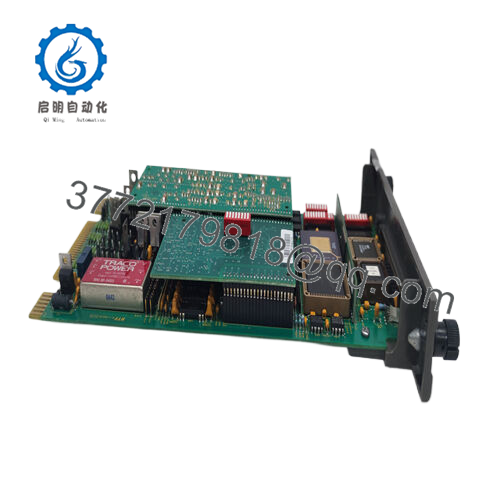
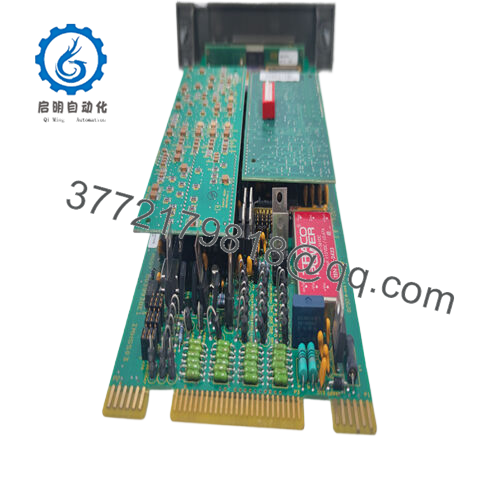
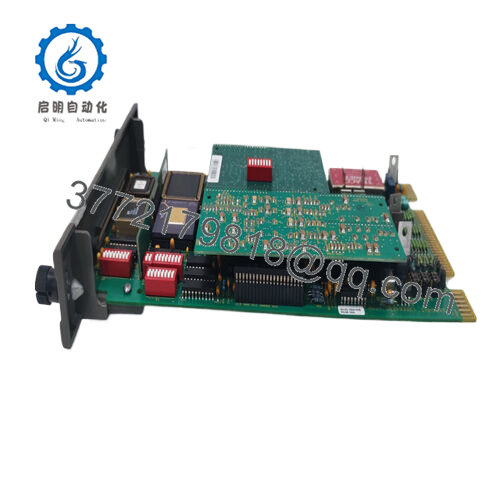
The ABB IMICV01 is a Profibus-DP communication interface module used in ABB S800 distributed I/O stations. It operates as a DP slave device, allowing cyclic exchange of process data between remote I/O modules and a Profibus master controller such as AC800M.
Plants deploy this module when S800 remote I/O racks must communicate with controllers over Profibus networks. Typical applications include process plants, power generation facilities, and distributed control cabinets where field I/O must be located far from the central controller. The module handles bus communication while the S800 modules manage the physical signals.
5. Installation & Configuration Guide
Stage 1: Pre-Installation Preparation (10 minutes)
⚠️ Safety First
- Inform the control room of the maintenance window.
- Bring the controlled process to a safe operating state.
- Apply lockout/tagout (LOTO) on the cabinet supply.
- Wait 5 minutes for power supply capacitors to discharge.
Tools Required
- ESD wrist strap and mat
- PH1 screwdriver
- Multimeter (Fluke 115 or equivalent)
- Wire labels
- Smartphone for wiring photos
Data Backup
- Export controller configuration from Control Builder / engineering software.
- Record Profibus node address and bus speed.
- Photograph the Profibus connector and DIP switch settings.
Stage 2: Removing the Old Module (5–10 minutes)
- Open the control cabinet and locate the S800 I/O station.
- Identify the IMICV01 Profibus interface module at the head of the station.
- Label the Profibus cable and shield connection.
- Disconnect the Sub-D connector carefully.
- Release the module locking tab.
- Pull the module straight out from the I/O station base.
⚠️ Important: Do not discard the old unit yet. It is the best reference for DIP switch configuration.
Stage 3: Installing the New Module (10 minutes)
- Attach an ESD strap before touching the replacement module.
- Confirm the model IMICV01 matches the removed hardware.
Configuration Clone (Critical)
- Copy the DIP switch configuration from the original module:
- Profibus node address
- Bus termination settings
- Any diagnostic configuration switches
- Insert the module into the S800 I/O base until it seats fully.
- Engage the locking mechanism.
- Reconnect the Profibus Sub-D connector with proper shield grounding.
Self-Checklist
- DIP switches match original module
- Bus cable secured
- Module fully seated
- Shield grounding intact
Stage 4: Power-On & Testing (10–15 minutes)
Pre-Power Check
- Use a multimeter to verify no short on the 24 V DC rail.
Startup Procedure
- Restore power to the S800 I/O station.
- Observe module LEDs.
Typical states:
- RUN LED green: communication active
- BUSF LED red: Profibus fault
- From the engineering workstation:
- Verify the node appears in the Profibus network configuration.
- Confirm the controller sees all connected I/O modules.
- Perform a dry I/O test before returning the process to service.
⚠️ Troubleshooting Tip
If BUSF remains active:
- Check Profibus termination at the last device.
- Verify duplicate node address is not present on the network.
- Confirm the GSD file used in configuration matches the module revision.

- IMICV01
6. Frequently Asked Questions (FAQ)
Q1: Can the ABB IMICV01 be hot-swapped?
Generally no. Most S800 I/O stations require the I/O segment to be de-energized before removing the fieldbus interface. Pulling the module live can corrupt the bus communication or damage the station backplane.
Q2: What controller typically acts as the Profibus master for this module?
In most ABB installations the master is an AC 800M controller configured as the Profibus DP master. Other systems can also control it if they support standard Profibus DP slave devices.
Q3: Is the IMICV01 obsolete?
Not fully obsolete, but it belongs to earlier generations of S800 I/O Profibus interfaces. Many plants still operate them, especially in power and process industries where lifecycle expectations exceed 20 years.
Stock availability today usually comes from surplus inventory or refurbished modules.
Q4: Will replacing the IMICV01 erase my control logic?
No. The module does not store the control program. Logic resides in the controller CPU. The interface module simply moves cyclic I/O data between the Profibus network and the S800 I/O rack.
Q5: Why does a Profibus module sometimes fail to start after replacement?
From field experience, the usual causes are:
❗ DIP switch address mismatch
A technician installs a new module with the factory default address (often 1). The network already has node 1 — the master flags a bus fault immediately.
❗ Termination resistor missing
If the module sits at the end of the segment and termination is disabled, the entire segment becomes unstable.
❗ Incorrect GSD file
If the engineering station uses the wrong device description file, the master rejects the slave during startup.
Q6: Why is surplus pricing much lower than buying from ABB directly?
OEM pricing includes lifecycle support, certified spare parts logistics, and engineering services. Surplus suppliers typically provide hardware only, often from warehouse stock. That difference explains the price gap.



