
 WhatsApp: +86 16626708626
 Email:
  Phone: +86 16626708626
Description
- Key Technical Specifications
- Processor type: MPC866, 133 MHz CPU clock
- Main memory (RAM): 64 MB for application code and data
- Firmware storage: 4 MB Flash PROM
- Application capacity: Up to 32 applications per controller, 64 programs per application
- Tasking / scan time: Up to 32 different cycle times, down to 1 ms per application program
- Power supply: 24 V DC (19.2–30 V DC)
- Power consumption: 210 mA typical / 360 mA max at 24 V DC, approx. 5.1 W (8.6 W max)
- Redundancy: Supports CPU redundancy with switchover time up to 10 ms, redundant power status input
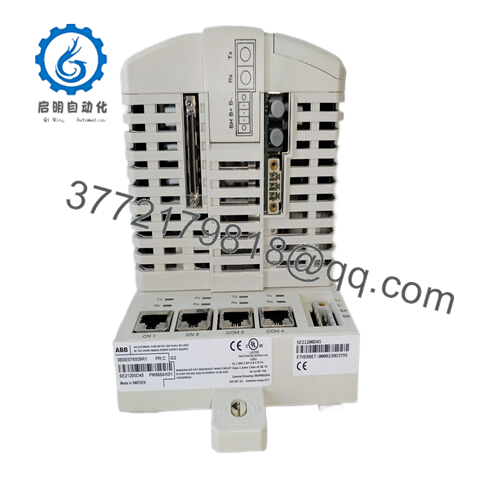
- Interfaces – control network: 2 × RJ45 Ethernet (CN1, CN2) for Control Network
- Interfaces – serial: 2 × RJ45 serial (COM3 RS‑232C with modem signals, COM4 isolated for configuration tool)
- Real-time clock / backup: Built-in real-time clock with lithium 3.6 V backup battery
- Event handling: Up to 3,000 events per OPC client in controller event queue
- Operating temperature: +5 to +55 °C (+41 to +131 °F)
- Storage temperature: −40 to +70 °C (−40 to +158 °F)
- Humidity: 5–95% non‑condensing
- Pollution / corrosion rating: Pollution degree 2 (IEC/EN 61131‑2), G3 corrosion class (ISA 71.04)
- Vibration rating: 10–50 Hz: 0.0375 mm amplitude; 50–150 Hz: 0.5 g; 5–500 Hz: 0.2 g
- Protection class: IP20 (EN 60529)
- Dimensions (W × H × D): 119 × 186 × 135 mm (4.7 × 7.3 × 5.3 in)
- Weight: Approx. 2,700 g (5.95 lb) including K02 base
- Product Introduction
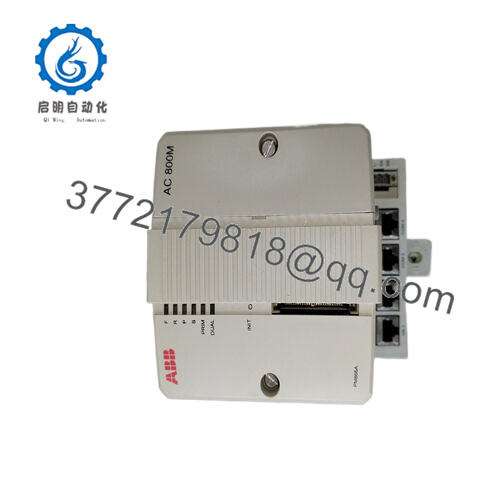
The ABB PM866AK02 (3BSE081637R1) is a redundant processor unit for the AC 800M / System 800xA platform, used as the main CPU in distributed control and PLC applications across process plants, power, chemicals, and marine. It handles central logic execution, communication to field I/O, and integration with higher-level 800xA nodes.
Compared with older AC 800M CPUs, this unit offers higher memory, fast task cycle times down to 1 ms, and full support for CPU and communication redundancy for high availability. Engineers typically choose the PM866AK02 as a direct fit in existing AC 800M racks when they need redundant operation without stepping up to higher-cost models in the same family.
- Troubleshooting Quick Reference
| Symptom | Possible Cause | Relevance to this Part | Quick Check Method | Recommendation |
|---|---|---|---|---|
| No LEDs on power‑up | No 24 V DC on baseplate connector | ✅ High | Measure 24 V DC at the controller power terminals with a calibrated meter | If 24 V is missing, fix PSU/wiring before blaming the CPU |
| RUN LED never turns green | Application not loaded, CPU in INIT, or firmware/config mismatch | ✅ High | Connect with Control Builder / 800xA, read status and diagnostics | If CPU stays in INIT with valid app, consider firmware alignment or CPU replacement |
| ERR or SYSFAIL LED solid or flashing | Internal CPU or memory fault | ✅ High | Check diagnostic buffer, note error codes, try controlled power cycle | If the same hardware fault repeats, swap with a known-good PM866AK02 |
| Redundancy not taking over on primary failure | Redundancy link or configuration issue between CPUs | ✅ High | Check CEX/ModuleBus links, redundancy configuration, and switchover logs | Verify firmware and configuration match on both CPUs before condemning hardware |
| Intermittent communication to control network | Network cabling or switch issue, or Ethernet port damage | ✅ Medium | Swap network cable, test port on different switch port, check for link/activity LEDs | Rule out network infrastructure first; if one port consistently fails, the unit may be damaged |
| All I/O modules show fault simultaneously | Power or backplane issue rather than I/O cards | ✅ Medium | Check S800 I/O power supplies and backplane status LEDs | Only replace the CPU after verifying I/O racks, backplane, and CEX cabling |
| Clock or time stamp drifting | Dead backup battery or time sync misconfiguration | ✅ Medium | Check system time in engineering tools, inspect battery status | Replace the battery during planned downtime and verify time sync configuration |
| Unit runs hot or trips in warm cabinet | Ambient temperature above +55 °C or poor ventilation | ✅ Low | Measure cabinet temperature, verify fan and airflow in panel | Improve cooling first; only replace CPU if it has visible damage or repeat thermal faults |
If you are unsure, capture clear photos of LEDs, wiring, and engineering tool diagnostics, then share them with technical support before ordering a replacement.

- PM866AK02 3BSE081637R1
- Frequently Asked Questions (FAQ)
Q1: Is ABB PM866AK02 3BSE081637R1 still current or obsolete?
The PM866A family is still widely deployed in active System 800xA and AC 800M installations, but ABB has newer CPUs in the same platform, so many sites treat this model as a “mature” unit with limited new production. Availability depends on region and distributor, so stock is typically from new original or new surplus channels rather than fresh factory launches. Always verify lifecycle status with ABB if you are designing a new system rather than maintaining an existing one.
Q2: What exactly is included with PM866AK02 compared with a bare CPU?
The PM866AK02 kit normally comprises two PM866A CPUs, two TP830 baseplates, two TB807 ModuleBus terminators, and one TK850 CEX‑bus extension cable, because it is intended for redundant configurations. That means you get both sides of the redundant pair, not just a single controller, which is important if you are building or replacing a full redundant node. Always double-check the packing list on your quote to confirm that all these pieces are included.
Q3: Can I hot‑swap a PM866AK02 under power?
No, you should not hot‑swap this controller with the rack powered. Pulling or inserting an AC 800M CPU live can upset the backplane and other modules and, in the worst case, damage the controller or other cards. Kill the 24 V DC supply, wait for the LEDs to go dark, observe basic ESD precautions, and only then remove or insert the unit. Treat it like any other high‑value DCS CPU: power down first, then work.
Q4: Will my existing application and firmware work if I swap in a new PM866AK02?
Functionally, PM866AK02 is backward compatible within the AC 800M / 800xA family, but firmware revision mismatches can cause communication or redundancy issues. Before you pull the old unit, record its firmware version and take screenshots of its configuration, then request the same or a compatible firmware range when you order. If you install a replacement on a different firmware, you may need to perform a controlled firmware update or adjust project settings to keep everything talking cleanly.
Q5: What happens to my program when I replace this CPU?
The controller stores firmware and configuration in internal flash and on the CompactFlash interface, but you should never rely on that during a swap. Export or back up the project from your engineering workstation, and if possible, keep a copy of the CompactFlash. When you insert the new PM866AK02, download the tested project again and verify task scan times, communication, and redundancy switchover behavior before handing the system back to operations.
Q6: Why is a New Original / New Surplus PM866AK02 often cheaper than buying direct from ABB?
Most third‑party industrial suppliers source new surplus and excess stock from projects, integrators, and distributors worldwide, not just direct factory pipelines. That can mean lower pricing and better availability, especially on mature models that ABB is slowly phasing from mainstream catalogs. The trade‑off is that you should pay attention to condition, warranty terms (typically 12 months), and testing procedures rather than just chasing the lowest price.
Q7: What testing should I expect before this PM866AK02 ships?
For a unit like this, I expect at least basic power‑on checks, LED and self‑test verification, Ethernet link checks, and a short runtime burn‑in on a real AC 800M rack, not just a bench visual inspection. Ideal practice is running load tests for 24 hours, verifying configuration via Control Builder, and documenting firmware, serial number, and diagnostics. Ask your supplier for photos, test reports, or even videos from their actual test rig, so you know the CPU was proven under power before it went into a box.



