
 WhatsApp: +86 16626708626
 Email:
  Phone: +86 16626708626
Description
2. Product Core Brief
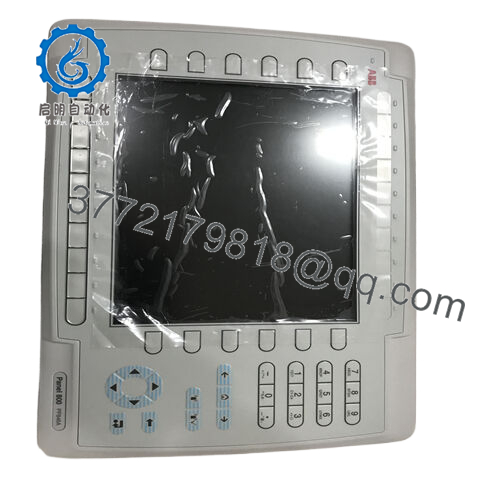
- Model: PP846A (3BSE042238R2)
- Brand: ABB
- Series: Panel 800 HMI
- Core Function: Operator interface for PLC/DCS systems
- Product Type: Industrial HMI / Operator Panel
- Key Specs: 10.4″ TFT display, 800 × 600 resolution, Ethernet + serial communications
- Condition: New Original / New Surplus
3. Key Technical Specifications
| Parameter | Value |
|---|---|
| Model | PP846A |
| ABB Article Number | 3BSE042238R2 |
| Product Type | Operator Interface Panel (HMI) |
| Series | Panel 800 |
| Display | 10.4″ TFT-LCD |
| Resolution | 800 × 600 pixels |
| Color Depth | 64K colors |
| Display Active Area | 211.2 × 158.4 mm |
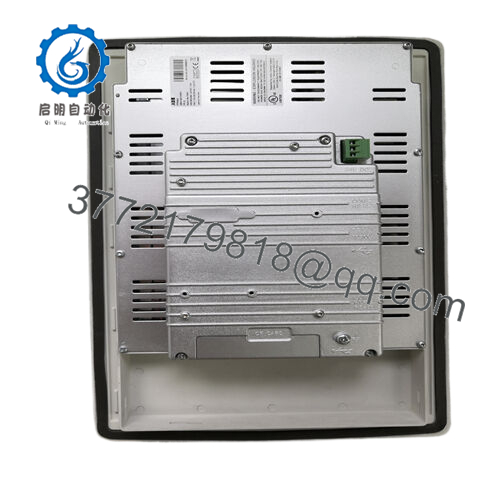
| Communication Ports | Ethernet RJ45, RS-232, RS-422/485 |
| USB Interfaces | USB Host (Type-A) and USB Device (Type-B) |
| CF Slot | CompactFlash Type I/II |
| Power Supply | 24 V DC (20–30 V DC) |
| Power Consumption | 0.5 A typical, 1.0 A max |
| Protection Rating | IP66 front / IP20 rear |
| Operating Temperature | 0 °C to +50 °C |
| Relative Humidity | 5–85% non-condensing |
| Weight | ~2.5 kg |
The panel integrates Ethernet, USB, and serial communication ports for connection with PLCs, drives, and other automation devices.
4. Product Introduction
The ABB PP846A (3BSE042238R2) is an industrial HMI operator panel from the Panel 800 series, designed for visualization and operator interaction in PLC and DCS systems. It provides a graphical interface for monitoring process variables, acknowledging alarms, and controlling equipment from a central touchscreen display.
The panel features a 10.4-inch TFT display with 800 × 600 resolution, Ethernet and serial communications, and compatibility with Panel Builder 800 engineering software. This makes it suitable for integration with ABB automation platforms and third-party PLC systems in industries such as power generation, manufacturing, and process plants.
5. Troubleshooting Quick Reference
| Symptom | Possible Cause | Relevance to this Part | Quick Check Method | Recommendation |
|---|---|---|---|---|
| HMI screen completely blank | No 24 V power supply | ❌ Low | Measure 24 V DC at terminal block | Verify power supply and cabinet fuse |
| Touchscreen not responding | Screen calibration lost | ⚠️ Medium | Enter service mode and run touch calibration | Recalibrate or reload HMI project |
| PLC communication timeout | Wrong protocol or cable fault | ❌ Low | Check Ethernet link LEDs and IP configuration | Verify Modbus/serial parameters |
| Panel stuck at startup logo | Corrupted HMI project | ⚠️ Medium | Connect engineering laptop via USB/Ethernet | Reload project from Panel Builder 800 |
| Panel reboots randomly | Internal hardware fault or overheating | ✅ High | Inspect cabinet ventilation and event logs | Replace panel if fault persists |
Field reality: 70% of “failed HMI” reports are actually communication misconfiguration or corrupted HMI projects. Verify PLC communication settings before replacing the panel.
If troubleshooting stalls, capture the startup screen and communication settings for remote diagnosis.

- PP846A
6. Frequently Asked Questions (FAQ)
Q1: What does the ABB PP846A panel actually do?
It provides the operator interface for an automation system. The panel displays process values, alarms, and trends while allowing operators to control equipment through touch commands or buttons.
Q2: What software is used to configure the PP846A?
ABB uses Panel Builder 800 for engineering and configuration. Engineers design graphics, alarms, and communication settings, then download the project to the panel via Ethernet or USB.
Q3: Can the PP846A communicate with non-ABB PLCs?
Yes. The panel supports standard communication interfaces including:
- Ethernet
- RS-232
- RS-422/485
This allows integration with PLCs that support protocols such as Modbus or serial communications.
Q4: Is the PP846A suitable for harsh industrial environments?
Yes. The panel front carries IP66 protection, meaning it resists dust and water spray when installed correctly in a control cabinet door.
Q5: Can I replace a failed PP846A without modifying the PLC program?
Usually yes. The PLC program normally stays unchanged because the HMI only handles visualization. You just need to download the original HMI project to the replacement panel.
Q6: What typically fails in these operator panels?
From field maintenance experience:
- Backlight wear after long runtime
- Touchscreen calibration drift
- Corrupted CompactFlash or firmware
The CPU electronics rarely fail unless exposed to heat or power surges.
Q7: Does the replacement panel include the HMI project?
No. The hardware ships blank. You must load the project file from your Panel Builder 800 engineering workstation or from a backup stored on CF/USB.



