
 WhatsApp: +86 16626708626
 Email:
  Phone: +86 16626708626
Description
Key Technical Specifications
- Processor Type: PSR-2
- Clock Frequency: 100 MHz
- Memory: 128 MB RAM (application-dependent)
- Fieldbus Support: Integrated fieldbus capability (specific protocols per UNITROL P configuration)
- Power Supply: Typically 24–48 V DC or 120/230 V AC (system-dependent)
- Operating Temperature: 0 to +60 °C (industrial rating; confirm with site conditions)
- Mounting: Plug-in module for UNITROL P rack or compatible cabinet
- Dimensions (approx.): 29 mm depth × 29 mm height × 29 mm width (compact form factor per ABB data)
- Weight (approx.): 1.149 kg
- Country of Origin: Switzerland (CH)
- Certifications: Conforms to industrial control standards (IEC-related for excitation systems)
- Battery Backup: Present for configuration retention (lithium type)
- Firmware: Version-specific; document before replacement
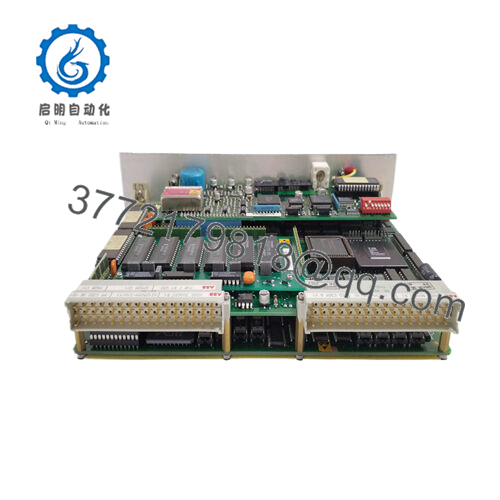
The ABB PPC322BE (HIEE300900R0001), labeled PP C322 BE01, functions as the PSR-2 processor module with integrated fieldbus in ABB UNITROL P excitation systems. It handles core processing for generator excitation control in power plants, industrial drives, and synchronous machine applications.
This module delivers reliable performance in legacy UNITROL P setups, supporting fieldbus communication for regulator interfacing and I/O expansion. Plants select it for direct spares in brownfield excitation systems where full migration to newer UNITROL 1000 or 6000 series isn’t immediate—preserving existing strategies and minimizing outage time.

- PPC322BE HIEE300900R0001
Installation & Configuration Guide
Stage 1: Pre-Installation Preparation (15–25 minutes) ⚠️ Safety First: Coordinate with operations for controlled shutdown. Confirm exciter in safe state (field breaker open, generator isolated). Lock out/tag out power supplies to the UNITROL P cabinet. Discharge capacitors—wait minimum 5–10 minutes. Tools Required: Grounded ESD wrist strap, PH1/PH2 screwdriver set, digital multimeter, torque screwdriver, wire labels, camera for documentation. Data Backup: Export regulator parameters and configurations via UNITROL P service tool or engineering station. Photograph all switch settings, jumper positions, LED states, and terminal connections before removal.
Stage 2: Removing the Old Module (10–15 minutes)
- Open cabinet front panel and locate PPC322BE slot (typically in processor section).
- Label and disconnect communication cables, fieldbus lines, and power links (avoid straining connectors).
- Release module locking mechanism (levers or screws). Pull straight out carefully to prevent pin damage on backplane.
- Inspect rack/backplane for contamination, bent pins, or oxidation—clean with ESD-safe tools if required. ⚠️ Note: Store the old module safely as backup reference until new unit proves stable.
Stage 3: Installing the New Module (15–20 minutes)
- Apply ESD protection. Verify part number HIEE300900R0001 matches exactly—no revision mismatches.
- Configuration Clone (Crucial): Match all DIP switches, jumpers, or rotary selectors to old module’s photographed settings—address, baud rate, termination, fieldbus parameters.
- Align module with slot guides and seat firmly (audible click or secure lock).
- Reconnect all cables precisely as labeled (check polarity, shielding, torque specs). Self-Checklist: [ ] Switches/jumpers identical to photo, [ ] Connections tight and correct, [ ] Module fully seated and locked.
Stage 4: Power-On & Testing (25–40 minutes) Pre-Power Check: Multimeter test for shorts on power rails and fieldbus lines. Power-On Steps:
- Restore power to controller section only (isolate field initially).
- Monitor LEDs: Normal green RUN/status; red/fault indicates issue (often config or firmware).
- Connect service tool; confirm processor boot, firmware version, and fieldbus communication.
- Reload parameters from backup if required.
- Perform offline tests: Simulate inputs, verify regulator response, check fieldbus diagnostics. ⚠️ Troubleshooting Note: Persistent fault LED likely from jumper mismatch or parameter corruption—recheck settings. No fieldbus comms? Inspect cable continuity and termination. Firmware differences can block startup.
Frequently Asked Questions (FAQ)
Can this processor module be hot-swapped? No. Always power down the UNITROL P section first. Hot insertion risks processor damage, backplane faults, or excitation instability in running systems.
Is PPC322BE obsolete, and is the stock new? Yes, legacy for UNITROL P—production phased out. We supply new surplus/original units from verified excess inventory, fully tested (power-on, comms, thermal soak >24 hours, insulation checks >10 MΩ). Traceability via OEM docs; no used/refurbished unless noted.
What replaces PPC322BE if unavailable? No direct plug-in successor in newer UNITROL lines (e.g., 1000/6800 series use different architecture). Migration requires system redesign, new processor boards, and parameter conversion. Contact ABB for upgrade path assessment.
Does swapping the module erase excitation parameters? Usually not—battery backup retains RAM configs if battery holds charge. Still export parameters first via service tool. Worst case: reload from saved file after swap and verification.
Why is the price below original ABB list? New surplus from project spares or decommissioned plants—no ongoing production costs or OEM distribution markup. We apply full QC (functional, electrical, load testing) before shipment.
How do I handle firmware or parameter loading? Use ABB’s dedicated UNITROL P tools/software. Document old firmware before removal. Mismatches cause boot failure or ERR states—update via service port if compatible. Test reports and photos available on request.
Keep photos of every setting and double-check clones—you’ll dodge most headaches. I’ve debugged excitation trips at startup from one missed jumper. Always cross-reference your specific UNITROL P cabinet manual and ABB datasheet for exact compatibility before going live.



