
 WhatsApp: +86 16626708626
 Email:
  Phone: +86 16626708626
Description
Product Core Brief
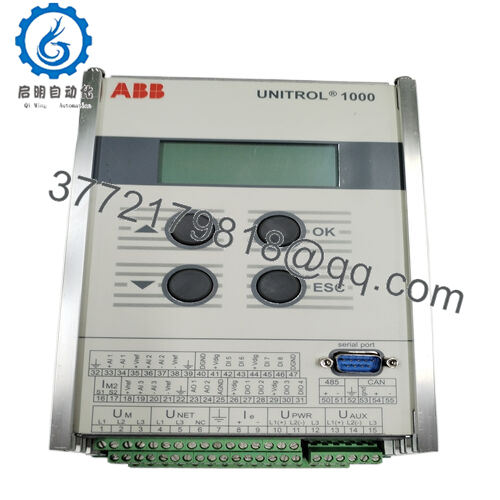
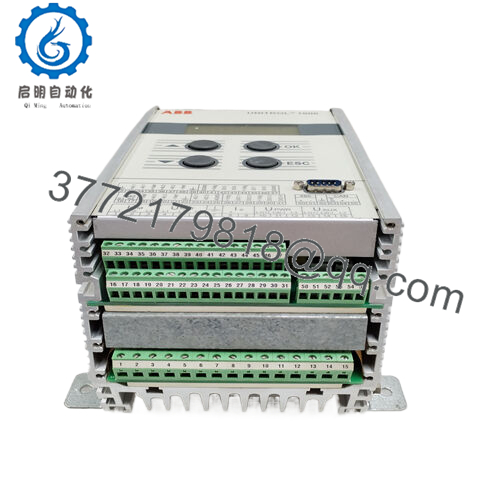
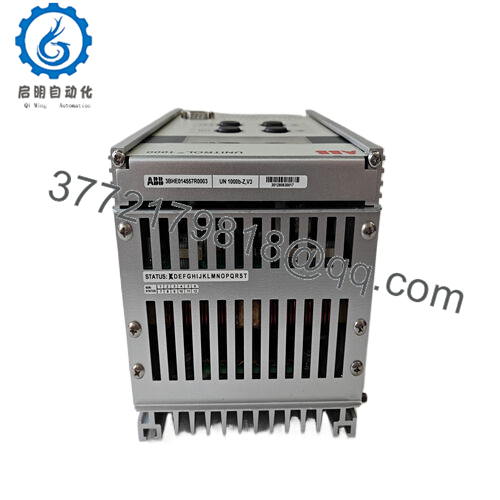
- Model: 3BHE014557R6104 (UNITROL 1000 UN1000B-Z V104)
- Brand: ABB
- Series: UNITROL 1000
- Core Function: Digital automatic voltage regulation for synchronous machines
- Product Type: Automatic Voltage Regulator (AVR) / Controller module
- Key Specs: 24 V DC supply typical, 45-65 Hz generator frequency, serial communication port, compact design for 100 kVA to 80 MVA machines
- Condition: New Original / New Surplus
Key Technical Specifications
| Parameter | Value |
|---|---|
| Ordering number | 3BHE014557R6104 |
| Type designation | UN1000B-Z V104 / UNITROL 1000 AVR |
| Supply voltage | 24 V DC (typical; confirm site-specific) |
| Generator frequency | 45-65 Hz or 55-65 Hz (selectable) |
| Regulation accuracy | Typically within ±0.5% or better |
| Communication | Serial port (RS-232/RS-485 for CMT1000 tool or SCADA) |
| Ambient temperature | -20 to +60 °C operating (verify exact) |
| Mounting | Compact backplate or panel mount |
| Dimensions (approx.) | 127 x 51 x 127 mm (based on similar modules) |
| Weight | Approx. 1-2 kg |
| Application range | Brushless excitation for 100 kVA to 80 MVA synchronous generators/motors |
| Protections | Overexcitation, underexcitation, field overcurrent, etc. |

- UNITROL 1000 3BHE014557R6104
Product Introduction
The ABB 3BHE014557R6104 is the core digital automatic voltage regulator (AVR) in the UNITROL 1000 series, designated UN1000B-Z V104. It provides precise excitation control for synchronous generators and motors in power plants, industrial drives, and marine applications ranging from 100 kVA to 80 MVA.
In installations I’ve commissioned across diesel and hydro sets, this compact AVR delivers stable terminal voltage under load swings, with built-in serial interface for commissioning via CMT1000 tool and integration to DCS. It stands out for its reliability in brushless systems, selectable frequency ranges, and straightforward setup that minimizes tuning time compared to older analog regulators.
Installation & Configuration Guide
Stage 1: Pre-Installation Preparation (20-30 minutes) ⚠️ Safety First: Isolate excitation power and generator field. Lock out/tag out all supplies to the AVR cabinet. Confirm zero voltage on terminals with multimeter; wait 10 minutes for discharge. Coordinate with operations for generator offline. Tools Required: Grounded ESD wrist strap, PH2 screwdriver, digital multimeter, torque screwdriver (0.5-1 Nm), wire labels, camera for photos, laptop with CMT1000 software. Data Backup: Photograph all terminal connections, LED status, and any configuration jumpers. Connect via serial and export current parameters (setpoints, limiters, PSS if enabled) using CMT1000 tool. Save fault/event logs.
Stage 2: Removing the Old Module (15-20 minutes)
- Open the UNITROL 1000 panel and locate the AVR module (central compact unit).
- Label every wire on power, sensing, field output, and communication terminals—take detailed photos.
- Disconnect wiring methodically; avoid bending pins or straining cables.
- Release mounting screws or clips and remove the module straight out.
- Inspect mounting plate/backplane for dust or damage. ⚠️ Note: Keep the old AVR stored and labeled until the new one operates stably for 48+ hours under load.
Stage 3: Installing the New Module (20-30 minutes)
- Use ESD protection. Confirm replacement is exact 3BHE014557R6104.
- Configuration Clone (Critical): Most settings are software-based—no extensive DIP switches. Use CMT1000 to upload saved parameters post-install; match any hardware jumpers from photos if present.
- Mount securely on the backplate; tighten screws evenly.
- Reconnect wiring per labels/photos, torque terminals (typically 0.5-0.6 Nm). Verify polarity on PT/CT inputs and field outputs. Self-Checklist: [ ] Wiring matches photos, [ ] Module seated and secured, [ ] Serial port connected if needed, [ ] No loose connections.
Stage 4: Power-On & Testing (45-90 minutes) Pre-Power Check: Check for shorts on supply and field circuits; verify fuse integrity. Power-On Steps:
- Apply auxiliary power only to AVR (no field enable initially).
- Observe LEDs: Power green, no major fault reds.
- Connect CMT1000 laptop via serial; verify firmware recognition and load parameters.
- Perform open-circuit test: Ramp excitation slowly, monitor voltage buildup and stability.
- If cleared, synchronize and load test incrementally; tune droop/PSS if required. ⚠️ Troubleshooting Note: No voltage buildup? Check PT sensing polarity and supply voltage. Persistent faults or “Underexcitation” alarm? Recheck parameter upload—firmware mismatch rare but possible in revisions. Serial comms fail? Confirm baud rate (default 9600) and cable.
Frequently Asked Questions (FAQ)
Can the UNITROL 1000 AVR be hot-swapped? No. The 3BHE014557R6104 is not hot-pluggable. Removing or inserting under power risks damaging internal circuits or corrupting flash memory. Always isolate all supplies first.
Is the 3BHE014557R6104 obsolete, and is your stock new? UNITROL 1000 remains supported for legacy systems as of 2026, though newer series like UNITROL 1020/6000 replace it in greenfield projects. Units supplied are new original surplus from OEM channels—traceable, with full inbound checks, 24-hour powered testing under simulated load, and insulation verification. Test reports and photos available on request.
What is the direct replacement if this is out of stock? For exact drop-in, stick to 3BHE014557R6104 equivalents in remaining stock. ABB may recommend migration to UNITROL 1000 FLEX or 1020 platforms for ongoing support—often requires parameter remapping and possible I/O adapters. Avoid non-ABB substitutes; regulation algorithms differ.
Will replacing the AVR erase my excitation settings? Software parameters (gains, limiters, setpoints) are stored in non-volatile memory and transferable via CMT1000 tool backup/restore. Hardware configs are minimal. Always export before removal and verify post-install—I’ve seen mismatches cause hunting if not reloaded properly.
Why is the price lower than ABB factory list? Sourced as new surplus/excess from verified channels, avoiding full OEM/distributor overhead. Every unit passes documented QC: anti-counterfeit serial check, functional test (power-up, regulation simulation), and 24-hour burn-in. Condition is new, not refurbished.
How does commissioning work with this model? Use ABB’s CMT1000 software over serial port for setup, tuning, and diagnostics. In field, start with factory defaults, then load site-specific files. Supports PSS (power system stabilizer) if enabled—tune carefully to avoid oscillations.
Common issues seen in service? Watch for sensing input failures (lost PT wires cause undervoltage trip), fan/filter clogging in dusty environments leading to overtemp, or serial port config mismatches during tool connection. In high-vibration setups, check mounting torque to prevent intermittent contacts.



