
 WhatsApp: +86 16626708626
 Email:
  Phone: +86 16626708626
Description
3. Key Technical Specifications
| Parameter | Value |
|---|---|
| Platform Compatibility | Nokia / Alcatel 7750 SR series |
| Module Type | IMM (Integrated Media Module) |
| Port Count | 20 × 10 Gigabit Ethernet |
| Interface Type | SFP+ (10GE optical) |
| Throughput Class | Multi-core forwarding engine |
| Feature Set | L3HQ (advanced QoS, hierarchical queuing) |
| Protocol Support | IPv4, IPv6, MPLS, QoS |
| Slot Type | Chassis-based router slot (SR-7×50 family) |
| Application | Edge routing / metro aggregation |
| Cooling | Chassis-controlled airflow |
| Lifecycle Status | Discontinued / legacy telecom hardware |
4. Product Introduction
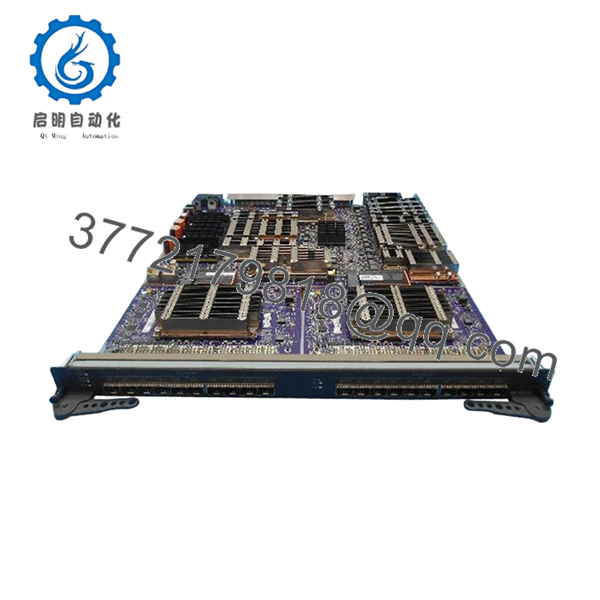
The Alcatel-Lucent 3HE07305AA is a 20-port 10GE SFP+ Integrated Media Module (IMM) designed for the 7750 SR service router platform. It expands edge routing capacity by providing high-density 10 Gigabit Ethernet interfaces for carrier-grade networks.
In live telecom deployments, this module is typically installed in SR-7×50 chassis to scale metro edge, mobile backhaul, or IP/MPLS aggregation layers. The L3HQ variant supports advanced QoS and hierarchical scheduling, which is critical in multi-service environments where traffic shaping and prioritization must be enforced at scale.
5. Installation & Configuration Guide
Stage 1: Pre-Installation Preparation (Estimated: 15 minutes)
- ⚠️ Safety First:
Notify NOC. Gracefully drain traffic from the slot. Power down or isolate the line card slot if platform does not support ISSU. Wait 5 minutes. - Tools Required:
ESD strap, flat screwdriver, optical cleaning kit, multimeter - Data Backup:
- Export router config (CLI:
admin save) - Record slot/port assignments
- Document optics (SFP+ types, wavelengths)
- Export router config (CLI:
Stage 2: Removing the Old Module (Estimated: 5–10 minutes)
- Disable interfaces on the card (
shutdownat CLI) - Remove all SFP+ optics (label each fiber pair)
- Loosen ejector levers
- Pull module straight out using handles
- Inspect backplane connectors
- ⚠️ Note: Keep optics organized — mismatched fiber reconnection causes major troubleshooting delays
Stage 3: Installing the New Module (Estimated: 5–10 minutes)
- Apply ESD protection
- Verify 3HE07305AA exact match (not similar IMM variants)
- Insert module firmly into chassis slot
- Lock ejector levers
- Reinstall SFP+ optics and reconnect fibers
- Self-Checklist:
- Module seated fully
- Optics clean and matched
- Fiber polarity correct
Stage 4: Power-On & Testing (Estimated: 10–20 minutes)
- Pre-Power Check:
Confirm no bent pins, optics properly seated - Power-On Steps:
- Bring module online via CLI
- Check card state (
show card) - Verify ports (
show port) - Validate link status and light levels
- Run traffic test
- ⚠️ Troubleshooting Note:
- Card not recognized → slot compatibility or firmware issue
- Ports down → check SFP+ compatibility or fiber polarity

- 3HE07305AA
6. Frequently Asked Questions (FAQ)
Q1: Can I hot-swap this module?
Yes—with conditions.
The 7750 SR platform supports hot-swapping, but only if procedures are followed (port shutdown, traffic drain). Pulling it live under load will drop services immediately.
Q2: Is this module obsolete?
Yes.
It belongs to earlier 7750 SR generations. Still widely used in operational networks, but procurement is now mainly surplus or refurbished.
Q3: What’s the difference between L3HQ and standard modules?
L3HQ enables advanced hierarchical QoS.
If your network uses traffic shaping, policing, or multi-tier service queues, you need this variant. Standard cards won’t handle the same QoS depth.
Q4: Can I mix this with newer Nokia line cards?
Not always.
I’ve seen mixed chassis setups fail due to fabric or software compatibility. Always verify SR OS version and card support matrix before installing.
Q5: Why are some units much cheaper?
Condition and licensing.
Some units are stripped (no license), others are heavily used. Also, telecom surplus pricing fluctuates based on operator decommission cycles.
Q6: What’s the most common deployment issue?
❗ Optics mismatch.
Engineers reuse old SFP+ modules without checking compatibility (SR OS can reject unsupported optics).
SOP Quality Transparency (Inspection & Testing Process)
1. Inbound Inspection & Traceability
- Verified P/N: 3HE07305AA against OEM labeling
- Serial number traceability recorded
- Visual inspection: no heatsink damage, no connector wear
- Optical ports checked for contamination
2. Live Functional Testing
- Tested in a Nokia 7750 SR chassis
- Card recognition and initialization verified
- Port-level testing with 10GE traffic generator
- 24-hour burn-in with sustained throughput
- Test logs and CLI outputs available upon request
3. Electrical Parameter Testing
- Backplane interface continuity verified
- Power draw monitored under load
- Grounding integrity checked
4. Firmware & Configuration Verification
- Verified compatibility with SR OS versions
- Hardware ID confirmed
- No licensing lock issues detected
5. Final QC & Packaging
- ESD packaging with port protectors
- Foam-secured industrial carton
- QC label with traceable inspection ID
Technical Pitfalls & Survival Guide
1. Firmware / SR OS Compatibility
❗ Biggest real-world issue.
I’ve seen cards rejected by the chassis because the SR OS was two major versions behind.
Avoidance: Check Nokia compatibility matrix before installation.
2. Optics Compatibility (SFP+)
❗ Not all SFP+ modules are accepted.
Some operators lock to approved vendor optics.
Avoidance: Use Nokia-approved SFP+ or enable unsupported optics via CLI (if policy allows).
3. Slot Power Budget
Each IMM draws significant power.
Avoidance: Verify chassis power capacity—especially in fully populated systems.
4. Traffic Migration Errors
Pulling the card without rerouting traffic = outage.
Avoidance: Drain traffic via routing protocol adjustment before removal.
5. ESD Handling
❗ High-density telecom boards are sensitive.
I’ve seen a card pass testing, then fail on-site due to poor handling.
Avoidance: Always use ESD protection.



