
 WhatsApp: +86 16626708626
 Email:
  Phone: +86 16626708626
Description
3. Key Technical Specifications
| Parameter | Value |
| Input Channels | 1 Analog Video Input (Composite) |
| Output Channels | 5 Isolated Video Outputs |
| Signal Standard | PAL / NTSC Compatible (Analog) |
| Impedance | 75 Ω (Standard Video) |
| Bandwidth | >10 MHz (Maintains signal integrity for high-res analog) |
| Supply Voltage | 24 V DC (Marine standard, 18-32 V range) |
| Connector Type | Pluggable Terminal Blocks or BNC (Variant dependent) |
| Isolation | Ground-loop suppression between channels |
| Mounting | DIN Rail or VISTA System Rack |
4. Product Introduction
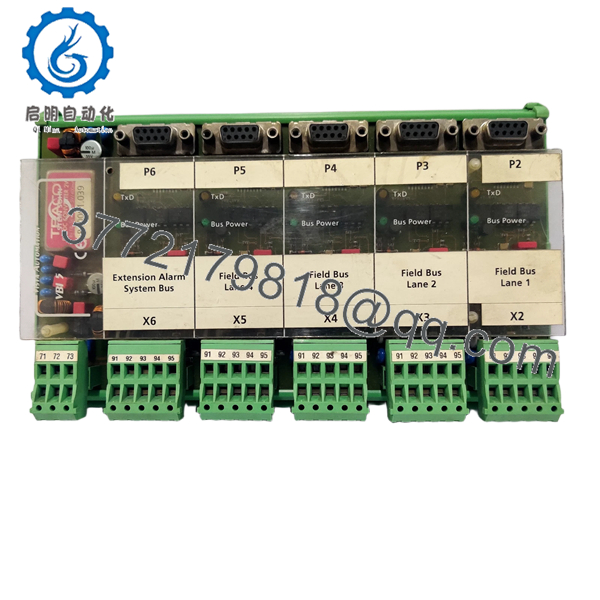
The Stein Sohn VISTA VBI5 is a specialized video bus interface designed for high-reliability maritime surveillance and engine room monitoring. Part of the legacy VISTA automation suite, the VBI5 acts as a high-fidelity distributor, taking a single analog video feed—typically from a CCTV camera or a radar repeater—and splitting it into five isolated outputs without signal loss or impedance mismatching.
In marine environments, ground loops are a constant headache for video quality. The VBI5 is engineered specifically to eliminate the “rolling hum bars” and ghosting often seen on bridge monitors. By providing galvanic isolation and precise 75-ohm termination, it ensures that critical visual data remains crisp and clear across multiple viewing stations, from the ECR (Engine Control Room) to the Captain’s bridge.

- VISTA
- VISTA
5. Installation & Configuration Guide
Stage 1: Pre-Installation Preparation (Estimated Time: 10 mins)
- ⚠️ Safety First: Notify the bridge that video monitoring for the affected zone will be offline. De-energize the 24 V DC supply to the VISTA rack or distribution panel.
- Tools Required: Small flat-head screwdriver (2.0mm for terminals), BNC crimp/extraction tool (if applicable), and an oscilloscope or high-end multimeter for signal verification.
- Data Backup: Note the camera channel assignment for each of the five outputs to ensure the correct monitors receive the correct feeds.
Stage 2: Removing the Old Module
- Disconnect the video input and the five output cables. Label each cable clearly with its destination (e.g., “Bridge Monitor 1,” “Chief Engineer Office”).
- Unplug the 24 V DC power header.
- Depress the DIN rail release or unscrew the rack mounting ears.
- Remove the unit. Inspect the connectors for oxidation or “green death” (copper corrosion) common in humid shipboard environments.
Stage 3: Installing the New VBI5 (Estimated Time: 15 mins)
- ESD Prep: Use a grounded wrist strap. These analog video circuits are sensitive to static discharge.
- Termination Check: Verify the 75 Ω termination jumpers. If this VBI5 is at the end of a long cable run, the input termination must be engaged.
- Snap the unit onto the DIN rail.
- Reconnect the video cables. Ensure the shields are properly seated to maintain the Faraday cage around the signal core.
- Self-Checklist: [ ] Input terminated correctly, [ ] 24 V polarity confirmed, [ ] All BNC/terminals tight.
Stage 4: Power-On & Testing
- Apply power and check the “Power” LED.
- Check the video quality on all five downstream monitors.
- ⚠️ Troubleshooting: If the image is too dark, check if multiple 75 Ω terminations are active on the same line (double termination). If the image is “blown out” or too bright, you likely have a missing termination.
6. Frequently Asked Questions (FAQ)
Q: Can I use the VBI5 with modern IP cameras?
A: No. The VISTA VBI5 is strictly for analog composite video (CVBS). It will not work with Ethernet-based IP cameras or digital HD-SDI signals without an external converter. It is designed for legacy analog CCTV and radar-video distribution.
Q: Is the VBI5 hot-swappable?
A: Technically, the video signals can be moved while live, but I highly recommend powering down the 24 V DC supply before removing the module. I’ve seen bridge monitors “lock up” or suffer logic board damage from the transient spikes caused by pulling a live power header.
Q: Why is my video signal grainy after installing the new module?
A: Check your cabling first. The VBI5 is a high-bandwidth distributor, but it can’t fix a degraded signal coming from a 20-year-old coax cable. If the signal is grainy at all five outputs, the issue is likely the input source or a lack of proper grounding on the input shield.
Q: Is this unit “New Original” or refurbished?
A: This is New Original (New Surplus). These units are increasingly rare as ships migrate to digital systems. This is unused factory stock, which is essential for maritime compliance where “refurbished” parts may not meet DNV vibration/thermal specs.
Q: Can I daisy-chain multiple VBI5 modules?
A: Yes, you can take one output from the first VBI5 and use it as the input for a second VBI5. However, be aware that every “hop” introduces a marginal amount of signal-to-noise degradation. For more than two stages, I’d suggest a dedicated video amplifier.



