
 WhatsApp: +86 16626708626
 Email:
  Phone: +86 16626708626
Description
3. Key Technical Specifications
- Power Supply Options: 24–60 V DC or 100–240 V AC/DC (nominal, verify exact type from label)
- Current Inputs: Rated 1 A or 5 A (phase), thermal withstand 4×In continuous / 500×In for 1 s (at 5 A)
- Voltage Inputs: 60–210 V AC rated, continuous 240 V, burden <0.05 VA
- Binary Inputs/Outputs: Typically 12–20 BI / 8–12 BO depending on ordering (check binary I/O module)
- Communication Protocols: IEC 61850-8-1, Modbus RTU/TCP, IEC 60870-5-103, DNP3; Ethernet RJ-45/LC, optional serial
- Operating Temperature: −25°C to +55°C (standard), storage −40°C to +85°C
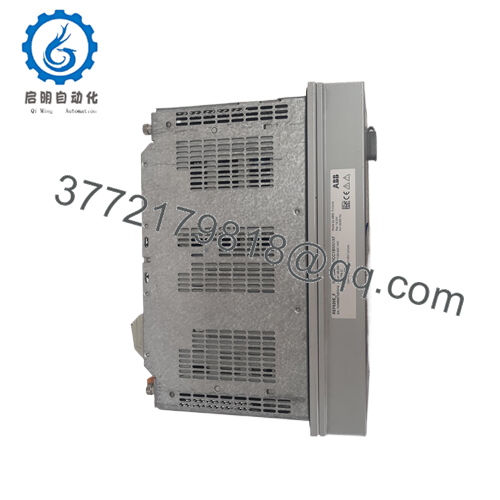
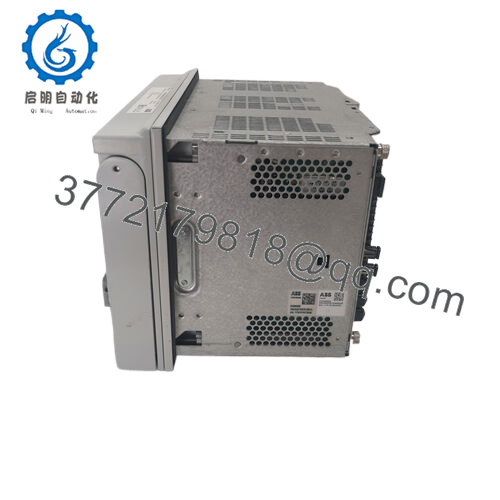
- Dimensions: Width 246 mm (case), Height 160 mm (case), Depth 201 mm; total ~5.0 kg
- Mounting: 4U rack/panel, drawout design for plug-in unit
- Protection Functions: Overcurrent (50/51), earth-fault (50N/51N), directional (67/67N), arc (50L), autoreclose (79), breaker failure (50BF)
- Measurement Accuracy: Current ±1.0%, voltage ±1.0% (at rated)
- Auxiliary Voltage Burden: <12 W quiescent / <19 W operating (DC)

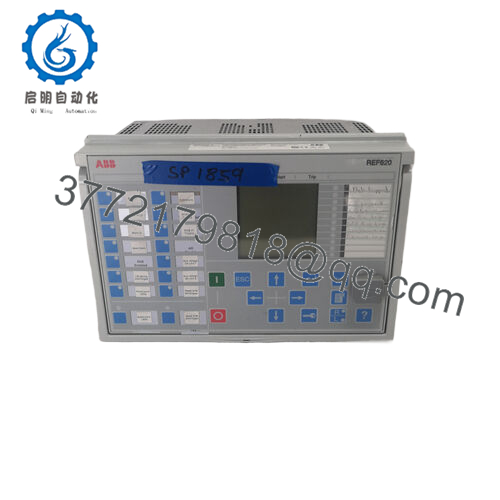
- REF620E-1G NBFNAANNNDA1BNNN11G
4. Product Introduction
The ABB REF620E-1G NBFNAANNNDA1BNNN11G is a member of the Relion 620 series, a dedicated feeder protection and control IED for medium-voltage distribution feeders in utility substations and industrial plants. It handles protection, control, metering, and supervision in radial, ring, or meshed networks, with or without distributed generation.
This configuration supports conventional CT/VT inputs (likely Config A variant) and packs extensive functionality including non-directional/directional overcurrent, earth-fault stages, arc flash detection options, autoreclosing, and breaker condition monitoring. Engineers choose it for its IEC 61850 integration, reliable drawout mechanics, and solid performance in harsh environments without unnecessary complexity.
5. Installation & Configuration Guide
Stage 1: Pre-Installation Preparation (10–15 minutes) ⚠️ Safety First: Coordinate with operations for planned downtime. Confirm feeder is de-energized, apply lockout/tagout on breaker and aux power. Wait at least 5 minutes for capacitors to discharge. Tools Required: Grounded ESD wrist strap, PH1/PH2 screwdriver, Fluke multimeter, wire labels, smartphone/camera for photos. Data Backup: Use PCM600 to connect via Ethernet/serial, read and export full IED configuration, parameter settings, and disturbance records. Photograph all rear terminal wiring, binary input/output assignments, and any DIP/jumper settings (though REF620 uses software config primarily).
Stage 2: Removing the Old Module (5–10 minutes)
- Open the front cover/bezel if present.
- Label every wire/terminal block position clearly—do not rely on memory.
- Disconnect wiring carefully (use torque screwdriver to avoid damage; typical 0.5–1 Nm).
- Release the drawout locking tabs/levers on both sides. Pull the plug-in unit straight out evenly to avoid bending backplane pins.
- Inspect rack backplane for dust, corrosion, or bent pins. Clean if needed with dry compressed air. ⚠️ Note: Keep the old unit intact and labeled until the new one runs fault-free for at least 24 hours.
Stage 3: Installing the New Module (10–15 minutes)
- Ground yourself with ESD strap. Confirm the replacement is exact match: REF620E-1G NBFNAANNNDA1BNNN11G (check nameplate).
- Configuration Clone (Crucial): Upload saved PCM600 project to new unit before insertion if possible. Verify firmware version matches (e.g., 2.0 FP1 or later—mismatch causes comms faults). Replicate all settings, including IP address, GOOSE mappings, and protection parameters.
- Align and insert unit into rack—push firmly until it seats with audible click and tabs lock.
- Reconnect wiring exactly per photos/labels. Torque terminals to spec (check manual: usually 0.5–1 Nm). Self-Checklist: [ ] Firmware/settings match, [ ] Wiring verified against photos, [ ] Unit fully seated and locked.
Stage 4: Power-On & Testing (15–30 minutes) Pre-Power Check: Use multimeter to verify no shorts on 24/110/220 V aux rail and ground continuity. Power-On Steps:
- Energize aux power only (keep field CT/VT isolated if possible).
- Watch front LEDs: Power green, Run green within seconds; no steady red ERR or Comm fault.
- Connect PCM600, read device status, confirm IP/firmware, and verify no internal faults in self-supervision.
- Download configuration if not pre-loaded; force logic to test.
- Apply test currents/voltages via secondary injection to confirm protection pickup/trip (dry run first—no breaker close). ⚠️ Troubleshooting Note: Solid red ERR often means firmware mismatch or config error—re-upload project. No Ethernet comms? Check IP conflict, cable, or port settings. Intermittent trips? Verify CT polarity and burden.
6. Frequently Asked Questions (FAQ)
Can this REF620 be hot-swapped under power? No. The drawout design requires power-off to avoid backplane damage or arc flash risk. Always de-energize aux voltage first. I’ve seen a rushed swap smoke a backplane connector—costly mistake.
Is this model obsolete, and is the unit genuinely new? REF620 is active in 2026 but specific ordering codes like NBFNAANNNDA1BNNN11G may have limited production runs. Units sold as new surplus come from OEM excess stock—factory sealed or verified unused. We perform inbound visual checks, firmware read, and 24-hour powered burn-in with comms/I/O simulation before shipment. Test photos/videos available on request.
What is a direct replacement if this exact code is unavailable? Check ABB for current REF620E variants or successors in the 620 series. Compatibility depends on I/O count, CT/VT config (A vs B), and firmware. Always match analog inputs and communication options—don’t assume plug-and-play across revisions.
Will I lose my programming/configuration when swapping the unit? No, if you export the full project from PCM600 before removal and reload it to the new unit. The non-volatile memory holds settings, but always back up. I’ve debugged many 2 AM calls where someone skipped the export step.
Why is the price lower than ABB direct list price? New surplus stock bypasses full OEM channel markup. Units are genuine ABB, not refurbished or gray-market copies—we verify serials and perform functional tests. No OEM warranty card, but we provide our 1-year functional warranty after load testing.
Keep these points in mind during replacement and you’ll avoid most common field headaches. Verify exact compatibility against the latest ABB datasheet before final commissioning.



