
 WhatsApp: +86 16626708626
 Email:
  Phone: +86 16626708626
Description
3. Key Technical Specifications
- Application Platform: Alcatel-Lucent CBX-500 / GX-550
- Interface Type: OC3 / STM-1 (155 Mbps SONET/SDH)
- Protocol: ATM (Asynchronous Transfer Mode)
- Function: ATM cell processing / traffic handling
- Backplane Interface: Proprietary CBX switching fabric
- Memory: 128 MB onboard RAM
- Connector Type: Backplane edge connector
- Power Supply: Chassis-fed (telecom −48 V DC typical)
- Operating Environment: Central office / telecom rack
- Revision Example: REV 02 (hardware-dependent behavior)
4. Product Introduction
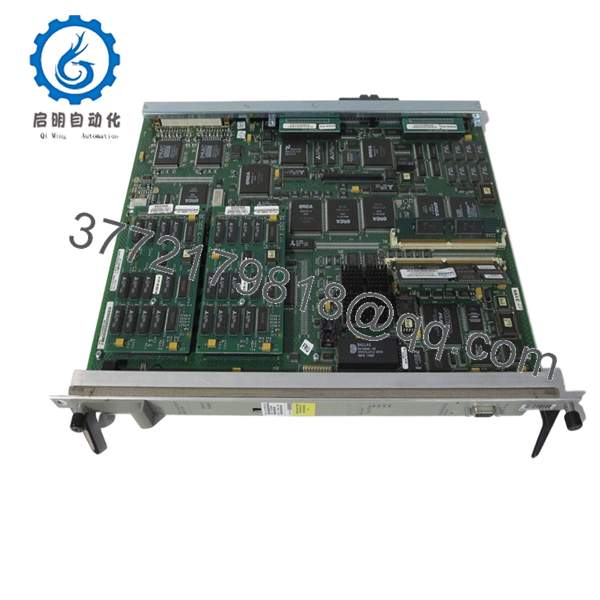
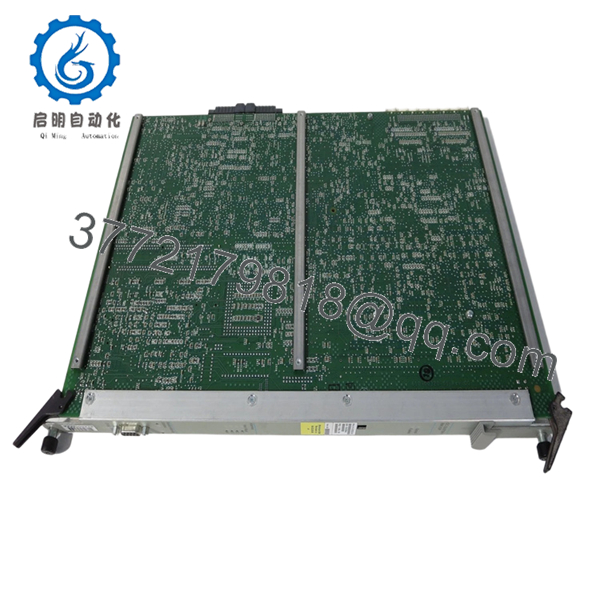
Alcatel-Lucent 11058L-128 (P/N 810-00320-28) is an OC3/STM-1 ATM processor card designed for the CBX-500 switching platform. It handles ATM cell processing and traffic management at 155 Mbps, typically used in legacy carrier and enterprise backbone networks.
In real deployments, these cards were common in ATM-based transport networks before MPLS/IP became dominant. Today, they are maintained mainly for brownfield systems where replacing the CBX platform would require full network redesign rather than a simple hardware swap.
5. Installation & Configuration Guide
Stage 1: Pre-Installation Preparation (Estimated: 15 minutes)
- ⚠️ Safety First: Notify operations, isolate affected ATM circuits, and power down the shelf unless hot-swap is confirmed. CBX systems run −48 V DC — treat it seriously.
- Tools Required: ESD strap, flat screwdriver, multimeter, labeling tags, smartphone.
- Data Backup: Document slot ID, virtual circuits (PVCs/SVCs), ATM configuration, and alarm logs.
Stage 2: Removing the Old Module (Estimated: 10 minutes)
- Identify correct slot (CBX shelves are slot-specific).
- Label all associated logical circuits (ATM mapping matters).
- Release ejector levers evenly.
- Pull module straight out — no twisting.
- Inspect backplane pins and airflow path.
- ⚠️ Note: Keep the old card for configuration reference — ATM mappings are not always obvious.
Stage 3: Installing the New Module (Estimated: 10–15 minutes)
- Apply ESD protection and verify exact model + revision.
- Insert card along guide rails.
- Seat firmly using ejector levers.
- Ensure full engagement with backplane.
- Self-Checklist:
- Model and P/N match (810-00320-28)
- Revision compatible
- Card fully seated
- No obstruction to airflow
Stage 4: Power-On & Testing (Estimated: 20–30 minutes)
- Pre-Power Check: Verify no short circuits on power rails.
- Power-On Steps:
- Power up shelf or enable slot.
- Monitor LEDs (STATUS / ALARM).
- Verify module detection in system CLI/NMS.
- Check ATM link status (UP/DOWN).
- Validate PVC/SVC connectivity.
- ⚠️ Troubleshooting Note:
- Link down → check SONET/SDH framing or fiber interface
- No traffic → ATM PVC misconfiguration
- Card not detected → revision mismatch or slot incompatibility

- 11058L-128 810-00320-28
6. Frequently Asked Questions (FAQ)
Q1: Can this card be hot-swapped?
Some CBX-500 configurations support hot-swap, but not all. Honestly, unless you’ve verified it in documentation, power down. I’ve seen backplanes damaged from live insertion.
Q2: Is this model obsolete?
Yes. ATM-based systems like CBX-500 are long past mainstream deployment. Most available units are surplus or pulled from decommissioned networks.
Q3: What is the modern replacement?
There is no direct drop-in replacement. Migration typically involves:
- MPLS/IP platforms (e.g., Nokia 7750 SR)
- Ethernet-based transport
This is a system-level migration, not a card swap.
Q4: Why is my ATM link not coming up after replacement?
Common causes:
- SONET/SDH framing mismatch
- Incorrect PVC configuration
- Clocking/synchronization issues
I’ve seen engineers assume ATM configs auto-load — they don’t always.
Q5: Will I lose configuration when replacing the card?
Usually no, since configs are stored centrally. But ATM mappings (PVCs) can behave inconsistently depending on system state. Always back up.
Q6: Why are prices inconsistent in the market?
Supply comes from:
- Carrier decommissioning
- Legacy network dismantling
Condition ranges from used to new surplus. Always request test reports.
Q7: What’s the most common mistake during replacement?
❗ Not documenting ATM PVC mappings.
I’ve seen teams replace hardware successfully but lose traffic because they didn’t restore the correct virtual circuit configuration.
SOP Quality Transparency (Inspection & Testing Process)
1. Inbound Inspection & Traceability
- Verified against OEM labels and part numbers (11058L-128 / 810-00320-28)
- Serial number and PCB markings checked
- Visual inspection under magnification (no corrosion, no rework marks)
- Edge connector inspection for wear
2. Live Functional Testing
- Tested in a CBX-500 compatible rack
- Power-on diagnostics verified (LED sequence)
- Backplane communication confirmed
- ATM loopback test performed (OC3 interface)
- 24-hour continuous runtime test
- Test report generated (available upon request)
3. Electrical Parameter Testing
- Insulation resistance >10 MΩ @ 500 V Megger
- Ground continuity verified
- Power draw measured using Fluke 115
4. Firmware & Configuration Verification
- Hardware revision documented (REV 02 or equivalent)
- Compatibility checked against CBX system release
- Slot and configuration parameters recorded
5. Final QC & Packaging
- QC sign-off with traceability
- Anti-static (ESD) sealed packaging
- Reinforced industrial carton
- Shock protection with foam inserts
Test photos and videos available upon request.
Technical Pitfall & Survival Guide
1. Firmware / Revision Mismatch
❗ Classic issue with CBX systems.
I’ve seen cards boot but fail to pass traffic due to revision mismatch.
Avoidance: Match revision exactly where possible.
2. ATM Configuration Loss
❗ This one burns time.
Hardware replaced, but traffic still down — PVCs missing.
Avoidance: Document all ATM mappings before removal.
3. Slot Misplacement
❗ Not all slots are interchangeable.
Wrong slot = no detection or alarms.
Avoidance: Verify slot function before installation.
4. Power Load Constraints
Legacy shelves have limited headroom.
Avoidance: Check total load; maintain 20% margin.
5. ESD Damage
❗ Old boards are even more sensitive.
Static damage may not show immediately.
Avoidance: Always use ESD strap and grounded surface.



