
 WhatsApp: +86 16626708626
 Email:
  Phone: +86 16626708626
Description
3. Key Technical Specifications
- Platform Compatibility: OmniPCX Enterprise (OXE), OmniPCX 4400, Crystal systems
- Function: Central processing unit for PBX system control and telephony applications
- Processor Role: Call control, signaling, system services (voice, messaging, telematics)
- Memory Support: External SDRAM modules (256 MB / 512 MB options)
- Storage: External SATA HDD required (not included with base board)
- Interfaces: Ethernet management, USB (backup/restore functions)
- Redundancy: Supports duplicated CPU configuration (active/standby architecture)
- Backplane Interface: Proprietary OmniPCX bus
- Power Supply: Chassis-fed (telecom −48 V DC typical)
- Typical Deployment: Enterprise PBX racks / telecom cabinets
- List Price Reference: ~USD 8,000 (historical OEM pricing)
4. Product Introduction
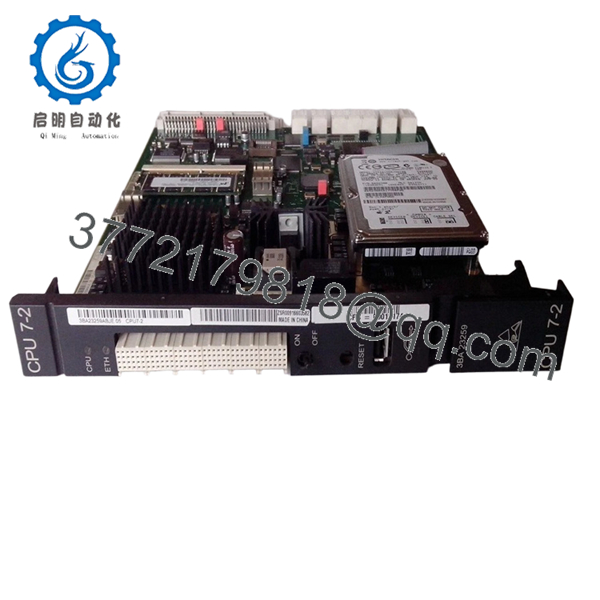
Alcatel-Lucent CPU7-2 (3BA23259AB) is the main processor board used in OmniPCX Enterprise and OmniPCX 4400 PBX systems. It executes call control logic, signaling, and system-level services for enterprise telephony environments.
In field deployments, CPU7-2 is typically installed in redundant pairs (active/standby) to maintain uptime. It replaced earlier CPU6 generations and is still widely maintained in legacy PBX environments where migrating to VoIP platforms would require full system replacement rather than a board swap.
5. Installation & Configuration Guide
Stage 1: Pre-Installation Preparation (Estimated: 15 minutes)
- ⚠️ Safety First: Notify users of service interruption. PBX downtime affects all voice services. Power down the ACT shelf unless redundancy allows controlled swap.
- Tools Required: ESD strap, screwdriver, laptop (for serial/Ethernet access), multimeter, smartphone.
- Data Backup:
- Export OXE database (MAO backup)
- Record IP configuration and CPU roles (A/B)
- Photograph slot layout and cabling
Stage 2: Removing the Old Module (Estimated: 10 minutes)
- Identify CPU slot (ACT shelf, typically slot-specific).
- Disconnect management and auxiliary cables.
- Release ejector levers evenly.
- Pull board straight out — do not twist.
- Inspect backplane connector condition.
- ⚠️ Note: Keep the old CPU for reference, especially for disk and memory modules.
Stage 3: Installing the New Module (Estimated: 15 minutes)
- ESD protection mandatory. Verify model (CPU7-2 / 3BA23259AB).
- Transfer RAM and HDD from old unit if required.
- Insert board along guide rails.
- Lock ejector levers fully.
- Reconnect Ethernet/console interfaces.
- Self-Checklist:
- RAM installed
- HDD installed
- CPU role (A/B) understood
- Board fully seated
Stage 4: Power-On & Testing (Estimated: 20–30 minutes)
- Pre-Power Check: Verify no short circuits and correct module seating.
- Power-On Steps:
- Power up shelf or enable CPU slot.
- Monitor LEDs (CPU status, alarm indicators).
- Connect via serial or Ethernet.
- Verify system boot (OXE software load).
- Restore configuration if needed.
- Validate call processing (test extensions).
- ⚠️ Troubleshooting Note:
- CPU not reachable → IP/security config issue
- System not booting → missing HDD or corrupted software
- Standby sync failure → software version mismatch
6. Frequently Asked Questions (FAQ)
Q1: Can I hot-swap CPU7-2 without shutting down the system?
Only in a duplicated (redundant) setup, and even then, proceed carefully. If you pull the active CPU by mistake, you’ll drop the entire PBX.
Q2: Is this model obsolete?
Yes. OmniPCX platforms are still deployed, but CPU7-2 is no longer in active production. Most units are surplus or refurbished.
Q3: What’s required besides the board itself?
Important detail:
- RAM module (SDRAM)
- SATA hard disk
These are often not included with the board
Q4: Can CPU7 replace CPU7-2?
❗ Not safely interchangeable in most cases.
I’ve seen mixed CPU7 / CPU7-2 systems fail synchronization in redundant setups. Match models whenever possible.
Q5: Will I lose configuration when replacing the CPU?
Depends:
- If HDD is reused → configuration retained
- If new disk → you must restore backup
Always assume recovery is required.
Q6: Why is pricing all over the place?
Because supply comes from:
- PBX decommission projects
- Enterprise upgrades to VoIP
Condition varies widely — tested vs. pulled units.
Q7: What’s the most common mistake during replacement?
❗ Forgetting to transfer the hard disk.
I’ve seen engineers install a new CPU board and wonder why nothing boots — the system software lives on that disk.

- CPU7-2 (3BA23259AB)
SOP Quality Transparency (Inspection & Testing Process)
1. Inbound Inspection & Traceability
- Verified part number: 3BA23259AB
- Serial number and labeling checked
- PCB inspected under magnification (no oxidation, no rework marks)
- Edge connector wear inspected
2. Live Functional Testing
- Installed in a real OmniPCX Enterprise rack
- Power-on diagnostics verified
- System boot tested with OXE software
- Ethernet and serial communication validated
- 24-hour continuous operation test
- Test report generated (available upon request)
3. Electrical Parameter Testing
- Insulation resistance >10 MΩ @ 500 V
- Ground continuity verified
- Power draw measured using Fluke 115
4. Firmware & Configuration Verification
- CPU firmware/software compatibility checked
- Boot process verified with HDD
- Configuration backup/restore tested
5. Final QC & Packaging
- QC sign-off with traceability record
- Anti-static (ESD) packaging
- Shock-protected carton
- QC Passed label with date
Test photos and videos available upon request.
Technical Pitfall & Survival Guide
1. Firmware / Software Version Mismatch
❗ Seen this multiple times.
System boots, but standby CPU won’t sync.
Avoidance: Match OXE software versions exactly before installation.
2. Missing HDD or Corrupted Disk
❗ System won’t boot at all.
Engineers often assume the board contains firmware — it doesn’t.
Avoidance: Always verify disk presence and integrity.
3. Redundancy Misconfiguration
❗ Active/standby roles reversed.
I’ve seen full PBX outages caused by pulling the wrong CPU.
Avoidance: Label CPU A/B clearly before removal.
4. Backplane Seating Issues
❗ Intermittent faults.
Board appears installed but loses contact under load.
Avoidance: Ensure full insertion and locked ejectors.
5. ESD Damage
❗ Silent killer.
Board installs fine but fails days later.
Avoidance: Use grounded wrist strap at all times.



