
 WhatsApp: +86 16626708626
 Email:
  Phone: +86 16626708626
Description
3. Key Technical Specifications
| Parameter | Value |
| Chassis Slots | 7 Total (2 for CMM Management, 5 for Network Interfaces) |
| Switching Capacity | Up to 5.12 Tbps (Configuration dependent) |
| Slot Bandwidth | 400 Gbps per slot (Full Duplex) |
| Form Factor | 11U Rack Mountable |
| Power Supply | Up to 4 x Hot-Swappable AC or DC Power Modules |
| Fan Trays | 3 x Redundant, Front-to-Back Cooling |
| Layer Support | Full Layer 2 and Layer 3 (IPv4/IPv6) |
| Throughput | Up to 3.8 Bpps |
| Advanced Features | EVPN, VXLAN, Shortest Path Bridging (SPB) |
4. Product Introduction & Supply Chain Strategy
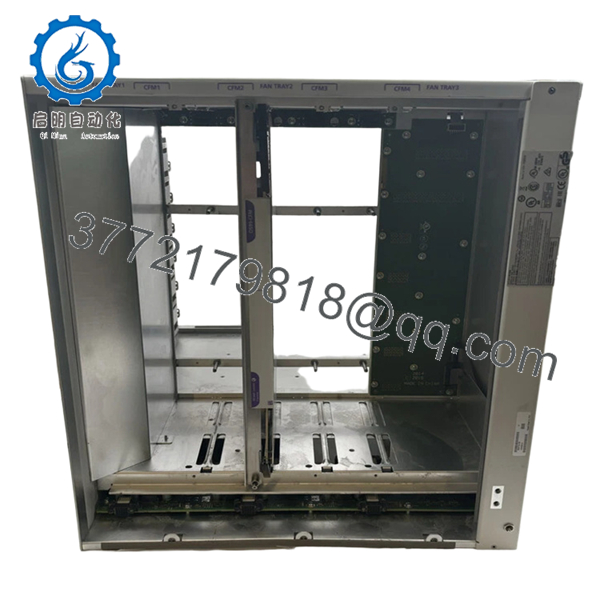
The Alcatel-Lucent OmniSwitch 9907 (OS9907) is a high-end, modular chassis designed to serve as the high-availability core of a modern enterprise network. With its 7-slot architecture, it provides the scalability to handle massive data throughput, supporting high-density 10G, 40G, and 100G Ethernet interfaces. It is engineered for mission-critical environments where “five-nines” (99.999%) uptime is a baseline requirement, utilizing redundant management (CMM) and power modules to eliminate single points of failure.
Strategically, the OS9907 chassis is the most vital component in your network’s Total Cost of Ownership (TCO). While individual line cards can be swapped, a chassis failure necessitates a complete network rebuild. Purchasing this unit as New Surplus provides an essential hardware foundation with zero prior thermal stress or backplane fatigue. Avoiding refurbished chassis is a critical reliability decision; used frames often harbor hidden damage in the high-density backplane pins or aging fan-controller circuits that can lead to catastrophic intermittent reboots during peak traffic loads.

- OS9907
5. Installation & Configuration Guide
Stage 1: Pre-Installation (Prep & Safety)
The OS9907 is a heavy, 11U component; ensure your rack is properly anchored and use a mechanical lift for positioning. Verify that your facility provides dedicated 20A circuits for the power supplies. Mandatory: Always wear a grounded ESD wrist strap when handling the CMM or Network Interface (NI) cards to protect the high-speed switching ASICs.
Stage 2: Removal
If replacing an existing OS9907, document all fiber and copper port mappings. Power down the redundant PSUs and disconnect all cables. Remove the heavy NI cards and CMMs first to lighten the chassis before unscrewing it from the rack rails.
Stage 3: Installation (Clone & Seat)
Mount the empty OS9907 chassis into the rack. Install the Fan Trays and Power Supplies first. Carefully slide the CMMs into slots 1 and 2, then populate the NI slots. Ensure all thumb screws are tightened to maintain a consistent chassis ground and proper EMI shielding.
Stage 4: Power-On & Testing
Power on the unit and observe the CMM boot sequence via the console port. Verify that all Fan Trays are spinning and the “OK” LEDs are lit on all modules. Use the AOS (Alcatel Operating System) CLI to verify that the fabric status is “UP” and that all installed NI cards are recognized by the primary CMM.
6. Firmware/Software Versions & Upgrade Notes
The OS9907 requires AOS Release 8.4.1 or higher. If you are migrating cards from an older OS9900 chassis, ensure the CMM firmware is synchronized across both management modules to prevent “Split-Brain” syndrome during a failover.
Technical Note: When commissioning a New Surplus chassis, always perform a “flash-sync” to ensure the backup CMM has an identical copy of the certified and working software image. Incompatible firmware versions between the chassis backplane microcode and the NI cards can result in port-flapping or degraded switching performance.
7. Frequently Asked Questions (FAQ)
What defines this as “New Surplus” rather than “Used”?
Our OS9907 units are original factory stock that has remained in climate-controlled storage. They have never been racked, powered on for production, or exposed to the dust and heat of a live data center. The backplane connectors are in pristine, factory condition.
Does the OS9907 include Power Supplies and CMMs?
This specific part number refers to the 7-slot chassis frame, including fan trays. Management modules (CMM), Network Interface (NI) cards, and Power Supply Units (PSUs) are typically ordered separately to match your specific port density requirements.
Can the OS9907 support 100G Ethernet?
Yes. By installing the appropriate OS99-NI-U2Q or similar 100G interface cards, the OS9907 can act as a high-speed 100G aggregation point for your network backbone.
Is it safe to mix AC and DC power supplies in this chassis?
No. To maintain electrical stability and redundancy logic, you must use identical power supply types (all AC or all DC) within the OS9907 chassis.
What is the warranty for a core switch of this scale?
We provide a 12-month replacement warranty on the OS9907 New Surplus chassis. Given its role as a core network asset, this warranty ensures you have immediate access to replacement hardware without the prohibitive costs of legacy OEM support contracts.



