
 WhatsApp: +86 16626708626
 Email:
  Phone: +86 16626708626
Description
Key Technical Specifications
| Parameter | Value |
|---|---|
| Manufacturer | FANUC |
| Full Part Number | A05B-2255-C102#ESW |
| Search Format | A05B2255C102#ESW |
| Product Series | A05B-2255 |
| Product Type | iPendant teach pendant |
| Controller Compatibility | FANUC R-30iB robot controller family; verify installed controller and software |
| Application Variant | Expert Spot Welding |
| Touch Function | No touch functionality |
| Primary Functions | Teaching, jogging, programming, monitoring, alarms, diagnostics, and maintenance operation |
| Safety Hardware | Emergency-stop circuit and enabling-device functions must be tested on the actual unit |
| Interface Style | Physical keypad and operator controls |
| Typical Use | Robotic spot-welding cells and compatible FANUC robot applications |
| Reported Weight | Approximately 3.10 lb |
| Mechanical Requirement | Verify pendant cable, connector, strain relief, mounting point, and enclosure condition |
| Replacement Requirement | Match the full A05B-2255-C102#ESW number; do not substitute #EAW, #SGL, #EMH, or other suffix versions without compatibility confirmation |
The A05B-2255-C102#ESW is consistently identified as a FANUC R-30iB teach pendant for spot-welding applications. A part-specific source describes it as an Expert Spot Welding iPendant without touch functionality; other records list it as a teach pendant with a reported weight of 3.10 lb.
Product Introduction
The FANUC A05B-2255-C102#ESW is an R-30iB iPendant teach pendant configured for Expert Spot Welding applications. It gives qualified personnel local access to robot teaching, jogging, program selection, alarm diagnostics, maintenance functions, and controlled manual operation at the robot cell. The #ESW suffix identifies the spot-welding pendant variant and is not a cosmetic label.
This pendant is purchased as an exact replacement when the original unit has display, keypad, cable, enabling-device, or emergency-stop faults. Confirm the full part number, especially #ESW, before ordering. A physically similar C102 pendant with a different suffix can have different application software, operating controls, touch capability, or controller compatibility.
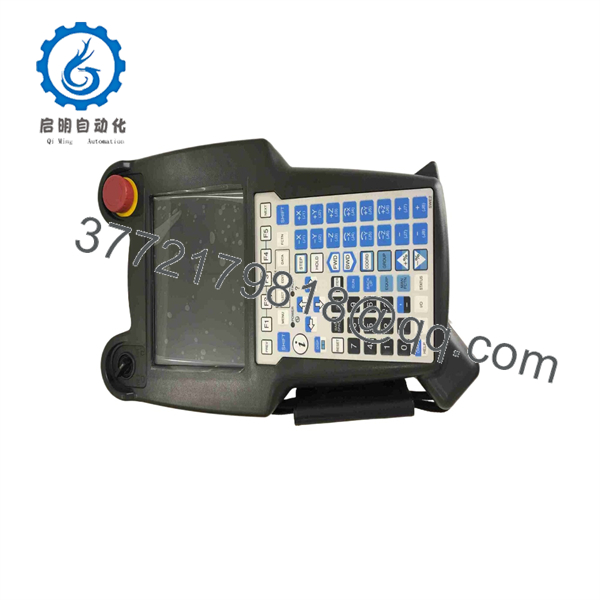
A05B-2255-C102#ESW R-30iB
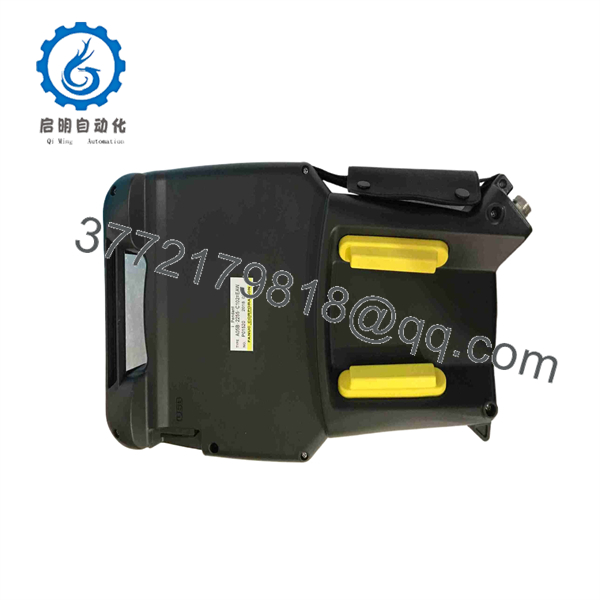
A05B-2255-C102#ESW R-30iB
Troubleshooting Quick Reference
| Symptom | Possible Cause | Relevance to This Part | Quick Check Method | Recommendation |
|---|---|---|---|---|
| Pendant screen is blank | Failed pendant, damaged cable, loose controller connector, controller power issue, failed display backlight | ✅ High | Check R-30iB controller power and alarms; inspect pendant cable and connector; test with a known-good compatible pendant if available | Confirm controller power and cable integrity before replacing the pendant |
| Pendant does not power up | Broken cable conductor, damaged connector, failed pendant electronics, controller-side interface issue | ✅ High | Power down under the approved procedure; inspect connector pins, cable jacket, strain relief, and cable entry point | Replace the pendant if a known-good cable/controller interface is confirmed |
| Emergency-stop remains active | E-stop button mechanically latched, failed E-stop contact block, broken pendant cable, safety circuit fault | ✅ High | Release the E-stop properly, check controller safety diagnostics, and test the pendant safety circuit only using FANUC-approved procedures | Do not bypass the E-stop circuit; replace the pendant if the device or cable is proven faulty |
| Deadman or enabling device does not permit motion | Enabling switch fault, pendant safety circuit fault, robot not in T1/T2 mode, external safety fault | ✅ High | Verify controller mode, safety fence status, external E-stop chain, and enabling-device diagnostics | Test the pendant only under controlled, authorized robot-maintenance conditions |
| Some keys do not respond | Worn keypad membrane, contamination, impact damage, internal keypad-cable fault | ✅ High | Run the controller’s approved keyboard or pendant diagnostic and document failed keys | Replace the pendant if repeated testing confirms key failure |
| Robot will not jog although pendant works | External safety gate open, servo off, controller alarm, deadman not held correctly, motion group disabled | ❌ Usually Low | Review the R-30iB alarm screen, mode selection, servo status, safety gates, and enabling-device procedure | Troubleshoot robot safety and controller status before replacing the pendant |
| Welding screen or spot-weld functions are missing | Incorrect pendant suffix, software mismatch, wrong application package, controller configuration issue | ✅ High | Confirm the label reads A05B-2255-C102#ESW and compare installed controller software/application configuration | Do not substitute a general-purpose pendant for an #ESW unit |
| Fault begins after installing replacement pendant | Wrong suffix, incompatible controller, damaged connector pins, cable strain, incorrect software expectation | ✅ High | Compare old and new pendant labels, connector layout, cable routing, key functions, and controller version before return to service | Stop commissioning until the full compatibility match is confirmed |
| Screen works but touch does not respond | Not applicable to #ESW non-touch version | ❌ Not Applicable | Confirm the label is #ESW; inspect and test physical keys instead of looking for touchscreen behavior | Do not reject an #ESW pendant because it has no touch function |
Field warning: A pendant that will not jog the robot is not automatically defective. The R-30iB controller will block motion for many valid reasons: fence open, external E-stop active, servo off, incorrect mode, deadman switch not held correctly, motion alarm, or a safety-zone condition. Read the controller alarm and safety status first.
❗ The #ESW suffix is mandatory: #ESW identifies the Expert Spot Welding version. Do not substitute #EAW, #SGL, #EMH, or another A05B-2255- suffix based only on housing appearance. The pendant variant can affect spot-weld screens, application behavior, physical controls, touch capability, and controller compatibility.
❗ No touchscreen is expected: #ESW is identified as a non-touch iPendant. If a buyer expects touch operation, they may be looking at the wrong pendant variant. Verify the actual HMI requirements before purchasing.
❗ Never bypass the deadman or E-stop: The enabling device and emergency-stop circuit are personnel-protection functions. Do not jumper contacts, tape the deadman switch, bypass the safety relay, or troubleshoot live robot motion without an approved procedure and qualified personnel.
❗ Inspect the cable before blaming the pendant: The flex point near the pendant handle, cable entry gland, and controller connector sees the most mechanical stress. A broken conductor can create intermittent display loss, deadman faults, random key behavior, or a permanent E-stop condition. Photograph the entire cable before removal.
❗ Treat the pendant like safety hardware: The pendant is not just an HMI. It participates in manual-mode safety functions. A used pendant with a cracked case, damaged cable, sticky E-stop, worn enable switch, or intermittent keys is not acceptable for production service without appropriate repair and validation.
❗ Do not rely on a visual inspection alone: A pendant can look clean and still have a failing keypad matrix, damaged cable conductor, weak display backlight, or intermittent enabling switch. Require functional testing on a compatible R-30iB controller.
Keep these checks in mind and you will save yourself 90% of typical rework time. If you are stuck, provide technical support with photos of the full label, display, emergency stop, enabling switch, cable and connector, plus the R-30iB alarm code and controller software version.
Frequently Asked Questions
What is FA#ESW?
FA#ESW is an iPendant teach pendant for FANUC R-30iB robot controllers. The #ESW version is identified as an Expert Spot Welding pendant without touch functionality. It supports robot teaching, jogging, programming, diagnostics, and local operation for the compatible robotic cell.
What does #ESW mean in the part number?
The #ESW suffix identifies the Expert Spot Welding pendant version. That suffix matters because family also includes other variants, such as #EAW and #SGL, which may differ in application functions, controls, display behavior, or intended robot use. Match the complete part number exactly.
D#ESW have a touchscreen?
No. The part-specific description identifies this #ESW pendant as an iPendant “without touch” functionality. It uses physical keypad and operator controls. Do not order it if your application requires a touchscreen pendant.
Does this pendant work with FANUC R-30iA or R-30iB Mate controllers?
Do not assume compatibility. The available records ident#ESW with the R-30iB controller family. FANUC pendant compatibility depends on controller generation, software version, robot application package, cable and connector configuration, safety architecture, and installed option set. Confirm the controller’s exact model and original pendant label before ordering.
Can I hot-swap the iPendant while the robot is powered?
Do not assume live replacement is permitted. The pendant includes safety-related manual-mode functions, including emergency-stop and enabling-device circuits. Follow the FANUC maintenance manual, cell lockout/tagout procedure, robot mode-selection procedure, and site safety policy. Unplanned disconnection can create safety faults or interrupt operator control.
Will replacing the pendant erase robot programs?
Robot programs normally reside in the robot controller, not in the pendant. However, the replacement can still affect operator settings, application access, screen behavior, pendant calibration, and software compatibility. Back up the robot controller, document the original pendant part number and software information, and verify all safety functions before returning the cell to automatic operation.
Can I use an #EAW pendant instead of #ESW?
Not as a blind replacement. #EAW and #ESW are distinct suffix variants in family. An #EAW pendant may suit a different welding application or software configuration, while #ESW is specifically identified for Expert Spot Welding. Use the pendant originally specified for the controller and installed robot application.
#ESW obsolete?
Treat it as a legacy R-30iB robot spare with availability dependent on surplus, refurbished, repair-exchange, and used inventory. Multiple suppliers list units for sale or repair, but condition varies. Verify the complete suffix, cable condition, display, keypad, safety devices, actual stock, lead time, and warranty before issuing a purchase order.
Why is a New Surplus or refurbished pendant cheaper than a factory replacement?
New Surplus stock may come from unused robot-cell inventory, project cancellations, maintenance stores, or warehouse liquidation. Refurbished stock may include repaired displays, membranes, cables, or enclosures. The price difference is not the main issue: require the exact #ESW label, actual-unit photos, test documentation, safety-device verification, packing quality, warranty terms, and return process.
What testing should a supplier perform before shipment?
For a FA#ESW iPendant, request evidence tied to the actual offered unit:
- Verify the complete #ESW label, serial number, revision markings, and non-touch configuration
- Photograph the display, keypad, emergency-stop button, enabling switch, cable jacket, strain-relief gland, controller connector, and housing
- Inspect for cracked housing, damaged display, worn keys, contamination, cable cuts, connector corrosion, bent pins, and missing labels
- Test the display, backlight, all physical keys, navigation controls, function keys, and spot-welding application screens on a compatible R-30iB controller
- Test emergency-stop circuit operation using an approved robot safety test procedure
- Test three-position enabling-device behavior using an approved safety validation procedure
- Verify stable pendant communication during a sustained test run while flexing the cable only within a controlled diagnostic procedure
- Confirm that the controller recognizes the pendant without intermittent faults or key-input errors
- Provide a test report, actual-unit photos or video, protective packing for the display and connector, QC sign-off, and written warranty terms
For a robot pendant, “powers on” is not a complete test. The screen, physical controls, emergency stop, enabling device, cable, and controller communication must all be verified before shipment.



