
 WhatsApp: +86 16626708626
 Email:
  Phone: +86 16626708626
Description
3. Key Technical Specifications
| Parameter | Value |
|---|---|
| System Compatibility | GE Mark V Speedtronic |
| Function Type | Drive control & LAN communications board |
| Functional Acronym | LDCC |
| Processor Architecture | 4 onboard microprocessors |
| Memory Type | Flash PROM (multiple programmable chips) |
| Communication | LAN interface (control network integration) |
| PCB Construction | Multi-layer board with conformal coating |
| Power Supply | Backplane powered (Mark V internal rails) |
| Environmental Protection | Conformal-coated for insulation and contamination resistance |
| Mounting | Mark V rack slot-in module |
| Application Areas | Gas/steam turbine, excitation systems, industrial drives |
| Weight | ~4.5 kg (10 lbs class) |
4. Product Introduction
The GE DS200LDCCH1APA is a Drive Control and LAN Communications Board (LDCC) used in the Mark V Speedtronic control system. It manages internal control processing and handles communication between the drive system and plant-level networks.
What makes this board critical is its multi-processor design—separate CPUs handle drive control, motor logic, and LAN communication simultaneously. In real turbine systems, this board effectively acts as a coordination layer between control logic and external systems, which is why failures often result in total communication loss rather than partial degradation.
5. Installation & Configuration Guide
Stage 1: Pre-Installation Preparation (Estimated Time: 10–15 min)
- ⚠️ Safety First:
Shut down turbine or drive system, isolate power, apply lockout/tagout, and wait 5 minutes minimum. - Tools Required:
ESD strap, PH1 screwdriver, Fluke 115 multimeter, labeling tags, smartphone. - Data Backup:
- Record Mark V system status (alarms, comms health)
- Photograph board slot and adjacent modules
- Document network configuration (if accessible)
Stage 2: Removing the Old Module (Estimated Time: 5–10 min)
- Open Mark V panel and locate LDCC board.
- Label any auxiliary connectors or cables.
- Release retaining clips.
- Pull board straight out — no rocking (protect backplane pins).
- Inspect backplane connector for carbon marks or bent pins.
- ⚠️ Note: Keep the original board nearby. You may need firmware or behavior reference.
Stage 3: Installing the New Module (Estimated Time: 5–10 min)
- Wear ESD protection.
- Verify exact model: DS200LDCCH1APA (suffix matters).
- Configuration Check (Critical):
- Check any jumper or PROM configuration
- Confirm firmware compatibility if documented
- Insert board firmly into the correct slot.
- Ensure full seating (you should feel resistance then a click).
- Secure retaining clips.
- Self-Checklist:
[ ] Model match
[ ] Fully seated
[ ] No bent pins
[ ] Correct slot
Stage 4: Power-On & Testing (Estimated Time: 10–15 min)
- Pre-Power Check:
Confirm no short on rack supply rails. - Power-On Steps:
- Power the Mark V rack only.
- Observe system LEDs and diagnostics.
- Verify LAN communication is restored.
- Check HMI/SCADA connectivity.
- Run dry test (no turbine load initially).
- ⚠️ Troubleshooting Note:
- No LAN comms → check network cable + firmware mismatch
- System fault after boot → suspect PROM configuration
- Intermittent comms → grounding/shielding issue
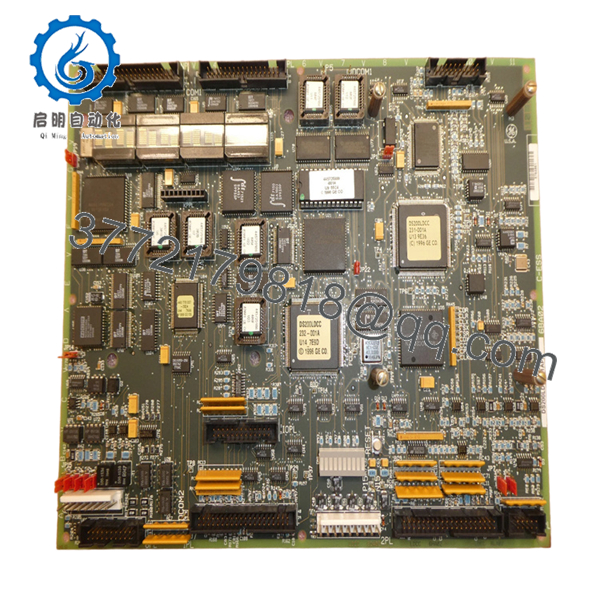
- DS200LDCCH1APA
6. Frequently Asked Questions (FAQ)
Q1: Can I hot-swap the DS200LDCCH1APA?
No. Mark V racks are not designed for hot-swapping. You risk damaging the backplane and corrupting communication states.
Q2: Is this module obsolete?
Yes. Mark V is a legacy GE platform. Units are only available as surplus or refurbished stock.
Q3: What happens if this board fails?
You typically lose LAN communication and sometimes drive coordination. In one outage I handled, the turbine stayed in a safe state but was completely uncontrollable from the HMI.
Q4: Are DS200LDCCH1APA and other LDCC variants interchangeable?
Not reliably. GE used multiple revisions (A/P/A etc.). Even small firmware or hardware differences can break communication with the rest of the rack.
Q5: Does this board store configuration?
Partially. It uses flash PROM for configuration and firmware storage.
Always verify compatibility with the existing system before installation.
Q6: Why is this board critical compared to other PCBs?
Because it bridges control logic and communication. If it fails, the system may still be powered but effectively “blind” to operators.
Q7: What’s the most common replacement mistake?
❗ Installing a board with mismatched firmware revision.
I’ve seen a unit sit offline for 48 hours because the replacement had a slightly newer PROM set. Everything powered up—but no comms.
Technical Pitfall & Survival Guide (Field Experience)
1. Firmware Revision Mismatch
❗ Most common failure after replacement
- Mark V is sensitive to PROM versions
- Always document original firmware before removal
- Request matching revision when ordering
2. Jumper / Configuration Errors
- Some LDCC boards include configurable hardware options
- Always replicate original settings exactly
3. Backplane Connector Damage
- Mark V connectors are not forgiving
- Slight misalignment can bend pins → intermittent faults
4. Power Load Oversight
- Not a high-load board, but cumulative rack load matters
- Keep ≥20% margin on power supply
5. ESD Damage
❗ Real-world failure case
An engineer installed one without grounding in winter conditions—board powered up once, then failed permanently.



