
 WhatsApp: +86 16626708626
 Email:
  Phone: +86 16626708626
Description
3. Product Introduction
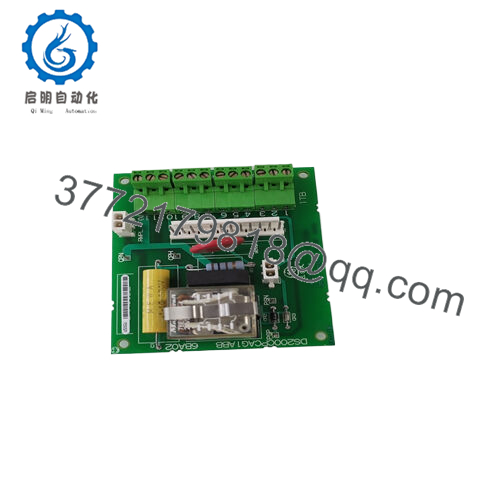
The GE DS3800DCCB is the DCCB fiber optic communication board for the Mark IV Speedtronic turbine control system. This board provides noise-immune serial communication over fiber optic cables to remote I/O racks, operator workstations, and plant DCS systems located in high-electrical-noise environments. You’ll find it in gas and steam turbine applications where long cable runs pass near variable frequency drives (VFDs), switchgear, or high-voltage equipment.
The DCCB board is a variant of the DCCA but replaces two of the four RS-232/485 ports with fiber optic transceivers (ST connectors, 820nm wavelength). The fiber ports support distances up to 2,000 meters (6,500 feet) without repeaters — far beyond the 50-meter limit of RS-485. The board still includes two RS-232 ports for local maintenance access. Without a functional DCCB, remote I/O racks lose communication, and the turbine may trip on “I/O Loss” alarms. This board is mission-critical for distributed Mark IV installations.
4. Key Technical Specifications
| Parameter | Value |
|---|---|
| Model | DS3800DCCB |
| Brand | GE (General Electric) |
| Series | Mark IV Speedtronic |
| Board Type | Fiber Optic Communication Coprocessor |
| Power Supply | +5V DC from backplane |
| Current Draw | 1.9A typical on +5V rail |
| Processor | 16-bit (Intel 80186 or equivalent custom GE ASIC) |
| Memory | 512KB RAM, 512KB Flash/EPROM (firmware) |
| Fiber Optic Ports | 2 x ST connectors (820nm, multi-mode) |
| Fiber Cable Type | 62.5/125µm or 50/125µm multi-mode |
| Fiber Distance | Up to 2,000 meters (6,500 feet) |
| Optical Power Budget | 12 dB typical |
| Wavelength | 820 nm ±30 nm |
| RS-232 Ports | 2 x DB9 male (maintenance terminal, printer) |
| Baud Rates | 300 to 115,200 baud (software selectable) |
| Protocols | GE proprietary fiber optic I/O bus, Modbus RTU (serial ports only) |
| Backplane Interface | VME-style 96-pin DIN (P1, P2) |
| Status LEDs | 8 x LEDs (Power, Run, Fault, Fiber Port 1-2 Link/Activity, RS-232 Ports 1-2 Activity) |
| DIP Switches | 8-position (node address, fiber port configuration, watchdog) |
| Operating Temp | 0 to +50°C (32 to 122°F) |
| Storage Temp | -40 to +85°C (-40 to 185°F) |
| Humidity | 5% to 95% non-condensing |
| Dimensions | 9.5 x 6.5 x 1.0 inches (approx) |
| Connectors | 1 x 96-pin backplane, 2 x ST fiber, 2 x DB9 serial |
| GE Part Family | DS3800 (Mark IV) |
| Firmware | Version marked on EPROM label (verify compatibility) |
5. Troubleshooting Quick Reference
| Symptom | Possible Cause | Relevance to this Part | Quick Check Method | Recommendation |
|---|---|---|---|---|
| No LEDs lit on DCCB | Backplane +5V missing or board not seated | ❌ Low (backplane issue) | Measure +5V on backplane pins. Reseat board firmly. | Check rack power supply (NPSR). Replace DCCB only if +5V present but board dead. |
| Run LED off, Fault LED on steady | Firmware checksum failure or hardware fault | ✅ High | Read Mark IV diagnostic display. Look for DCCB fault codes (typically 100-109 range). | Cycle rack power. If fault persists, replace board. EPROM may need reprogramming. |
| Fiber port link LED off | Fiber cable broken, dirty connector, or far-end device off | ✅ High | Inspect fiber connectors with visual fault locator (red light). Check for light at far end. | Clean connectors with lint-free wipes. Replace fiber cable if damaged. Replace DCCB if transmitter dead. |
| Fiber port link LED on but no data | Wrong fiber polarity (TX to TX instead of TX to RX) | ✅ High | Swap the two fiber cables at one end (TX ↔ RX). | Mark cables before disconnecting. Swap polarity. |
| Intermittent fiber communication | Dirty connectors or cable bend radius exceeded | ✅ Medium | Inspect connectors under magnification. Check cable routing for tight bends (<50mm radius). | Clean connectors. Reroute cable. Replace if damaged. |
| RS-232 port no communication | Driver chip failed or configuration mismatch | ✅ High | Loopback test: Short pins 2 and 3 on DB9. Send data from terminal — should echo. | Replace DCCB. Driver chips are not field-replaceable on this board. |
| Remote I/O rack shows “Comm Lost” | Fiber cable cut or DCCB transmitter failed | ✅ High | Check fiber link LED on DCCB. If off, problem is local. If on, problem is at remote rack. | Replace fiber cable. Replace DCCB if local transmitter failed. |
| DCCB resets randomly | Watchdog timeout or power supply dip | ✅ High | Monitor +5V with oscilloscope. Look for drops below 4.75V. | Replace rack power supply first. If issue persists, replace DCCB. |
| All ports dead but Run LED on | Internal bus failure or clock oscillator failed | ✅ High | Measure clock output on test point (if marked). Should show appropriate frequency. | Replace board. This failure is not field-repairable. |
Tech Note: Fiber optic ports are immune to electrical noise but sensitive to dirt. A single fingerprint on an ST connector can attenuate the signal enough to cause intermittent errors. Clean connectors with isopropyl alcohol and lint-free wipes before diagnosing “failed” hardware. We’ve seen plants replace DCCB boards three times when the problem was just a dirty connector.

- DS3800DCCB
6. Frequently Asked Questions (FAQ)
Q: Is the DS3800DCCB a direct replacement for the DCCA (non-fiber version)?
A: Not without fiber infrastructure. The DCCB has fiber ports instead of RS-422/485 ports. If your system currently uses RS-485 to a remote I/O rack, you cannot simply swap in a DCCB — you would need to add fiber converters at both ends. Conversely, if your system uses fiber, a DCCA will not work (no fiber transceivers). Match the board type to your existing installation. If you’re converting from copper to fiber, we can help with the migration.
Q: Can I replace my DCCB with a newer revision like DCCB1A or DCCB1B?
A: Yes, with a firmware check. The base DCCB (no suffix) is the original design. Later revisions (DCCB1A, DCCB1B) added minor hardware updates (improved fiber transceivers, better ESD protection). This DCCB board is backward compatible with all Mark IV racks. However, if your system uses specific timing-sensitive protocols, verify firmware compatibility. We can match firmware versions from our inventory.
Q: What fiber optic cable and connectors do I need?
A: Specifications:
- Connector type: ST (straight tip) — not SC, not LC, not SMA.
- Fiber type: 62.5/125µm or 50/125µm multi-mode (not single-mode).
- Wavelength: 820nm (multi-mode, not 1300nm or 1550nm).
- Cable: Duplex (two fibers) — one for transmit, one for receive.
Do not use single-mode fiber. The DCCB’s LED transmitter does not have enough power for single-mode, and the connector mismatch will cause high loss.
Q: How far can I run fiber from the DCCB to a remote I/O rack?
A: Up to 2,000 meters (6,500 feet) with 62.5µm fiber and no patch panels. For longer distances, you need a fiber extender or media converter. Beyond 2,000 meters, the optical power budget runs out. Measure optical loss with a power meter before commissioning. Acceptable loss: <10 dB total (including connectors and splices).
Q: Why is my fiber link LED on but I have no communication with my remote rack?
A: Most common cause: polarity mismatch. Fiber links require transmit (TX) on one end to connect to receive (RX) on the other end. If you connect TX to TX, the link LED may still light due to back reflection, but data won’t flow. Fix: Swap the two fiber cables at one end of the link. Mark the cables before disconnecting so you can revert if needed.
Q: Can I clean fiber connectors myself, or do I need special tools?
A: You can clean them with proper technique. Use:
- Lint-free wipes (Kimwipes or similar) — never paper towels or cotton swabs.
- 99% isopropyl alcohol.
- Canned air or a fiber optic cleaning pen (optional).
Procedure: Dampen wipe with alcohol. Wipe connector end-face in one direction (don’t scrub). Inspect under magnification if available. Let dry for 30 seconds before reconnecting. Do not blow into the connector with your mouth — moisture and contaminants will make it worse.
Q: What’s the difference between DCCB and other Mark IV fiber optic boards?
A: Quick reference:
- DCCB (DS3800DCCB): Fiber optic serial communication coprocessor (2 x fiber ST, 2 x RS-232).
- DCCA (DS3800DCCA): Copper-only serial communication (4 x RS-232/422/485, no fiber).
- DCFB (DS3800DCFB): Fiber optic for high-speed I/O scanning (different protocol, not interchangeable).
- FIBR (DS3800FIBR): Simple fiber optic repeater (no processor, just signal regeneration).
The DCCB is the standard fiber communication board for Mark IV. Do not substitute DCFB or FIBR without engineering review.
Q: How do I bench test the DCCB without a Mark IV rack?
A: You need a +5V power supply (3A minimum), a serial terminal, and a fiber optic loopback cable (one ST connector with a loop of fiber connecting TX to RX). Procedure:
- Apply +5V to backplane pins.
- Connect fiber loopback cable to Port 1 (TX to RX on same port).
- Board LEDs should light (Power OK, Run). Fiber link LED should light.
- Connect PC serial terminal to RS-232 Port 1.
- Power cycle the board while watching the terminal. You should see a boot message (e.g., “DCCB v3.2”).
- Send test data over the fiber loopback — data should echo.
Simpler approach: Install in a known-good rack. We can provide a test report from our Mark IV test rack instead.
Q: What’s your testing process for this board?
A: We test every DS3800DCCB on a live Mark IV test rack with a known-good main processor and fiber optic loopback. Test sequence:
- Visual inspection (corrosion, rework, damaged ST connectors)
- EPROM verification (checksum and version match)
- Power-on test (+5V current draw, LED sequence)
- Backplane communication test (processor sees DCCB)
- Fiber optic test: Both ports, 2,000 meter fiber spool, bit error rate <1e-9
- RS-232 test: Loopback at 9600, 19200, and 115200 baud
- Optical power measurement: >10 dB budget on both transmitters
- 24-hour burn-in with continuous fiber traffic
Test report with optical power readings and firmware version available upon request.
Q: My plant has fiber runs longer than 2,000 meters. What are my options?
A: Three options:
- Fiber extender — Use a media converter to switch to single-mode fiber (up to 10 km).
- Intermediate repeater — Install a DCCB or FIBR board in a remote cabinet as a repeater (requires power and enclosure).
- Move the remote rack — Not practical, but sometimes the best answer.
We stock fiber extenders that convert the DCCB’s multi-mode output to single-mode. Contact us for recommendations.
Q: What’s the warranty on this obsolete board?
A: 1-year replacement warranty. Covers failure under normal operating conditions (0-50°C, correct backplane voltage). Does NOT cover damage from dirty fiber connectors, lightning strikes on outdoor fiber (yes, fiber is non-conductive, but the connected equipment can still surge), ESD, or physical damage to ST connectors. We cross-ship replacements within 24 hours for confirmed defects.



