
 WhatsApp: +86 16626708626
 Email:
  Phone: +86 16626708626
Description
The GE IC752CTD450 is most often used where operators need a robust, panel-mounted touch display to interact directly with control systems, view process graphics, and acknowledge alarms on the plant floor. Typical environments include packaging lines, material handling systems, and process skids where a full industrial PC would be overkill but a simple text terminal is not enough. In these applications, the GE IC752CTD450 serves as the primary human-machine interface for GE PLCs and SCADA systems, allowing technicians to navigate mimic diagrams, trend screens, and status pages without leaving the production area. It is particularly useful in older but still widely deployed CIMPLICITY HMI environments, where continuity and compatibility matter more than chasing the newest hardware platform.
Because the GE IC752CTD450 integrates both display and computing functions in a single industrial enclosure, it is well suited to machine-level operator stations on production machinery, utility systems, and small control panels. Instead of mounting a separate PC, monitor, and keyboard, OEMs and integrators cut a single hole in the panel door and install this unit for a clean, sealed interface. In real-world applications, it is used in industrial automation systems that require local visualization, recipe selection, and basic supervisory control, while higher-level SCADA servers handle data logging and enterprise connectivity. Its touch screen operation also makes it practical for gloved use in factories, helping maintenance and operations staff execute start-up, shutdown, and changeover procedures directly at the machine.
Product Introduction & Positioning
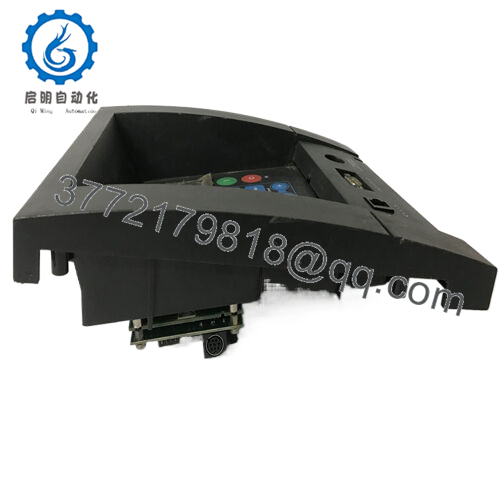
The GE IC752CTD450 is an industrial touch display station that combines a 10.4-inch TFT color LCD, resistive touch screen, and built-in Pentium-class computer in a rugged metal housing. It is part of the GE CIMPLICITY Display Station family and comes preloaded with CIMPLICITY HMI software, making it a turnkey operator interface for GE-based control systems. Within a typical architecture, this unit acts as a local HMI node, communicating over Ethernet or serial links to PLCs and controllers while presenting process graphics, alarms, and trends to the operator
From a system perspective, the GE IC752CTD450 sits between field control hardware and higher-level SCADA servers: PLCs handle discrete and analog control, this display provides local visualization and command entry, and plant networks connect everything together. Engineers value it because the hardware, operating system (Windows NT for this model), and CIMPLICITY runtime are already qualified as a package, reducing integration time and long-term compatibility risks. For integrators standardizing on GE solutions, the GE IC752CTD450 offers a consistent, supportable platform for machine HMIs that aligns with CIMPLICITY projects created on engineering workstations.

- IC752CTD450
- IC752CTD450
Key Technical Features & Functional Benefits
A major strength of the GE IC752CTD450 is that it is delivered as a fully assembled, panel-mount unit with industrial-grade construction and an integrated 10.4-inch active-matrix TFT display. This provides a bright, high-contrast viewing area suitable for typical control room and plant-floor lighting, while the touch screen surround eliminates the need for a permanent keyboard or mouse during normal operation. Operators can interact with CIMPLICITY screens directly on the glass, reducing clutter in crowded panels.
Inside, the GE IC752CTD450 uses a Pentium 133 MHz CPU with 32 MB of RAM and a 1.2 GB hard disk, running Windows NT together with a full point-count version of CIMPLICITY HMI development and runtime software. That means engineers can both develop and run HMI applications on the same station if desired, or deploy projects created on other CIMPLICITY engineering PCs. A 3.5-inch 1.44 MB floppy disk drive supports project transfer, backup, and software updates—important in the era and still practical for plants maintaining legacy systems.
Connectivity is another key benefit of the GE IC752CTD450. It provides multiple serial ports (two RS‑232), a parallel port, keyboard and mouse ports, VGA output for an external CRT, and Ethernet interfaces (coaxial and 10Base‑T RJ45) for network integration. This flexibility lets it connect to PLCs, printers, engineering workstations, and plant networks using standard interfaces. From a maintenance perspective, the unit incorporates an internal fan and air filter to manage temperature and dust, supporting reliable long-term operation in industrial environments.
Finally, the enclosure of the GE IC752CTD450 is designed for panel mounting with a good environmental seal when all ten spring-loaded mounting clips are correctly installed. This ensures that when fitted into a properly prepared cut-out, the unit resists dust ingress and maintains mechanical stability, which is critical when installed in vibrating panels or near rotating equipment.
Detailed Technical Specifications
| Parameter | Value |
|---|---|
| Model | IC752CTD450 |
| Brand | GE Fanuc (General Electric) |
| Product Type | Industrial Touch Display Station |
| Display Size | 10.4 inch color TFT active-matrix LCD |
| Touch Interface | Integrated resistive touch screen surround |
| CPU | Pentium 133 MHz |
| System RAM | 32 MB |
| Hard Disk Capacity | 1.2 GB |
| Floppy Disk Drive | 3.5 inch, 1.44 MB |
| Operating System | Windows NT |
| HMI Software | CIMPLICITY HMI, development and runtime preloaded |
| Serial Interfaces | Two RS‑232 serial ports |
| Parallel Port | One 25-pin parallel port |
| Ethernet Interfaces | Coaxial and 10Base‑T RJ45 Ethernet ports |
| Power Input | AC, auto-ranging via standard CEE22 connector |
| Approximate Weight | Less than 11 kg (without floppy drive) |
| Enclosure | Compact, rugged metal industrial housing |
| Mounting | Panel mount with ten spring-loaded retaining clips |
| Cooling | Forced air with fan and replaceable air filter |
| Maximum Panel Thickness | 10 mm (0.39 inch) |
| |
Related Modules or Compatible Units
IC752CTD400 – Similar touch display station using Windows 95 instead of Windows NT, suited for older CIMPLICITY deployments.
IC752DPA062 – Related GE display or panel product often seen in the same installed base for local operator interfaces.
IC752CTD500 – Higher model in the same family listed alongside the IC752CTD450, typically used in similar HMI roles.
GE Series 90‑30 PLC CPUs (e.g., IC693CPUxxx) – Common controllers connected to the GE IC752CTD450 via serial or Ethernet for machine control.
GE Rx7i / PACSystems CPUs – Newer controllers that can still use GE IC752CTD450 as an HMI node through Ethernet where legacy visualization is retained.
CIMPLICITY SCADA Servers – Central SCADA nodes that share projects and data with the GE IC752CTD450 for distributed operator access.
Installation Notes & Maintenance Best Practices
When installing the GE IC752CTD450, the panel must be rigid enough to support the unit’s weight without distortion, and the cut-out must follow the specified dimensions to ensure a proper seal. All ten spring-loaded mounting clips supplied with the display must be installed and tightened evenly; this is essential to achieve uniform compression between the gasket and the panel surface, which helps maintain the environmental rating and prevents vibration-related loosening. Maximum panel thickness is 10 mm, so enclosure doors or plates must be selected accordingly. Adequate airflow must be provided around the side where the fan and filter are located, allowing cool air to be drawn in and warm air to be exhausted from the opposite side slots.
Routine maintenance for the GE IC752CTD450 should focus on airflow and cleanliness. The air filter, a 6.35 mm polyester/polyurethane open-cell foam element, should be inspected regularly and replaced when clogged to prevent overheating and fan strain. Internally, any additional adapter cards must be installed with attention to I/O address and IRQ assignments so they do not conflict with factory-set resources such as the custom COM port used for the touch screen. It is advisable to document any changes to jumper positions and resource usage to simplify future troubleshooting and upgrades.



