

 WhatsApp: +86 16626708626
 Email:
  Phone: +86 16626708626
Description
2. Product Core Brief
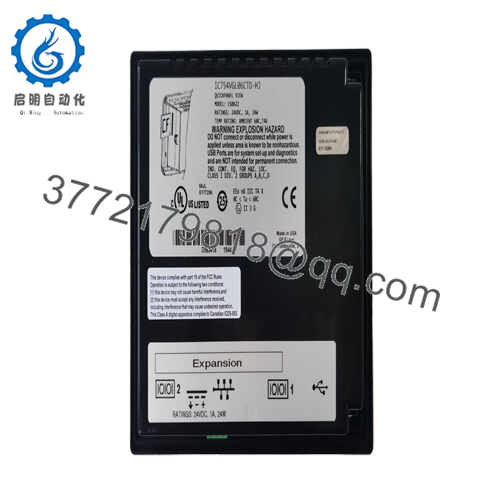
- Model: IC754VGF12CTD-FC
- Brand: GE Fanuc (Emerson)
- Series: QuickPanel View
- Core Function: Provides touchscreen HMI for operator interaction and process visualization
- Product Type: Operator Interface Terminal (HMI)
- Key Specs: 12-inch color TFT display, 800 × 600 resolution (SVGA), 65,536 colors, analog resistive touchscreen, 64 MB RAM + 64 MB flash
- Condition: New Surplus / New Original (obsolete part, limited spares available)
3. Key Technical Specifications
- Display Size: 12 inches
- Display Type: Color TFT (Thin Film Transistor)
- Resolution: 800 × 600 pixels (SVGA)
- Color Depth: 16 bits per pixel (65,536 colors)
- Touchscreen: Analog resistive, multi-touch capable in some configs
- Processor: 266 MHz RISC
- Memory: 64 MB RAM (dynamic), 64 MB flash (user/internal)
- External Memory: CompactFlash slot support
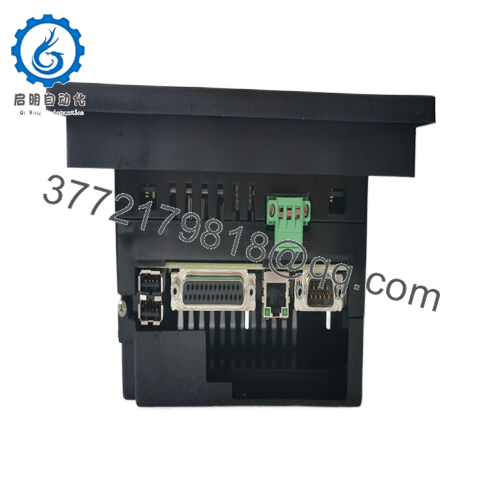
- Ports: Ethernet (RJ-45), USB (host/device), serial (RS-232/422/485), possible expansion bus
- LED Indicators: Bi-color power, tri-color user
- Power Input: Typically 24 VDC (confirm per unit; some variants AC/DC)
- Operating Temperature: 0 to 50 °C (typical QuickPanel rating)
- Mounting: Panel cutout (standard 12-inch QuickPanel dimensions)
- Status: Obsolete by manufacturer – spares only
4. Product Introduction
The GE Fanuc IC754VGF12CTD-FC is a 12-inch QuickPanel View operator interface terminal. It mounts in a control panel cutout and runs QuickPanel View runtime software for displaying graphics, alarms, trends, and buttons—connecting to PLCs via Ethernet, serial, or Modbus for real-time data in machines, conveyors, packaging lines, or process skids.
This model packs a bright TFT screen with SVGA resolution and resistive touch into a compact unit, plus solid onboard memory for larger applications. Legacy QuickPanel users keep these in service because they drop into existing cutouts and configurations without rewriting screens or rewiring—saving major rework versus migrating to newer Proficy HMI platforms.
5. Troubleshooting Quick Reference
| Symptom | Possible Cause | Relevance to this Part | Quick Check Method | Recommendation |
|---|---|---|---|---|
| No power-up (screen blank, no LEDs) | No 24 VDC input or fuse blown | ✅ High | Measure input terminals with multimeter (typically 24 VDC) | Verify power supply; check wiring/fuses |
| Touch unresponsive | Overlay wear, calibration lost, or controller fault | ✅ High | Calibrate via setup menu (if accessible); test multiple points | Recalibrate; replace if dead zones persist |
| Screen flickers or colors wrong | Loose cable, backlight aging, or internal fault | ✅ High | Inspect internal display cable if open; check brightness setting | Tighten connections; backlight common in old units—replace unit |
| No comms to PLC (no tag updates) | Cable mismatch, IP/baud wrong, or port config | ✅ High | Ping Ethernet IP; check serial settings in Proficy View | Verify config in software; test cable continuity |
| CF card not recognized | Bad card, wrong format, or slot issue | ✅ Medium | Format CF to FAT16/32; test known good card | Use compatible CF; slot failures rare |
| Intermittent reboots | Power instability or overheating | ✅ Medium | Monitor input voltage stability; check vents | Stabilize power; clean dust from vents |
| Boot hangs or error messages | Corrupt flash, low battery (if any), or firmware glitch | ✅ High | Reload project via USB/Ethernet; check error codes | Reflash firmware/project; battery rare here |
QuickPanel View issues usually stem from power, cabling, project config, or touchscreen wear after years—not core board failure. Grab photos of any error screens, LED states, and comms settings. Send them if it’s locked up; we can guide reload steps fast.

- IC754VGF12CTD-FC
6. Frequently Asked Questions (FAQ)
What’s the -FC suffix on IC754VGF12CTD-FC? It’s a revision code (like -AA to -FC variants). No changes to display, memory, ports, or software compatibility from base IC754VGF12CTD. We’ve swapped FC units into panels running older projects without touching the application.
Is the IC754VGF12CTD-FC still made new? No, QuickPanel View series went obsolete years ago. We stock new surplus—unused, factory-sealed or new-old-stock from spares. They boot and run projects like original but no active Emerson support.
What software programs this HMI? Proficy Machine Edition (QuickPanel View runtime). Load projects via Ethernet, USB, or serial. Always back up the current .MEP file before changes—easy to reload after swap.
Can I replace just the touchscreen overlay? Yes, replacement films exist (often cross-referenced to IC754VSI12MTD or similar). But if the display or internals are failing, full unit swap is faster. We see overlay wear as the #1 field complaint.
Will swapping the unit lose my HMI project? No—the project stores in flash/internal memory. Power down, swap, power up; it boots to the last loaded app if flash intact. If corrupted (rare), reload via USB/Ethernet from backup.
Why surplus over refurbished QuickPanels? Surplus means no runtime cycles—no backlight dimming, no touch degradation, no capacitor aging. Refurbs often come from worn panels and get patched. We test every IC754VGF12CTD-FC: power-up, screen self-test, touch calibration check, Ethernet ping, and project load sim.
What warranty do you offer? 1-year functional when installed per specs. Covers defects, not physical damage, power surges, or project errors. Test reports with boot photos, screen shots, and touch response data available on request.



