
 WhatsApp: +86 16626708626
 Email:
  Phone: +86 16626708626
Description
Key Technical Specifications
- Processor: Motorola MC68040 / MC68LC040 (32-bit)
- Clock Speed: 25 MHz typical
- Cache: 8 KB on-chip instruction/data cache
- Memory: Onboard DRAM (model-dependent), 1 MB Flash, 512 KB SRAM
- Non-Volatile Memory: MK48T08 Timekeeper NVRAM
- Bus Interface: VMEbus via VMEChip2 ASIC (ANSI/IEEE 1014)
- I/O Interfaces: RS-232 serial, optional Ethernet (Intel 82596), optional SCSI
- Expansion: IndustryPack (IP) module support (MVIP interfaces)
- Form Factor: 6U VME single-slot SBC
- Power Supply: +5 V DC (4.75–5.25 V range)
- Operating Temperature: −40 to +85 °C (industrial variants)
- Dimensions: Approx. 9.45 × 6.2 × 1.3 inches
4. Product Introduction
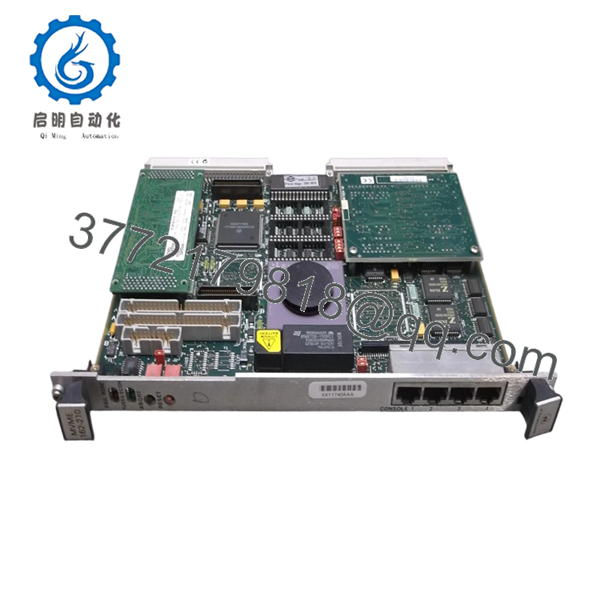
The Motorola MVME162-210 is a 6U VMEbus single-board computer based on the MC68040 architecture, designed for real-time industrial control, telecom switching, and embedded computing systems. It integrates CPU, memory, and I/O on a single board, functioning as the primary controller in VME-based racks.
Compared to earlier MVME133/147 series, the MVME162 provides higher processing capability and integrated peripherals such as Ethernet and SCSI (variant-dependent). In legacy DCS and test systems, it remains in service due to long lifecycle designs and stable RTOS support (VxWorks, pSOS).

- MVME162-210
5. Installation & Configuration Guide
Stage 1: Pre-Installation Preparation (10–15 minutes)
- ⚠️ Safety First: Notify operations, shut down system, lock out/tag out. Wait 5 minutes for discharge.
- Tools Required: ESD wrist strap, screwdriver, multimeter, labels, smartphone
- Data Backup:
- Backup OS image (Flash or external storage)
- Record VME slot address and base address configuration
- Photograph jumper settings and rear P2 I/O mapping
Stage 2: Removing the Old Module (5–10 minutes)
- Remove front panel screws
- Label serial/Ethernet/SCSI cables
- Use ejector handles to extract board evenly
- Inspect backplane DIN connectors
- ⚠️ Note: Older VME racks often have worn connectors—don’t rush removal or you’ll bend pins.
Stage 3: Installing the New Module (10 minutes)
- ESD Protection mandatory
- Confirm exact model MVME162-210 (watch suffix differences)
- Configuration Clone (Critical):
- Match all jumpers (boot source, base address, IP slots)
- Verify Ethernet/SCSI enable settings
- Insert board along guide rails
- Seat firmly until connectors engage
- Secure front panel
- Checklist:
- Jumpers identical
- Board seated
- No connector misalignment
Stage 4: Power-On & Testing (15–20 minutes)
- Pre-check: Verify +5 V rail stability
- Power-On Steps:
- Power rack only
- Observe LED sequence (FAIL → RUN transition)
- Connect via serial console (typically 9600/8/N/1)
- Access MVMEbug firmware prompt
- Verify memory and device detection
- Boot RTOS
- ⚠️ Troubleshooting:
- Stuck in FAIL state → NVRAM battery failure (common)
- No Ethernet → Check 82596 config jumpers
- Boot loop → Flash corruption or firmware mismatch
6. Frequently Asked Questions (FAQ)
Q1: Can I hot-swap the MVME162-210?
No. VMEbus systems are not inherently hot-swappable. Removing under power risks bus arbitration faults and possible damage to the VMEChip2 controller.
Q2: Is this model obsolete? Can I still get new units?
Yes, it’s obsolete. Most available units are new surplus or refurbished. True factory-sealed stock is rare at this point.
Q3: What fails most often on this board?
The Timekeeper NVRAM (MK48T08) is the usual culprit. When the internal battery dies, you lose boot parameters and the board may not start cleanly. I’ve replaced more of these than CPUs.
Q4: What’s the closest upgrade path?
MVME167 or MVME177 (68040/68060-based) are typical upgrades. But expect OS and BSP adjustments—this is not plug-and-play.
Q5: Will my application survive a board swap?
If stored externally (SCSI disk or network), yes. If stored in onboard Flash/NVRAM, back it up first. I’ve seen systems come back blank after swap due to dead NVRAM.
Q6: Why are some units much cheaper online?
Because many are pulled from decommissioned systems and not tested. Without burn-in testing, you’re gambling—especially with aging capacitors and NVRAM.
Q7: Any critical installation mistakes to avoid?
- ❗ Wrong jumper settings → system won’t boot
- ❗ Misaligned insertion → bent VME pins
- ❗ Ignoring power budget → unstable rack



