
 WhatsApp: +86 16626708626
 Email:
  Phone: +86 16626708626
Description
3. Key Technical Specifications
| Parameter | Value |
|---|---|
| Manufacturer | ABB |
| Model | 3ADT311500R0001 |
| Board Type | SDCS-FEX-2A Field Exciter Board |
| Product Family | SDCS Drive Control System |
| Primary Function | DC Motor Field Excitation Control |
| Installation Location | Mounted inside ABB DC converter module |
| Compatible Drive Families | ABB DCS modules (C1, C2, A5; verify exact hardware compatibility) |
| Control Method | Fully digital microprocessor control |
| AC Input Voltage | 110 V to 500 V AC (single-phase) |
| Maximum Field Current | 16 A |
| Power Devices | Half-controlled thyristor bridge |
| Communication | Flat-cable interface to SDCS-CON-2 controller |
| Associated Power Supply | SDCS-POW-1 |
| Operating Temperature | Verify according to installed drive cabinet specification |
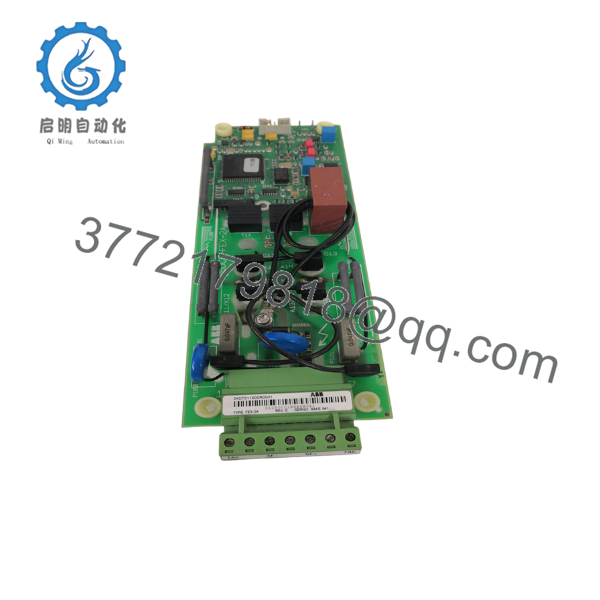
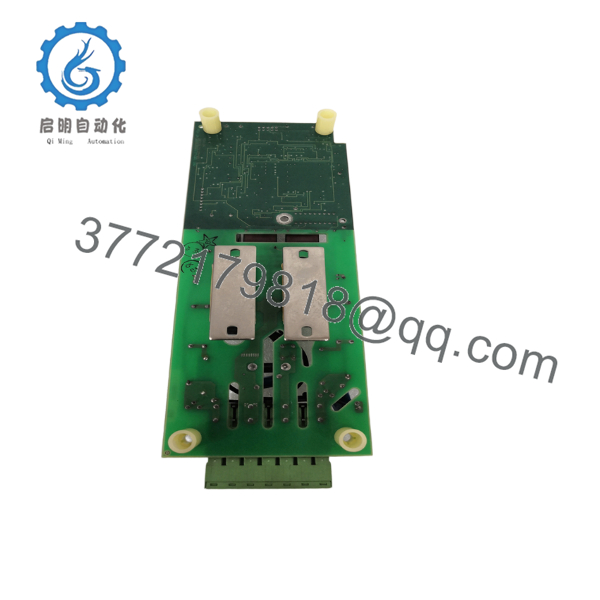
The SDCS-FEX-2A is an internal field exciter board used in ABB DC drive systems. It receives control signals from the SDCS-CON-2 control board and generates firing pulses for the thyristor-based field excitation bridge. It is designed for installation inside specific ABB DC converter modules alongside the SDCS-POW-1 power supply.
4. Product Introduction
The ABB 3ADT311500R0001 SDCS-FEX-2A is a digital field excitation board used in ABB industrial DC drive systems. It regulates the field current of separately excited DC motors, ensuring stable speed regulation, torque response, and field control during normal operation and dynamic load changes.
The board integrates a microprocessor-based controller with a thyristor firing circuit and communicates directly with the SDCS-CON-2 control board. Because it is installed inside the converter power section, replacement should always include verification of firmware compatibility, power-stage condition, and converter configuration before returning the drive to production.

- 3ADT311500R0001 SDCS-FEX-2A
- 3ADT311500R0001 SDCS-FEX-2A
5. Installation & Configuration Guide
Stage 1 – Pre-Installation Preparation (20 Minutes)
⚠️ Safety First
- Notify production of the scheduled drive outage.
- Stop the motor and isolate incoming AC power.
- Apply Lockout/Tagout procedures.
- Wait at least 5 minutes for the DC bus capacitors to discharge.
- Verify zero voltage using a calibrated multimeter.
Tools Required
- Grounded ESD wrist strap
- PH1 screwdriver
- Fluke 115 digital multimeter
- Insulated nut driver
- Smartphone for wiring documentation
- ABB DriveWindow or commissioning software (if applicable)
Data Backup
Before removal:
- Record drive parameter settings.
- Document firmware revision.
- Photograph ribbon cable routing.
- Photograph terminal wiring.
- Record jumper positions if fitted.
Stage 2 – Removing the Existing Board (15 Minutes)
- Remove the converter cover.
- Label all ribbon cables.
- Disconnect wiring carefully.
- Release board mounting hardware.
- Remove the board vertically to avoid connector damage.
Inspect:
- Flat-cable connectors
- Thyristor connections
- Power terminals
- Mounting standoffs
- PCB for overheating
⚠️ Do not discard the original board until the replacement has completed load testing.
Stage 3 – Installing the Replacement Board (20 Minutes)
- Wear an ESD wrist strap.
- Verify the exact part number:
3ADT311500R0001 SDCS-FEX-2A
- Confirm hardware revision compatibility.
- Install the board evenly.
- Reconnect ribbon cables without twisting.
- Tighten mounting hardware.
- Verify connector seating.
Installation Checklist
- Part number verified
- Connectors fully seated
- Ribbon cables correctly oriented
- Mounting hardware secured
- Ground connections verified
Stage 4 – Power-On & Testing (30 Minutes)
Pre-Power Inspection
- Verify AC input wiring.
- Inspect field circuit continuity.
- Confirm insulation resistance where applicable.
- Check connector seating.
Startup Procedure
- Energize the converter without loading the motor.
- Verify normal startup LEDs.
- Monitor field current.
- Confirm communication with the SDCS-CON-2 controller.
- Verify stable field voltage.
- Run the motor at low speed.
- Monitor field current under load.
⚠️ Troubleshooting Note
If the drive reports field-loss or excitation faults immediately after startup, inspect the flat-cable connection to the SDCS-CON-2 board before replacing the SDCS-FEX-2A. Many commissioning issues result from connector seating rather than board failure.
6. Frequently Asked Questions (FAQ)
Q1. What is the SDCS-FEX-2A used for?
It controls the excitation current of separately excited DC motors by generating firing pulses for the thyristor field bridge. Proper field regulation is essential for stable motor speed and torque.
Q2. Is this board compatible with every ABB DCS drive?
No. The SDCS-FEX-2A is intended for specific ABB DC converter configurations. Public ABB documentation identifies compatibility with C1, C2, and A5 converter modules, while other hardware variants require verification before installation. Always confirm the converter type and spare-parts list for your drive.
Q3. Can I hot-swap this board?
No.
The SDCS-FEX-2A is mounted inside the converter power section. Removing or installing it under power can damage the board, converter, or associated power semiconductors. Isolate the drive completely before servicing.
Q4. Why should I document ribbon cable locations?
The board communicates with the SDCS-CON-2 through flat-cable connections. Incorrect cable orientation or poor connector engagement can cause firing pulse errors, excitation faults, or complete loss of field control. Taking photographs before removal saves considerable troubleshooting time.
Q5. Why is this module often available only as surplus stock?
The SDCS-FEX-2A belongs to legacy ABB DC drive platforms that are no longer widely manufactured. New surplus inventory typically originates from unused project stock or plant modernization programs. Request serial number verification, inspection records, and functional test documentation before purchase.
Q6. What quality checks should accompany this board?
For critical applications, request:
- Serial number verification
- Visual inspection report
- Functional power-up test
- Insulation resistance measurement
- Communication verification with an SDCS-CON-2 controller
- 24-hour burn-in record
- ESD-safe packaging
- QC inspection report
Q7. What is the most common installation mistake?
The most frequent issue is assuming every SDCS-FEX board is interchangeable. I’ve seen maintenance teams install the correct-looking board only to discover a hardware revision mismatch or incorrectly seated flat cable. Always verify the full ABB part number, compare hardware revisions, and inspect every connector before applying power.



