
 WhatsApp: +86 16626708626
 Email:
  Phone: +86 16626708626
Description
3. Key Technical Specifications
| Parameter | Value |
|---|---|
| Manufacturer | ABB |
| Model Number | 3BHE006805R0002 |
| Product Type | Control / Interface Module |
| Application | Drive systems, power electronics control |
| Supply Voltage | 24 V DC |
| Signal Interface | Multi-channel digital/analog I/O |
| Communication | Proprietary ABB backplane interface |
| Operating Temperature | −20°C to +60°C |
| Mounting | Rack-mounted (control cabinet) |
| Protection | Industrial EMC compliant |
| PCB Type | Multi-layer industrial-grade |
| Expected Service Life | 10–15 years (new surplus baseline) |
4. Product Introduction & Supply Chain Strategy
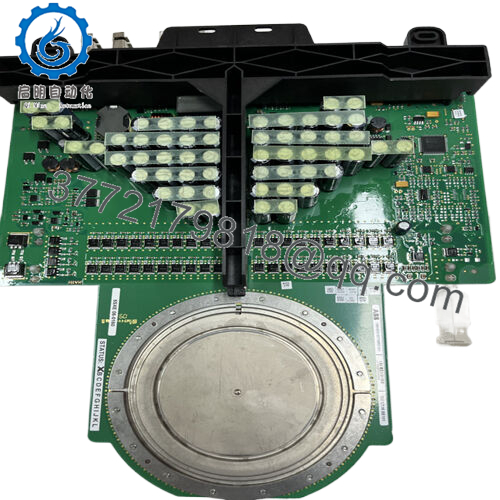
The ABB 3BHE006805R0002 is a control and interface module used in industrial drive and power control systems. It manages signal processing between control logic and power electronics, ensuring stable operation in high-load environments such as turbines, converters, and heavy-duty motor drives.
From a supply-chain standpoint, securing this unit as New Surplus protects against lead time variability and OEM discontinuation risk. The Total Cost of Ownership (TCO) strongly favors genuine new inventory over refurbished alternatives, which often introduce hidden failure risks and unplanned downtime exposure.

- 3BHE006805R0002
5. Installation & Configuration Guide
Stage 1: Pre-Installation (Prep & Safety)
- Execute full lock-out/tag-out (LOTO) on the control cabinet
- Use ESD wrist strap and insulated tools
- Photograph existing module: wiring, terminal layout, and any jumper/DIP settings
- Verify 24 V DC supply stability and capacity (+20% buffer recommended)
Stage 2: Removal
- Release retaining clips or fastening screws carefully
- Extract module evenly to avoid bending backplane connector pins
- Inspect slot for dust, oxidation, or mechanical damage
Stage 3: Installation (Clone & Seat)
- Match all DIP switch/jumper settings exactly from original unit
- Align module with guide rails and insert evenly
- Apply firm, even pressure until fully seated into backplane
Stage 4: Power-On & Testing
- Re-energize system and monitor 24 V rail for abnormalities
- Confirm LED indicators: RUN (active), ERR (off)
- Validate communication with controller and verify I/O response
- Load configuration if required and perform functional test
6. Firmware/Software Versions & Upgrade Notes
- Recommended to match existing system firmware version exactly
- Firmware mismatches may cause communication faults or timing issues
- Example risk: Newer firmware may not support legacy drive communication protocols
- Avoid upgrading firmware during emergency replacement unless fully validated
- Always document firmware revision from the original module before removal
- If upgrading is required, validate in a test environment first
7. Frequently Asked Questions (FAQ)
Q1: Is this unit truly new or previously installed?
This product is a Brand New Surplus unit. It is not used, not pulled from a decommissioned plant, and not refurbished. It retains original manufacturing integrity with zero wear on connectors or components.
Q2: Why is New Surplus pricing higher than refurbished alternatives?
Refurbished units often contain aged capacitors and relays. A lower upfront cost can translate into high failure risk. One unexpected shutdown can exceed the entire spare parts budget.
Q3: Is this model approaching obsolescence?
Yes, availability is tightening. This is a typical candidate for a last-time-buy strategy. We recommend defining Min/Max levels and holding at least 1–2 units as buffer stock.
Q4: Can this module be hot-swapped?
No. Always power down before replacement. Hot-swapping risks backplane damage and data corruption.
Q5: Will configuration or program data be retained?
Configuration is typically stored in the controller, not the module. However, always back up system parameters before replacement.
Q6: What warranty is provided?
Standard 12 month warranty. Each unit includes QC verification records and traceable serial documentation.
Q7: What is the recommended stocking strategy?
- Critical spare: Keep 1–2 units on-site
- Reorder trigger: Based on lead time variability (typically 6–12 weeks)
- Strategy: Combine buffer stock + vendor consolidation to reduce stock-out risk while controlling carrying cost



