
 WhatsApp: +86 16626708626
 Email:
  Phone: +86 16626708626
Description
3. Key Technical Specifications
| Parameter | Value |
|---|---|
| Manufacturer | ABB |
| Model | FI840F |
| Product ID | 3BDH000033R1 |
| Product Family | ABB Freelance AC 800F |
| Product Type | Foundation Fieldbus FF/HSE Communication Module |
| Protocol | Foundation Fieldbus High Speed Ethernet (FF/HSE) |
| Network Interface | RJ45 Ethernet |
| Ethernet Speed | 10/100Base-TX (Auto Detection) |
| Transmission Medium | Category 5 Ethernet Cable |
| Maximum Segment Length | 100 m |
| FF/HSE Role | Foundation Fieldbus HSE Master |
| Processor | 32-bit ARM CPU with integrated Ethernet controller |
| Module Memory | 8 MB SDRAM |
| Shared Memory | 1 MB SRAM |
| Firmware Storage | 2 MB Flash EPROM |
| EEPROM | 16 kbit configuration memory |
| Power Consumption | 1.4–2.1 W |
| Weight | Approximately 0.15 kg |
| Electrical Isolation | Isolated Ethernet interface with ESD protection |
These specifications are documented in the ABB Freelance product catalog and AC 800F installation documentation.
4. Product Introduction
The ABB FI840F (3BDH000033R1) is a Foundation Fieldbus High Speed Ethernet (FF/HSE) communication module for the ABB Freelance AC 800F controller platform. It operates as an FF/HSE master, providing high-speed Ethernet communication between the controller and Foundation Fieldbus H1 devices through the HSE network.
In process plants, the FI840F is commonly deployed in oil and gas, chemical, pharmaceutical, and power generation applications where Foundation Fieldbus architecture is already established. One advantage of this module is its automatic 10/100 Mbps link detection and integrated diagnostics. Before replacement, verify the controller firmware revision and the existing Control Builder F project to avoid communication mismatches.
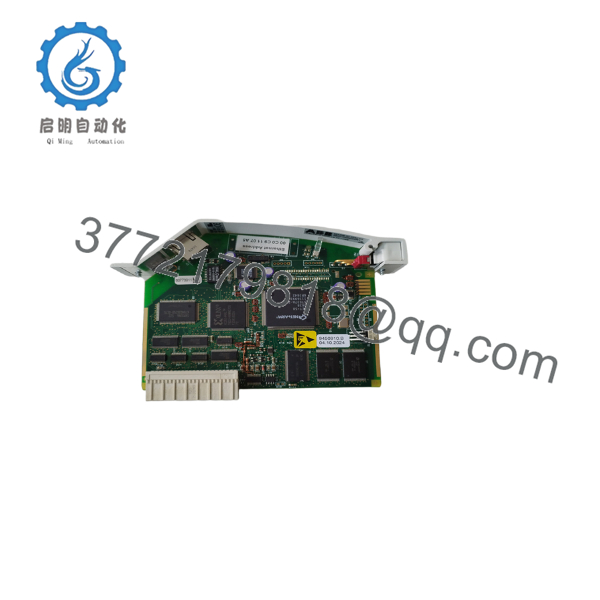
- FI840F
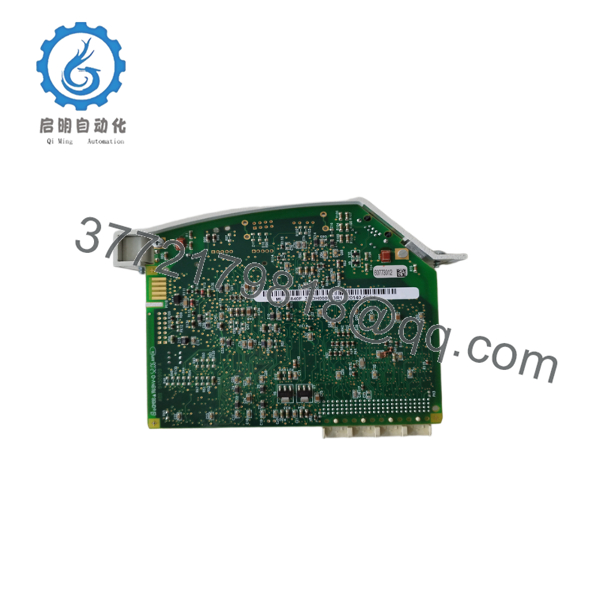
- FI840F
5. Installation & Configuration Guide
Stage 1 – Pre-Installation Preparation (Estimated Time: 15 Minutes)
⚠️ Safety First
- Notify operations before taking the controller offline.
- Place the process in a safe operating condition.
- Apply Lockout/Tagout procedures.
- Remove controller power.
- Wait at least 5 minutes before handling electronics.
Tools Required
- Grounded ESD wrist strap
- PH1 screwdriver
- Fluke 115 digital multimeter
- Ethernet cable tester
- Smartphone for documentation
Data Backup
Before replacing the module:
- Export the Control Builder F project.
- Record controller firmware version.
- Save Foundation Fieldbus configuration.
- Document Ethernet settings.
- Photograph all RJ45 connections and module positions.
Stage 2 – Removing the Existing Module (Estimated Time: 10 Minutes)
- Verify controller power is OFF.
- Disconnect the Ethernet cable.
- Label every network connection.
- Release the module retaining mechanism.
- Remove the module straight from the controller.
⚠️ Never pull on the Ethernet cable to remove the connector. Damage to the RJ45 socket can create intermittent communication faults that are difficult to diagnose.
Inspect:
- Module connector
- RJ45 socket
- Controller backplane
- Cabinet cleanliness
Keep the original module until the replacement has completed commissioning.
Stage 3 – Installing the New Module (Estimated Time: 10 Minutes)
- Wear an ESD wrist strap.
- Verify the replacement part number:
- FI840F
- 3BDH000033R1
- Install the module firmly into the controller.
- Connect the Ethernet cable.
- Restore power connections.
Configuration Check
Verify:
- Controller firmware version
- Foundation Fieldbus project configuration
- Ethernet link speed
- Device addressing
- Network topology
Self-Checklist
- ✅ Module fully seated
- ✅ Ethernet connected
- ✅ Configuration verified
- ✅ Controller recognizes module
Stage 4 – Power-On & Testing (Estimated Time: 20 Minutes)
Pre-Power Inspection
- Verify cabinet grounding.
- Confirm Ethernet cable integrity.
- Check connector seating.
Startup Procedure
- Energize the controller.
- Observe the module status LED.
- Verify Ethernet Link LED.
- Confirm the Speed LED indicates the negotiated network speed.
- Open Control Builder F.
- Verify communication with all Foundation Fieldbus devices.
⚠️ Troubleshooting Notes
No Ethernet Link
- Check the CAT5 cable.
- Verify switch port status.
- Confirm RJ45 connector seating.
Foundation Fieldbus devices offline
The first item I investigate is the network configuration. I’ve seen replacement modules installed correctly while the HSE network parameters were never restored from backup.
Module Fault
Confirm that the AC 800F CPU firmware supports the installed FI840F hardware revision before replacing additional hardware.
6. Frequently Asked Questions (FAQ)
Q1. What is the primary purpose of the FI840F?
The FI840F functions as a Foundation Fieldbus High Speed Ethernet (FF/HSE) master, allowing an ABB AC 800F controller to communicate with Foundation Fieldbus devices over an HSE network.
Q2. Does the FI840F support both 10 Mbps and 100 Mbps Ethernet?
Yes. The Ethernet interface automatically detects and negotiates 10Base-T or 100Base-TX connections, with LEDs indicating link status and negotiated speed.
Q3. Can I replace the FI840F while the controller is running?
No.
Although communication modules may appear easy to access, replacing the FI840F with the controller energized risks communication loss and unexpected process interruptions. Schedule a controlled shutdown whenever possible.
Q4. What is the most common commissioning mistake?
The mistake I encounter most often is overlooking the existing Foundation Fieldbus configuration. Engineers replace the hardware successfully but forget to restore the HSE project settings. The module powers up normally, yet none of the field devices communicate.
Q5. Does the FI840F require firmware compatibility verification?
Yes.
Always compare:
- AC 800F CPU firmware
- Control Builder F project version
- FI840F hardware revision
I’ve seen projects delayed because a newer communication module was installed into an older controller without updating the firmware first.
Q6. What indicators help diagnose communication problems?
The FI840F includes:
- Module status LED
- Power LED
- Ethernet Link LED (green)
- Ethernet Speed LED (yellow)
These indicators provide immediate feedback on power, link status, and negotiated Ethernet speed before software diagnostics are even opened.
Q7. What quality checks should be completed before shipment?
A qualified supplier should document the following:
- Inbound Inspection & Traceability
- OEM part number verification
- Serial number inspection
- Visual inspection for corrosion, scratches, rework, and damaged connectors
- Functional Testing
- Installation in an ABB AC 800F test rack
- Power-on verification
- Ethernet link establishment
- Foundation Fieldbus communication verification
- Continuous operational testing with a recorded test report
- Electrical Testing
- Insulation resistance testing where applicable
- Ground continuity verification
- Connector integrity inspection
- Firmware Verification
- Record firmware and hardware revision
- Verify compatibility with the intended controller version
- Final QC & Packaging
- QC sign-off
- ESD-safe packaging
- Shock-resistant protective packaging
- QC label with inspection date
Requesting photographs and functional test records before shipment is a practical way to reduce installation risk, especially for communication modules used in running process plants.



