
 WhatsApp: +86 16626708626
 Email:
  Phone: +86 16626708626
Description
- Product Core Brief
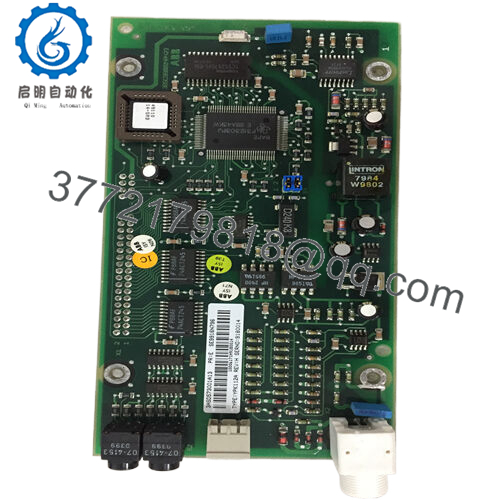
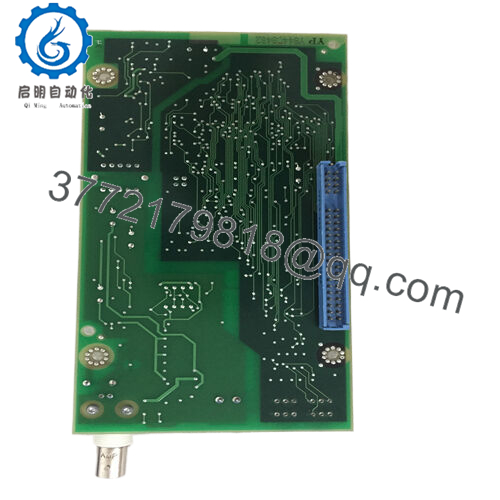
- Model: ABB YPK112A 3ASD573001A13
- Brand: ABB
- Series: VFD spares / DCS communication module
- Core Function: Communication interface between ABB drives/controllers and external
- Product Type: Communication module / single-port communication
- Key Specs: 24 V DC operation; multi‑protocol support (Modbus, Profibus, CAN, Modbus TCP/IP); compact 0.1 kg
- Condition: New Original / New Surplus (unused OEM spare)
- Key Technical Specifications
| Parameter | Value |
|---|---|
| Manufacturer | ABB |
| Model | YPK112A |
| Ordering / Spare Part Number | 3ASD573001A13 |
| Product Category | Communication module / communication board for DCS / VFD systems |
| Rated / Operating Voltage | 24 V DC (module-side supply) |
| Alternative listed input ratings | Some listings also quote 120 / 230 V AC input and <10 W consumption – verify against your unit label and manual before design use |
| Rated system voltage | Three‑phase 380–400 V AC system environment (drives/motors side), not the module supply |
| Communication protocols | Modbus RTU, Modbus TCP/IP, Profibus, CAN; exact enabled set depends on firmware/options |
| Processor | 32‑bit RISC, ~100 MHz (typical spec given for YPK112A series) |
| Memory | 128 MB RAM, 256 MB Flash (typical listing) |
| Dimensions | Common listings: 18.5 × 8.4 × 2.8 cm; others: approx. 2.2 × 12.4 × 12.6 cm or 6.0″ × 2.0″ × 8.0″ (variant / packaging differences) apterpower+3 |
| Weight | ~0.1 kg |
| Operating temperature | −20 °C to +60 / +70 °C (source-dependent, verify in ABB datasheet) |
| Operating humidity | 5–95% RH, non‑condensing |
| Installation | Plug‑in / card‑type communication board in ABB drive/DCS rack or cabinet |
| Typical use | Communications and data exchange between ABB drives/motor controllers/DCS and plant networks or remote systems |
There are conflicting third‑party specs (especially around supply voltage and dimensions); always prioritize the nameplate and ABB manual of your exact system over generic web listings.

- YPK112A 3ASD573001A13
- Product Introduction
The ABB YPK112A 3ASD573001A13 is a communication module used in ABB drive and DCS environments to link motor controllers and automation equipment to external networks such as Modbus, Profibus, CAN, or Ethernet-based Modbus TCP/IP. It is a compact, 24 V DC–powered board that mounts inside the host cabinet and provides a single communication interface point for data exchange and remote control.
In the field, engineers use the YPK112A when they need to integrate ABB variable‑speed drives or related controllers into plant SCADA/DCS without redesigning the power or control layers. Because it supports multiple industrial protocols and is delivered as an OEM spare for specific ABB platforms, it is usually treated as a direct part‑number replacement: match YPK112A and 3ASD573001A13 to the existing card and swap, keeping firmware and configuration aligned with the original system.
- Troubleshooting Quick Reference
| Symptom | Possible Cause | Relevance to this Part | Quick Check Method | Recommendation |
|---|---|---|---|---|
| DCS/SCADA cannot see the ABB drive/controller over the fieldbus | Failed or unpowered YPK112A, or network wiring fault | ✅ High | Check 24 V DC at the module’s supply terminals; verify status LEDs on the comms card; then meter bus wiring continuity and polarity | If 24 V is present, wiring is correct, and other nodes are healthy, swap in a known‑good YPK112A with the same part number to confirm a card fault before ordering replacements |
| Intermittent communication drops or timeouts | Marginal bus wiring, EMC issues, or card beginning to fail thermally | ✅ Medium | Log error counters (CRC, timeouts) in the master, feel module temperature, and gently flex harnesses while monitoring link status | Fix shielding, terminations, and topology first; if errors stay with this slot after those fixes, the YPK112A is a reasonable suspect |
| Bus LED stays dark or red while others on the same segment are OK | Incorrect protocol configuration or card not initialized by host | ✅ Medium | Check that the drive/DCS is configured to use the YPK112A slot, and confirm protocol (e.g., Profibus vs Modbus) and address/baud parameters | Correct configuration and power‑cycle the controller; if the LED state does not change and a spare card behaves normally, retire the original module |
| Communication OK, but data values are wrong or scrambled | Mapping or byte‑order mismatch in configuration, not hardware | ❌ Low | Compare I/O map and register addresses between PLC/DCS and ABB parameters; test with a known‑good device simulator if possible | Correct mapping first; do not replace the YPK112A for pure configuration problems |
| Module does not power up (no LEDs at all) | No 24 V DC supply or internal power fault | ✅ High | Measure the card’s supply pins for 24 V DC; check upstream fuses and any backplane jumpers | If supply is missing, fix the panel wiring; if supply is good and the module is still dead, a replacement YPK112A is warranted |
| Excessive heat on the module compared to others | Poor cabinet ventilation or failing electronics on the card | ✅ Medium | Use an IR thermometer to compare temperature with adjacent cards under normal load | Improve airflow; if this module alone runs significantly hotter and comms degrade with temperature, plan a proactive change‑out |
If you are unsure whether the YPK112A is really the culprit, grab screenshots of comms errors, photos of the module and wiring, and an export of your drive/DCS communication configuration; that combined view is what a support engineer will use to separate cabling/config issues from a genuinely failed card.
- Frequently Asked Questions (FAQ)
Q1: What exactly does the ABB YPK112A 3ASD573001A13 do?
It is a communication board that gives an ABB drive or controller a fieldbus or Ethernet interface so it can talk to higher‑level systems like PLCs, DCS, or SCADA, using protocols such as Modbus, Profibus, CAN, or Modbus TCP/IP depending on firmware and configuration.
Q2: Is YPK112A protocol‑specific, or can I switch between Modbus, Profibus, and CAN?
Listings show multi‑protocol capability (Modbus, Profibus, CAN, Modbus TCP/IP), but which ones are actually usable on your site depends on firmware revision and how ABB packaged it for that product line. Check your drive/DCS manual and the parameter set; do not assume that every protocol in the marketing blurb is enabled on your exact unit.
Q3: What supply do I need to power this module?
Most technical listings for YPK112A communication boards show a 24 V DC operating voltage for the card itself, with less than 10 W power consumption. Some marketing pages also quote 120/230 V AC input, but that likely refers to system‑level context, not the card’s direct supply, so always trust the label on your existing module and the ABB product manual.
Q4: Can I hot‑swap the YPK112A while the drive or DCS is powered?
From a field perspective, you should not hot‑swap it unless ABB explicitly documents that for your system. Pulling a communication module live can cause bus errors, write unexpected values, or hang the host controller, so it is safer to stop the drive or place the controller in a safe state, remove power to the rack segment if practical, then change the card.
Q5: Will swapping the YPK112A wipe my configuration?
The network and I/O mapping configuration usually lives in the host device (drive/DCS), not in this module alone, so simply changing the card does not typically erase settings. Still, before any hardware work, back up the drive/DCS parameter set and note bus addresses, baud rates, and node IDs so you can quickly verify comms when you power back up.
Q6: Why do I see different dimensions and specs online for the same 3ASD573001A13?
Different resellers often copy partial data from various sources, and some mix mechanical packing dimensions with PCB dimensions. Treat online specs as a rough guide only; for panel layout, rely on the drawing or measure your existing module, and for electrical design, use ABB’s official documentation.
Q7: Any key mistakes to avoid when replacing this communication module?
The common traps are not matching the exact part number, forgetting to document network settings, and assuming the problem is the card when it is actually a bad cable or termination. Before you touch anything, take photos of the module, its labels, and all connectors, back up the host configuration, verify bus wiring and termination, and only then swap the YPK112A if symptoms still point to a hardware fault.



