
 WhatsApp: +86 16626708626
 Email:
  Phone: +86 16626708626
Description
Key Technical Specifications
- Analog Input: Single channel, DC-coupled
- Input Impedance: 50 Ω
- Input Ranges: 125 mV, 250 mV, 500 mV, and 1 V peak-to-peak
- Analog Bandwidth: DC to 350 MHz
- A/D Resolution: 8 bits
- Maximum Sampling Rate: 1 GSample/s
- Selectable Sampling Rates: 100, 250, 500, and 1,000 MSample/s
- Onboard Acquisition Memory: 64 MSamples
- Optional Memory: 256 MB
- Signal Connector: BNC analog-input connector
- Trigger Connections: BNC trigger I/O and internal 3-pin trigger header
- Trigger Sources: Signal threshold, encoder, software, internal, and external trigger
- Motion Input: One quadrature encoder or step-and-direction input
- DSP Functions: ×2 and ×4 interpolation; programmable peak detector
- Maximum PCI Transfer Rate: Up to 133 MB/s burst transfer
- PCI Interface: 32-bit, 33 MHz PCI; bus-master DMA with scatter/gather support
- Board Dimensions: 9.35 in. × 4.2 in.
- Backplane Power: +5 V at 2.0 A; +3.3 V at 4.5 A; +12 V at 0.1 A; −12 V at 0.1 A
- Product Status: Obsolete since August 2013; AL81xGTe identified as the modern replacement family.
Product Introduction
The Acquisition Logic AL81G is a single-channel PCI A/D converter board for high-speed ultrasonic scanning and RF signal digitizing. It captures analog signals at up to 1 GSample/s with 8-bit resolution and is commonly paired with UT340 or similar high-frequency pulser-receivers.
Buyers select the AL81G when an installed system requires the original 32-bit, 33 MHz PCI digitizer architecture, BNC analog input, encoder synchronization, and 64 MSamples of onboard acquisition memory. It supports RF digitizing around 200 MHz center frequency, with approximately 40 dB useful dynamic range.
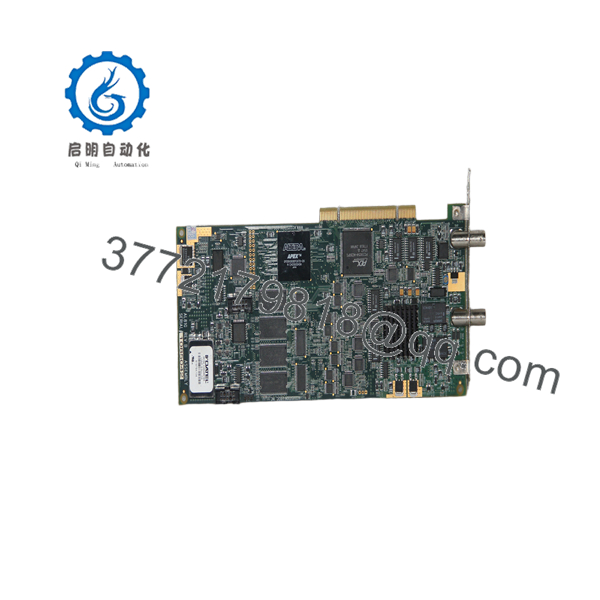
AL81G
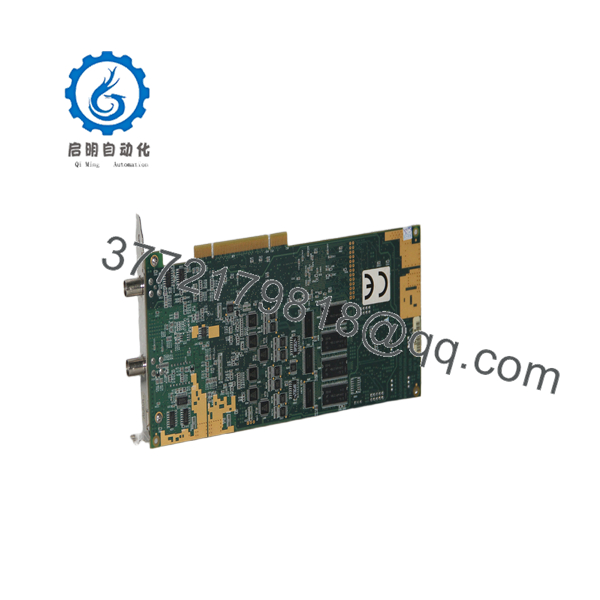
AL81G
Troubleshooting Quick Reference
| Symptom | Possible Cause | Relevance to This Part | Quick Check Method | Recommendation |
|---|
| Symptom | Possible Cause | Relevance to This Part | Quick Check Method | Recommendation |
|---|---|---|---|---|
| No board detected by acquisition software | PCI slot, BIOS setting, driver, or board failure | ✅ High | Power down, reseat the card, confirm the PCI slot is 32-bit/33 MHz compatible, then check Device Manager and application logs | Verify host-PC compatibility and driver version before replacing the AL81G |
| No LEDs or system fails to boot with board installed | PCI power-rail overload or damaged board | ✅ High | Measure +5 V, +3.3 V, +12 V, and −12 V at the PCI backplane; compare against the board requirement | Check the PC power supply first; the AL81G requires up to 4.5 A from +3.3 V |
| Flat-line waveform or no analog signal | Incorrect cable, source not powered, wrong input range, or failed input stage | ✅ High | Inject a known low-level signal through a 50 Ω BNC cable; test each input range from 125 mV to 1 V peak-to-peak | Confirm the signal source and BNC cable before condemning the board |
| Clipped or distorted waveform | Input level exceeds selected range or source impedance mismatch | ❌ Usually external | Check source amplitude using an oscilloscope; confirm the source is suitable for the 50 Ω input | Reduce source amplitude or add suitable attenuation; do not feed the board from a high-voltage source |
| Trigger never occurs | Threshold, trigger routing, external trigger cable, or software setup error | ❌ Usually configuration | Check the BNC trigger path, trigger threshold, polarity, and selected source in the acquisition software | Photograph and document the working trigger configuration before swapping hardware |
| Scan position drifts or data does not align with motion | Encoder wiring, encoder type, scaling, or step/direction configuration | ❌ Usually external | Check encoder A/B channels or step/direction signals with an oscilloscope; verify motion-controller settings | Confirm encoder format and signal levels before replacing the digitizer |
| Random acquisition dropouts under continuous scanning | PCI bus contention, DMA configuration, thermal issue, or host-PC instability | ✅ Possible | Run a continuous acquisition test, review missed-trigger counts, and check board temperature after 30–60 minutes | Test in a known-good legacy PCI host before declaring the board faulty |
| Software reports DMA or transfer timeout | Driver mismatch, PCI chipset issue, memory issue, or board DMA fault | ✅ Possible | Test with the validated application version and another compatible PCI computer | Avoid assuming a newer PC is compatible; legacy PCI behavior matters with this board |
❗ Field warning: The AL81G is a conventional 32-bit, 33 MHz PCI card, not PCI Express. Do not buy it until you verify that the host computer has a true compatible PCI slot and that your acquisition software supports the installed operating system.
❗ Replacement warning: Before removing the old board, record the driver version, software release, trigger thresholds, sampling rate, input range, encoder wiring, and any external timing connections. I have seen technicians replace a working digitizer, load a newer driver, and spend two days chasing “hardware faults” caused entirely by a changed DMA or trigger configuration.
If you are stuck, provide technical support with clear photos of the installed board, PCI slot, BNC and encoder connections, software diagnostic logs, and a screenshot of the acquisition setup.
Frequently Asked Questions (FAQ)
Is the Acquisition Logic AL81G still manufactured?
No. The has been obsolete since August 2013. Acquisition Logic documentation identifies the AL81xGTe family as the modern replacement path. That does not automatically make an AL81xGTe board a drop-in replacement for an existing machine; verify software, drivers, host interface, trigger wiring, and mechanical fit before ordering.
What does the actually do?
It digitizes one analog channel at up to 1 GSample/s with 8-bit resolution. Typical applications include high-frequency ultrasonic inspection, automated scanning systems, pulser-receiver signal capture, and RF waveform acquisition. It also accepts quadrature encoder or step-and-direction motion signals for position-correlated data collection.
Can I install this board in a modern PCI Express computer?
Not directly. The uses a 32-bit, 33 MHz PCI interface. A PCI Express slot is electrically different. A passive adapter does not solve every compatibility problem because PCI bridge chips, BIOS behavior, operating-system support, and legacy driver requirements can all affect detection and DMA operation. Verify the exact host-PC hardware before purchase.
What is the difference between the and an ordinary analog input card?
This is not a standard 4–20 mA or low-speed process I/O module. The is a high-speed, single-channel digitizer with DC to 350 MHz analog bandwidth, a 50 Ω input, up to 1 GSample/s sampling, and BNC signal connections. Treat it like test-and-measurement or ultrasonic-inspection hardware, not a PLC analog input module.
Will my existing settings and acquisition program remain after I replace the board?
The board replacement itself does not guarantee that your system configuration will behave identically. Record the application version, driver release, sampling rate, input range, trigger source, threshold, pre-trigger/post-trigger delay, encoder setup, and cable routing before removal. If the PC is reimaged or the software is updated during the swap, you can introduce a second failure point.
Can I hot-swap the ?
No. Standard PCI systems are not intended for hot replacement of this type of acquisition board. Shut down the computer, isolate mains power, wait for stored energy to discharge, use a grounded ESD wrist strap, and install the board by its edges. Hot-swapping can damage the PCI backplane, the card, or both.
Why is a New Surplus cheaper than a factory replacement?
Because the is obsolete and usually sold through independent surplus channels rather than current OEM production. New Surplus generally means unused inventory from a distributor, integrator, canceled project, or warehouse stock. It does not necessarily mean factory-sealed or accompanied by current OEM support. Ask for actual unit photos, label and revision details, packaging condition, included accessories, test evidence, warranty terms, and return conditions before issuing a purchase order.
How should an be tested before shipment?
A credible supplier should inspect the serial label and PCB for corrosion, rework marks, damaged BNC connectors, or missing components; install the board in a verified 32-bit PCI test host; confirm detection; inject a known signal into the 50 Ω BNC input; verify acquisition at 100, 250, 500, and 1,000 MSample/s; test trigger operation; and run extended capture with DMA transfers. Request a dated test report, operating screenshots, and photos or video of the actual board under test.



