
 WhatsApp: +86 16626708626
 Email:
  Phone: +86 16626708626
Description
Key Technical Specifications
| Parameter | Value |
|---|---|
| Manufacturer | Adept Technology |
| Part Number | 20000-310 |
| Product Name | SmartController CX |
| Product Type | Industrial robot motion controller |
| Input Voltage | 24 VDC ±10% |
| Rated Current | 5 A |
| Power Rating | Approximately 120 W |
| Motion Control | Multi-axis robot motion control |
| Expansion Interface | IEEE-1394 |
| Digital I/O | IEEE-1394-based digital I/O support |
| Vision Support | Distributed motion and vision controller architecture |
| Conveyor Tracking | Supported |
| CompactFlash | Configuration/software storage; capacity varies by configuration |
| Typical Dimensions | Approximately 13 in L × 8 in D × 3.5 in H |
| Weight | Approximately 2.8 kg |
| Known Revisions | Rev. K, Rev. Q and other hardware revisions exist |
| Typical Applications | Cobra S-Series, Viper, Quattro, Python, SmartServo systems |
Adept documentation reproduced by industrial automation suppliers identifies the 20000-310 as the SmartController CX, with 24 VDC power and approximately 120 W consumption. The controller supports IEEE-1394-based digital I/O and motion expansion and was designed for several Adept robot families.
The exact hardware revision matters. Current secondary-market listings document both Rev. K and Rev. Q units, and at least one listing specifies a 128 MB CompactFlash card with a Rev. Q controller. Do not assume that every 20000-310 listing has identical memory, firmware, or accessories.
Product Introduction
Adept Technology 20000-310 is a SmartController CX industrial robot controller used for distributed motion and vision control. It operates from 24 VDC and supports IEEE-1394-based digital I/O and motion expansion. Adept designed the SmartController family for Cobra, Viper, Quattro, Python, and SmartServo applications.
The CX version also supports conveyor tracking, making it suitable for robot cells where motion must be coordinated with moving production equipment. Because this is a legacy Adept controller, replacement work should verify hardware revision, CompactFlash contents, V+ software, and connected robot configuration before installation.
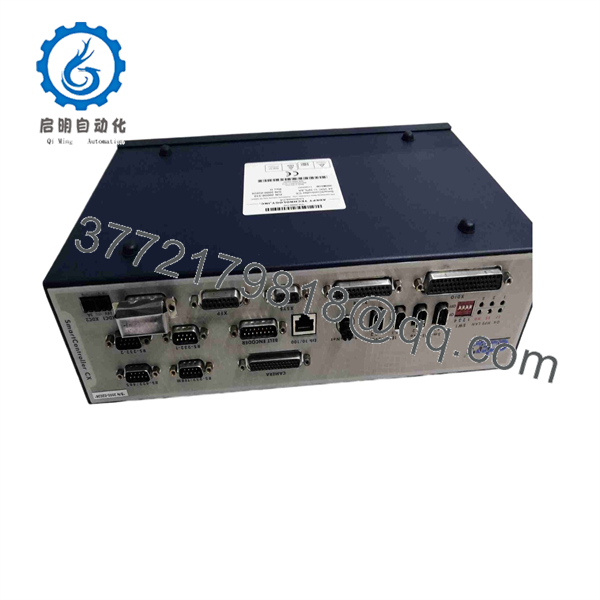
20000-310
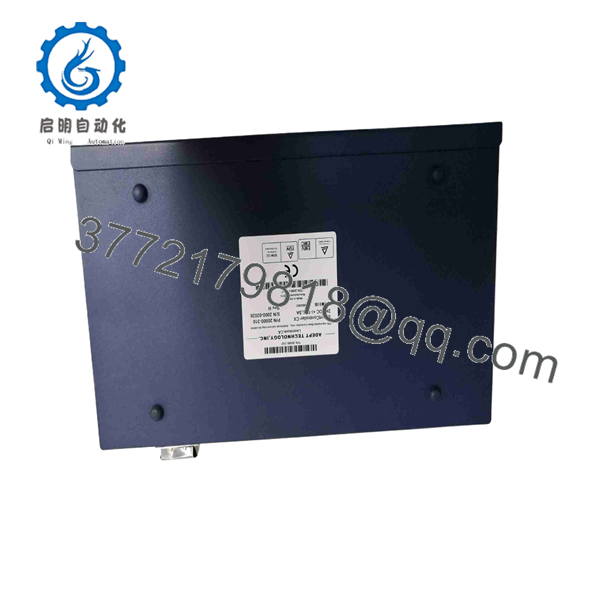
20000-310
Installation & Configuration Guide
Stage 1: Pre-Installation Preparation — Approximately 10 Minutes
⚠️ Safety First: Stop the robot cell, place the manipulator in a safe state, isolate the 24 VDC controller supply, apply site lockout/tagout procedures, and verify that the controller is de-energized.
Tools Required:
- ESD wrist strap
- PH1/PH2 screwdriver as applicable
- Digital multimeter
- Cable and connector labels
- Smartphone or camera
Data Backup:
- Record the complete 20000-310 part number and hardware revision.
- Photograph the front and rear of the existing SmartController.
- Record the controller’s V+ software/firmware information.
- Back up application programs and robot configuration.
- Record IP/network settings where applicable.
- Photograph every connected cable before removal.
- Preserve the existing CompactFlash card and its contents.
⚠️ Do not format the CompactFlash card. On a legacy Adept installation, that card may contain information required to reproduce the existing controller environment.
Stage 2: Removing the Old Controller — Approximately 5 Minutes
- Switch off the 24 VDC supply.
- Verify the supply voltage has fallen to a safe level.
- Label all communication, I/O, and peripheral cables.
- Disconnect the cables without pulling on the conductors.
- Disconnect the 24 VDC power connection.
- Remove the controller mounting hardware.
- Carefully remove the SmartController CX from the cabinet.
- Inspect connectors and cables for bent pins, oxidation, contamination, or damaged locking hardware.
⚠️ Keep the original controller available until the replacement has completed startup, communication, and robot-motion testing.
Stage 3: Installing the New Controller — Approximately 10 Minutes
- Verify the replacement is specifically marked 20000-310.
- Compare the hardware revision with the removed controller.
- Confirm the CompactFlash configuration matches the original system.
- Mount the controller in the same cabinet position.
- Connect the 24 VDC supply with correct polarity.
- Reconnect IEEE-1394 connections and other system interfaces.
- Reconnect I/O and communication cables using the photographs taken during removal.
- Secure all connectors and cable locks.
- Check that no cable is under mechanical stress.
Self-Checklist:
- 20000-310 verified
- Hardware revision documented
- 24 VDC polarity checked
- IEEE-1394 connections secured
- CompactFlash preserved
- I/O wiring matched
- All mounting hardware secured
Stage 4: Power-On & Testing — Approximately 10–15 Minutes
- Energize the SmartController without enabling robot motion.
- Observe the controller startup sequence.
- Check controller status indicators.
- Verify the installed V+ environment.
- Confirm CompactFlash detection.
- Check communication with the robot and connected I/O.
- Verify the controller recognizes the expected motion hardware.
- Test digital I/O without enabling production motion.
- If conveyor tracking is configured, verify its interface before enabling tracking.
- Enable robot drives only after controller diagnostics pass.
- Perform a low-speed homing or controlled motion test.
- Run a dry cycle before returning the cell to production.
⚠️ If the controller boots but the robot does not initialize, check V+ software compatibility, CompactFlash contents, controller revision, connections, and robot configuration before replacing additional hardware.
⚠️ If I/O disappears after replacement, inspect the network and configuration rather than assuming the controller has failed.
Frequently Asked Questions (FAQ)
What is the Adept 20000-310?
The 20000-310 is the Adept SmartController CX, an industrial robot controller for Adept motion and vision systems. It supports distributed motion control, digital I/O and motion expansion, and conveyor tracking.
Is the 20000-310 a servo amplifier?
No. This distinction matters. The 20000-310 is a SmartController CX, not the same type of hardware as Adept servo amplifier or SmartMotion modules. Some third-party websites incorrectly categorize the part, so use the original part label and Adept documentation when determining its function.
Does the 20000-310 use 24 VDC?
Yes. Available technical references identify a 24 VDC supply, with one manufacturer-derived listing specifying approximately 120 W. Another Adept parts reference identifies the unit as a SmartController CX with 24 VDC/5 A.
Are Rev. K and Rev. Q interchangeable?
Do not assume that they are identical. Both Rev. K and Rev. Q 20000-310 units appear in the secondary market, but the hardware revision, CompactFlash configuration, installed V+ software, and application requirements should be checked before substitution.
Will I lose the robot program when replacing the SmartController?
Potentially, if the replacement does not have the required CompactFlash/configuration data. Back up the existing controller before removal and preserve the original CompactFlash card. Do not erase or reinitialize the media simply because the replacement controller does not immediately boot the expected application.
Is 20000-310 obsolete?
It is a legacy Adept Technology SmartController CX and is primarily encountered today through industrial surplus, used-equipment, and repair inventories. Current listings show both used and surplus units, with availability and condition varying substantially between suppliers.
What should I request when buying a replacement 20000-310?
Ask the supplier to confirm exact part number, hardware revision, CompactFlash capacity and contents, firmware/V+ version, test status, physical condition, and warranty. This is particularly important because some listings are sold tested, while others are explicitly sold for parts or untested.



