
 WhatsApp: +86 16626708626
 Email:
  Phone: +86 16626708626
Description
3. Key Technical Specifications
- Data Rate: 100 Gbps (100GBASE-LR4)
- Form Factor: CFP (C Form-factor Pluggable)
- Wavelength: LAN-WDM (4 × ~1310 nm)
- Transmission Distance: Up to 10 km over single-mode fiber (SMF)
- Connector Type: Duplex LC
- Power Supply: 3.3 V
- Power Consumption: < 24 W (typical CFP class)
- Operating Temperature: 0 to +70 °C
- Compliance Standards: IEEE 802.3ba (100GBASE-LR4)
- Interface: CFP MSA compliant electrical interface
- Dimensions: CFP standard (approx. 144 × 82 × 13.6 mm)
- Weight: ~300 g
4. Product Introduction
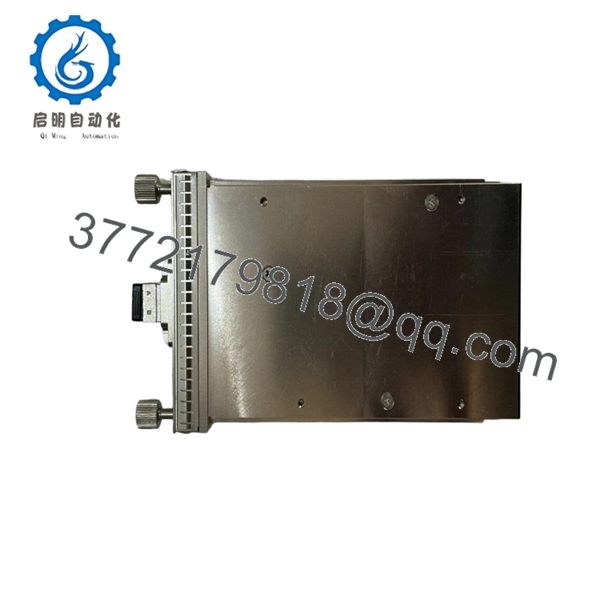
Alcatel-Lucent 3HE09437AA CFP-100G is a CFP form-factor 100 Gigabit optical transceiver designed for long-reach data transmission over single-mode fiber. It is typically deployed in carrier-grade transport systems, including IP/MPLS backbone nodes and high-capacity aggregation layers.
In field deployments on legacy Alcatel-Lucent 7750 SR and 7450 ESS platforms, this module is commonly selected for stable 10 km links where QSFP28 is not supported. It provides predictable thermal behavior and compatibility with CFP MSA-compliant ports, which still exist in many installed base systems.
5. Installation & Configuration Guide
Stage 1: Pre-Installation Preparation (Estimated: 10 minutes)
- ⚠️ Safety First: Notify NOC, disable affected ports, isolate optical links, and power down the line card if hot-swap is not explicitly supported.
- Tools Required: ESD wrist strap, fiber cleaning kit, inspection scope, smartphone (for port labeling), multimeter.
- Data Backup: Record port configuration, capture interface stats, document optical power levels (Tx/Rx dBm).
Stage 2: Removing the Old Module (Estimated: 5 minutes)
- Disconnect fiber patch cords (label Tx/Rx clearly).
- Engage CFP latch mechanism and pull straight out — avoid angular force.
- Inspect cage and connector for dust or bent pins.
- Cap fiber ends immediately to prevent contamination.
- ⚠️ Note: Keep the old transceiver for optical power baseline comparison.
Stage 3: Installing the New Module (Estimated: 10 minutes)
- Wear ESD protection and verify model (3HE09437AA) matches system requirements.
- Clean LC connectors using lint-free wipes and isopropyl alcohol.
- Insert CFP module firmly into the port until latch engages.
- Reconnect fiber (Tx ↔ Rx alignment must match remote end).
- Self-Checklist:
- Correct module inserted
- Fiber polarity verified
- Connectors cleaned
- Module fully seated
Stage 4: Power-On & Testing (Estimated: 5–10 minutes)
- Pre-Power Check: Confirm no fiber damage or excessive bend radius.
- Power-On Steps:
- Enable port from CLI or NMS.
- Check module detection (
show port opticsor equivalent). - Verify DOM readings (Tx/Rx power, temperature).
- Confirm link status = UP.
- Perform traffic test or ping across link.
- ⚠️ Troubleshooting Note:
- No link → check wavelength compatibility and fiber type.
- High Rx loss → dirty connectors or fiber attenuation.
- Module not detected → platform firmware may not support this CFP revision.

- 3HE09437AA CFP-100G
6. Frequently Asked Questions (FAQ)
Q1: Can I hot-swap this CFP module under power?
Yes, most carrier-grade platforms like 7750 SR support hot-swappable CFP modules. That said, I’ve seen ports lock up after hot insertion on older firmware. If uptime is critical, disable the port first before swapping.
Q2: Is this model obsolete, and is it genuinely new?
CFP modules are being phased out in favor of QSFP28. This specific model is typically new surplus, not freshly manufactured. Verify serial numbers and request test reports if uptime matters.
Q3: What is the direct replacement if this is unavailable?
There is no drop-in QSFP28 replacement due to form factor differences. Within CFP, you must match platform compatibility. Check Nokia optics compatibility matrix before substituting.
Q4: Why won’t my link come up after installation?
Common causes:
- Fiber polarity reversed
- Dirty LC connectors
- Mismatch between LR4 optics and fiber type
- Unsupported firmware on the router
I’ve seen engineers spend hours troubleshooting what turned out to be a dirty connector.
Q5: Why is your price lower than OEM list pricing?
Because this is new surplus inventory, typically sourced from project overstock or canceled deployments. It’s not counterfeit, but it didn’t come directly from a current production batch.
Q6: Do I need to configure anything after installation?
Usually no major configuration changes. However, verify:
- Interface is enabled
- Correct port speed (100G) is set
- Monitoring thresholds for optical power
Q7: What’s the most common installation mistake?
❗ Not cleaning fiber connectors.
I’ve seen perfectly good modules blamed for link failure when the issue was contamination on the LC interface. Always clean before insertion.



