
 WhatsApp: +86 16626708626
 Email:
  Phone: +86 16626708626
Description
Key Technical Specifications
| Parameter | Value |
|---|---|
| Model | ESS-M10-1GB-SFP-B |
| Module type | 10-port Gigabit Ethernet SFP MDA, Revision B |
| Port count | 10 SFP ports |
| Port speed | Gigabit Ethernet; supported operation depends on the qualified SFP installed |
| Optical SFP operation | 1000BASE |
| Copper SFP operation | 10/100/1000BASE-T, when using a compatible copper Gigabit Ethernet SFP |
| SFP compatibility | Alcatel-Lucent/Nokia-qualified SFPs; confirm supported part numbers for the platform and software |
| Platform use | 7450 ESS and 7750 SR families; confirm exact chassis and IOM support |
| Maximum power consumption | 31 W, listed for 1GB-SFP-B (10-port) |
| MDA dimensions | 1.4 × 7.5 × 7 in. (H × W × D), ESS-1 installation-guide family specification |
| MDA weight | 1.5 lb, ESS-1 installation-guide family specification |
| Hot-swap | MDAs are field-replaceable; follow the platform-specific shutdown and replacement procedure |
| Provisioning | MDA type must be configured to match the installed module |
Nokia documentation lists the M10-1GB-SFP-B as a supported MDA type and describes qualified SFP support; the ESS-1 guide gives a 31 W figure for the 10-port 1GB-SFP-B MDA. Check chassis-specific documentation before applying that power figure or assuming physical fit.
Product Introduction
The Alcatel-Lucent ESS-M10-1GB-SFP-B is a Revision B, 10-port Gigabit Ethernet Media Dependent Adapter for supported 7450 ESS and 7750 SR systems. It provides SFP-based network interfaces, with optical 1000BASE operation or copper 10/100/1000BASE-T operation when an appropriate qualified copper SFP is installed.
Check the system’s IOM/MDA compatibility, TiMOS release, provisioned MDA type, and approved SFP list before installation. Nokia documentation states that supported platforms require qualified SFPs and do not support third-party SFPs in the cited high-scale MDA installation guidance; verify the rule for your specific platform and software.
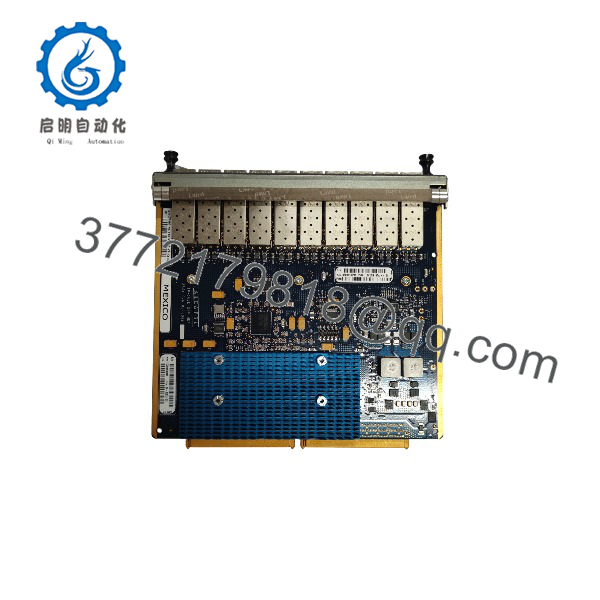
ESS-M10-1GB-SFP-B
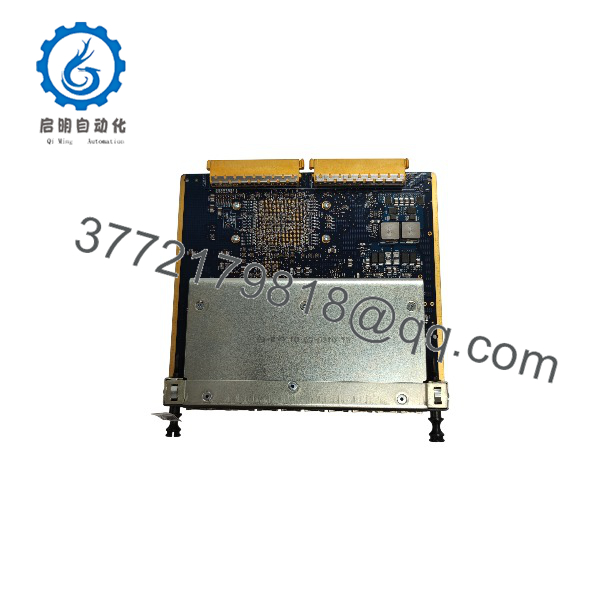
ESS-M10-1GB-SFP-B
Troubleshooting Quick Reference
| Symptom | Possible Cause | Relevance to This Part | Quick Check Method | Recommendation |
|---|---|---|---|---|
| MDA remains operationally down | Wrong MDA type provisioned, slot mismatch, or module fault | High | Check the card/MDA status and configured MDA type in the platform CLI; compare the configured type with the installed module | Correct the MDA provisioning or verify module compatibility before replacement |
| Port shows no link | SFP type, fiber/copper cabling, remote port, or configuration issue | High | Check port state and SFP recognition in the CLI; verify fiber polarity or copper link, remote speed, and port admin state | Confirm the SFP is qualified for the platform and inspect the entire link path |
| SFP is not recognized | Unsupported or defective SFP, dirty contacts, or MDA/SFP seating issue | High | Review system logs and transceiver diagnostics; compare the SFP part number with the platform-supported list | Test with a known-good qualified SFP; do not assume a generic SFP will work |
| Port reports errors or flaps | Fiber contamination, weak optical budget, bad patch cord, or speed mismatch | Medium | Check interface counters and optical diagnostics if available; clean connectors using approved fiber procedures | Replace or clean the patch cord and verify transceiver compatibility and optical budget |
| Multiple ports fail together | MDA seating, IOM issue, provisioning mismatch, or MDA hardware fault | High | Check MDA and IOM status, system alarms, and whether failures span the module | Follow the platform’s MDA removal/replacement procedure; preserve logs before reseating |
| Replacement MDA triggers an alarm | Revision/platform mismatch or configured type does not match hardware | High | Compare the installed MDA type, board label/revision, chassis, and IOM against the approved hardware list | Confirm the exact platform/software support matrix before commissioning |
Nokia CLI documentation notes that an inserted MDA that does not match the configured MDA type raises an alarm; MDAs must be provisioned for the slot before ports can be configured.
If the issue persists, contact technical support with photos of the MDA and SFP labels, chassis/IOM model, TiMOS version, port status, alarms, and interface counters.
Frequently Asked Questions (FAQ)
How many ports does the ESS-M10-1GB-SFP-B provide?
It provides ten SFP-based Gigabit Ethernet ports. Port function depends on the installed SFP and the system configuration.
Which chassis can use this MDA?
Listings identify it for 7450 ESS and 7750 SR systems, but the exact chassis, IOM, and software-release combination matters. Check the Nokia hardware support documentation for the installed system before ordering.
Can I use third-party SFPs?
Do not assume compatibility. Nokia installation guidance for the cited 7×50 high-scale MDA states that the platforms support qualified SFPs and do not support third-party SFPs. Confirm the supported SFP list for the exact chassis, IOM, MDA, and software release in your network.
Can the ports run at 10/100 Mbps?
Optical SFP operation is listed as 1000BASE. Copper Gigabit Ethernet SFPs can support 10/100/1000BASE-T on the documented platform guidance. Confirm the exact copper SFP and platform behavior before planning lower-speed links.
Is this MDA hot-swappable?
The 7450 ESS documentation describes MDAs as field-replaceable, and the platform provides installation and replacement procedures. Follow the exact chassis procedure and shut down or drain affected ports as required; do not infer that every system permits removal while forwarding traffic.
What does Revision B mean for a replacement?
It is part of the MDA’s hardware identification. Match the full ESS-M10-1GB-SFP-B designation and verify compatibility with the chassis, IOM, and software. Do not substitute the non-B M10-1GB-SFP based on port count alone.
Is the item new, refurbished, or in stock?
Condition and availability depend on the seller. A secondary-market listing describes a refurbished unit with a 90-day warranty, but that does not establish the condition or warranty of other offers. Request current stock confirmation, unit photos, test details, and written warranty terms.



