
 WhatsApp: +86 16626708626
 Email:
  Phone: +86 16626708626
Description
| Parameter | Specification |
| Catalog Number | 1732E-16CFGM12 |
| Brand | Allen-Bradley / Rockwell Automation |
| Module Type | ArmorBlock Dual-Port EtherNet/IP Digital I/O |
| I/O Points | 16 Channels (Self-Configuring Input/Output) |
| Operating Voltage Range | 12 to 30 V DC |
| Bus Current Draw | 200 mA at 24 V DC |
| Network Protocol | EtherNet/IP (Supports Device Level Ring – DLR) |
| Network Connectors | 2 x M12 D-Coded female connectors |
| I/O Connectors | 8 x M12 A-Coded 5-pin female connectors |
| Enclosure Rating | IP67, IP69K, NEMA 4X (Washdown environments) |
| Operating Temperature | −20 to +60 °C (−4 to +140 °F) |
The Allen-Bradley 1732E-16CFGM12 is an IP67-rated, 16-point self-configuring digital I/O block designed for direct on-machine installation via EtherNet/IP networks. It handles local sensor signals and actuator outputs in harsh washdown environments without requiring protective control enclosures.
Securing this module as New Surplus ensures immediate drop-in replacement availability, eliminating standard 12-to-16-week factory lead times. It lowers Total Cost of Ownership by providing OEM-level operational reliability without risking the catastrophic unexpected downtime associated with degraded refurbished units.
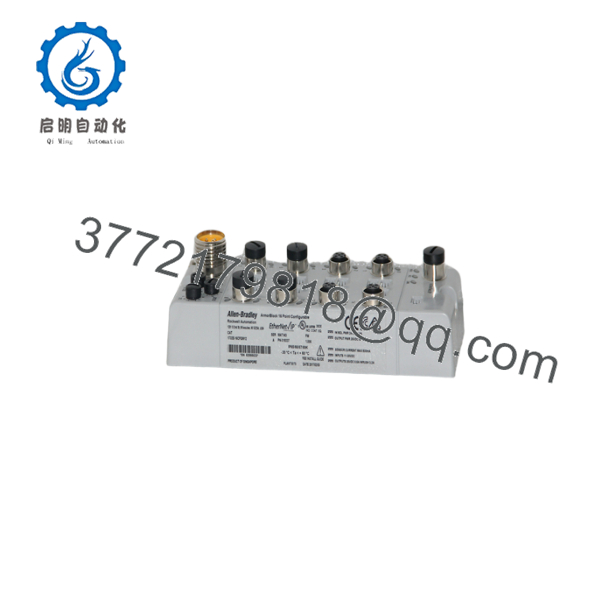
1732E-16CFGM12
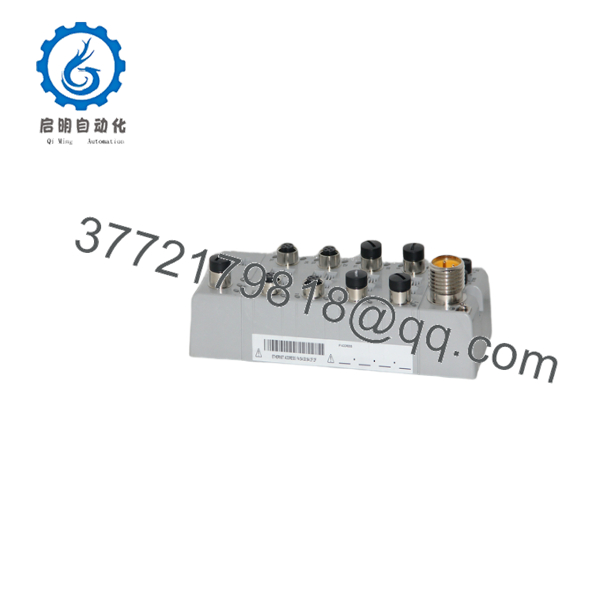
1732E-16CFGM12
Stage 1: Pre-Installation (Prep & Safety)
Perform Lock-Out/Tag-Out (LOTO) on the 24 V DC sensor/actuator power supply and logic power lines feeding the target machine segment. Put on a grounded ESD wrist strap before handling replacement hardware. Take clear photographs of the existing module cabling, network connections, and rotary IP address switches to document the exact node configuration.
Stage 2: Removal
Unscrew the M12 network cables and M12 I/O field connectors by turning the coupling nuts counter-clockwise. Disconnect the auxiliary power cables. Remove the two mounting bolts securing the block to the machine frame. Pull the module straight off the mounting surface without twisting, ensuring no stress is applied to adjacent cable runs.
Stage 3: Installation (Clone & Seat)
Inspect the mounting surface to ensure it is free of dirt and debris. Position the new 1732E-16CFGM12 module and tighten the mounting bolts to 1.5 N·m (13 lb·in). Set the rotary switches on the new module to match the exact node address (or DHCP mode) photographed on the original unit. Torque all M12 cable connectors to 0.6 to 0.8 N·m to maintain the IP67/IP69K ingress protection seal.
Stage 4: Power-On & Testing
Reapply 24 V DC power to the logic and auxiliary power circuits. Observe the Module Status (MS) and Network Status (NS) LEDs. The MS LED must turn solid green. Once connected to the Studio 5000 / Logix designer controller, verify that the NS LED shifts from flashing green to solid green, signaling an active EtherNet/IP I/O connection.
- Recommended Firmware: Firmware Revision 3.001 or higher is recommended for full integration with Studio 5000 Logix Designer (V24 and higher) and full support for Device Level Ring (DLR) topologies.
- Compatibility Notes: Firmware Revision 3.x modules maintain backward compatibility with Revision 2.x electronic keying configurations when set to “Compatible Module” keying in Studio 5000. However, advanced diagnostic features and DLR fast-recovery protocols require matching project profile definitions.
- Swap Risks: Avoid updating firmware directly over an active production Ethernet ring. Always flash firmware on a bench-test station prior to field installation to prevent communication interruptions or corrupted bootloader states during a hardware swap.
How do you guarantee this 1732E-16CFGM12 module is genuine New Surplus and not refurbished?
This product is a Brand New Surplus unit. It is not used, not pulled from a decommissioned plant, and not refurbished. All modules undergo rigorous quality verification to ensure OEM-level reliability. We inspect all incoming stock to confirm original OEM factory seals, verify untouched M12 pin contacts, and validate serial numbers against manufacturer batch records.
Why is this unit priced higher than used marketplace listings but lower than OEM list price?
Our pricing reflects the cost of securing genuine New Surplus inventory globally. It may be 20-30% higher than a refurbished gamble, but it is substantially less than OEM list prices, and it buys you 100% peace of mind. A second-hand or refurbished module carries hidden risks like thermal fatigue on internal switching circuits, which can trigger an emergency plant shutdown costing tens of thousands of dollars.
Is the 1732E-16CFGM12 actively supported, and should we stock buffer inventory?
While the 1732E series remains an active line within Rockwell Automation’s catalog, lead times from factory distributors frequently exceed 12 to 16 weeks. Because this 16-channel self-configuring block manages critical field inputs and outputs on automated assembly lines, maintaining 1 to 2 units on-site as insurance stock protects your plant against extended downtime.
Can I hot-swap the 1732E-16CFGM12 while the EtherNet/IP network and machine power are active?
While the M12 connectors carry IP67 ratings, hot-swapping under load is not recommended. Disconnecting field power connectors under load can create micro-arcing across M12 pins, degrading connector contacts over time. Always isolate the 24 V DC auxiliary field power line prior to swapping the block.
Do I need to reprogram the module when replacing a failed 1732E-16CFGM12 unit?
No. The 1732E-16CFGM12 points are self-configuring based on the configuration parameters pushed from the Logix controller (ControlLogix or CompactLogix). Once you align the rotary IP switches on the replacement unit to match the original node address, the PLC automatically connects, recognizes the hardware via Electronic Keying, and downloads the channel configurations.
What warranty protection comes with this New Surplus Allen-Bradley module?
Every 1732E-16CFGM12 unit ships with a full 1-year functional replacement warranty. Each module undergoes a complete power-on self-test, communication handshake check, and port verification under our SOP quality protocols before shipment.



