
 WhatsApp: +86 16626708626
 Email:
  Phone: +86 16626708626
Description
Key Technical Specifications
| Parameter | Specification |
|---|---|
| Catalog Number | 1756-CN2R |
| Product Family | ControlLogix |
| Communication Protocol | ControlNet |
| Module Type | Redundant ControlNet Interface Module |
| ControlNet Ports | 2 BNC |
| Maximum Connections | 131 |
| Maximum Nodes | 99 |
| Transmission Rate | 5 Mbps |
| ControlNet Cable | 1786-RG6 quad-shield RG6 coaxial cable |
| Backplane Current | 1.3 A @ 5.1 V DC; 3 mA @ 24 V DC |
| Power Dissipation | 6.7 W |
| Operating Temperature | 0 to 60 °C |
| Storage Temperature | -40 to 85 °C |
| Relative Humidity | 5–95%, noncondensing |
| Isolation Voltage | 30 V continuous, basic insulation |
| Chassis Location | Any ControlLogix chassis slot |
| Approx. Weight | 0.293 kg |
| Firmware | Series B supports up to revision 20.x; Series C supports revision 25.x |
Rockwell Automation identifies the 1756-CN2R specifically as a ControlNet Redundant Interface Module (100 connections) with two ControlNet channels. Current Rockwell specifications list 131 maximum supported connections, 99 maximum nodes, 5 Mbps transmission, and 1.3 A backplane current at 5.1 V DC.
Product Introduction
The Allen-Bradley 1756-CN2R is a ControlLogix communication module designed for redundant ControlNet media. Its two ControlNet BNC interfaces allow the module to connect to redundant ControlNet networks while providing communication between ControlLogix controllers, I/O, and other networked devices. The module supports up to 131 connections and a maximum of 99 ControlNet nodes.
The module operates at the standard 5 Mbps ControlNet transmission rate and installs in any ControlLogix chassis slot. It is intended for established ControlNet architectures where network redundancy and deterministic communication remain operational requirements. Rockwell currently lists the 1756-CN2R as Active Mature, rather than discontinued.
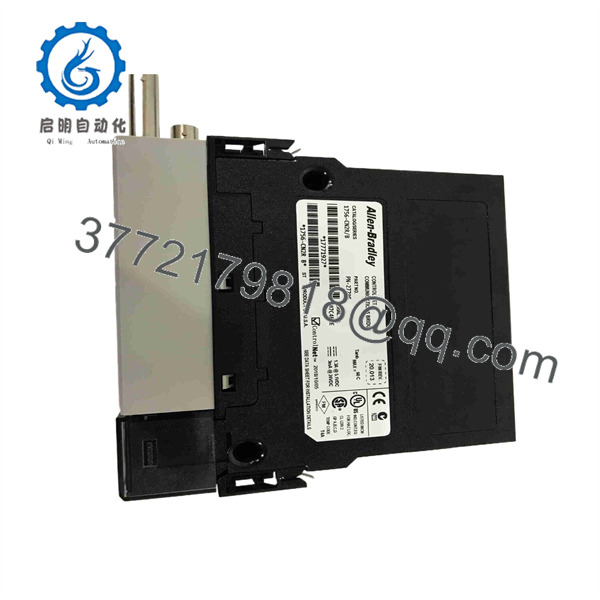
1756-CN2R
Installation & Configuration Guide
Stage 1 — Pre-Installation and Safety
- Confirm the module label shows 1756-CN2R.
- Verify the installed ControlLogix chassis has sufficient 5.1 V DC backplane capacity. The module requires approximately 1.3 A at 5.1 V DC.
- Document the existing ControlNet network topology, node addresses, media paths, and redundant A/B connections.
- Record the existing module’s Series and firmware revision before replacement.
- Confirm that the replacement firmware is compatible with the controller and existing ControlNet architecture.
- Inspect both BNC connectors and the module’s backplane connector for contamination or mechanical damage.
- Estimated time: 20–30 minutes.
WARNING: Do not assume that a 1756-CN2 and 1756-CN2R are interchangeable. The is specifically designed for redundant ControlNet media and provides two ControlNet network connections.
Stage 2 — Module Removal
- Place the controlled process in an appropriate safe state.
- Follow the site’s electrical isolation and LOTO procedure where required.
- Identify and label the two ControlNet connections before removal.
- Disconnect the ControlNet BNC connections without applying excessive force to the connectors.
- Release the ControlLogix module from the chassis.
- Remove the 1756- while supporting the module body.
- Inspect the chassis slot and backplane connector before installing the replacement.
- Estimated time: 15–30 minutes.
WARNING: ControlNet network availability can be affected by module removal. For a production network, coordinate the replacement with the plant’s communication-maintenance procedure rather than treating the operation as a routine I/O-module exchange.
Stage 3 — Installation and Configuration
- Verify the replacement module’s catalog number and Series.
- Insert the 1756- into the selected ControlLogix chassis slot.
- Secure the module according to the ControlLogix installation procedure.
- Reconnect the ControlNet A and B network connections to their documented positions.
- Restore the appropriate network topology and termination arrangement.
- Apply power according to the approved commissioning procedure.
- Verify the module’s status indicators.
- Confirm that the controller recognizes the communication module.
- Check the ControlNet network configuration and node status.
- Verify that scheduled and unscheduled ControlNet connections establish correctly.
Rockwell documents the 1756- as a chassis-based module that can occupy any ControlLogix chassis slot.
Estimated time: 30–60 minutes, excluding ControlNet network troubleshooting.
Stage 4 — Power-Up and Testing
- Confirm normal module status after power-up.
- Verify both redundant ControlNet paths.
- Check controller communication with remote ControlNet devices.
- Confirm that expected ControlNet nodes appear without persistent network faults.
- Verify I/O data updates at the controller.
- Check for unexpected connection errors or network retries.
- If the application uses redundant media, verify operation of each media path according to the site’s maintenance procedure.
- Confirm HMI/SCADA communications before returning the process to normal operation.
- Record the replacement module’s serial number, Series, firmware revision, and installation date.
- Estimated time: 30–90 minutes.
Commissioning note: A normal module LED indication alone does not prove that redundant ControlNet communication is functioning correctly. Test the actual network paths and application connections.
Frequently Asked Questions (FAQ)
1. What is the Allen-Bradley 1756- used for?
The 1756- is a ControlLogix redundant ControlNet communication module. It provides two ControlNet BNC connections for redundant media architectures and communication between ControlLogix systems and ControlNet devices.
2. How many ControlNet ports does the 1756- have?
The module has two ControlNet BNC ports, corresponding to its redundant ControlNet media architecture. Rockwell specifies 1786-RG6 quad-shield RG6 coaxial cable for the ControlNet network.
3. What is the maximum number of ControlNet connections?
Rockwell’s current product specification lists 131 maximum supported connections and up to 99 ControlNet nodes. The actual usable capacity depends on the network architecture and connection requirements.
4. What is the ControlNet transmission speed?
The 1756- operates at 5,000 kbps (5 Mbps).
5. Is the 1756- discontinued?
No. Rockwell Automation currently lists the 1756- lifecycle status as Active Mature. This is different from the older 1756-CNBR, which Rockwell lists as discontinued on December 31, 2024, with the 1756- identified as its engineering replacement.
6. Can I replace a 1756-CNBR with a 1756-?
The 1756- is the Rockwell-designated engineering replacement for the discontinued 1756-CNBR, but it should not be treated as a blind drop-in replacement. Review the existing ControlNet configuration, connection capacity, firmware, chassis power budget, and network topology before making the change.
7. What firmware should I verify before purchasing a 1756-?
Series and firmware matter. Rockwell compatibility information lists Series B units with firmware in the 20.x range and Series C units with firmware 25.x; current compatibility documentation lists 25.006 for Series C. Verify the exact Series printed on the module label and the firmware requirements of the installed ControlLogix system before procurement.



