
 WhatsApp: +86 16626708626
 Email:
  Phone: +86 16626708626
Description
Key Technical Specifications
| Parameter | Specification Value |
| Catalog Number | 1756-CNBR |
| Communication Protocol | ControlNet (Deterministic, Scheduled/Unscheduled I/O) |
| Media Type | Redundant RG-6 Quad-Shield Coaxial Cable (Dual BNC Connectors: Channel A & B) |
| Data Transfer Rate | 5 Mbps |
| Backplane Current (5.1V DC) | 1.0 A |
| Backplane Current (24V DC) | 14 mA |
| Power Dissipation | 5.14 W max |
| Network Connections | 64 Logix Connections (CIP connections over ControlNet) |
| Node Addressing | 01 to 99 (Configured via rotary switches) |
| Diagnostic Port | RJ45 Local Access / NAP (Network Access Port) |
| Status Display | 4-Character Alpha-Numeric Display + LED Array (OK, A, B) |
Product Introduction & Supply Chain Strategy
This product is a Brand New Surplus unit. It is not used, not pulled from a decommissioned plant, and not refurbished. All modules undergo rigorous quality verification to ensure OEM-level reliability. The Allen-Bradley 1756-CNBR is a specialized ControlNet bridge card designed for ControlLogix chassis, featuring dual BNC connectors to support redundant coaxial media layouts. It establishes high-speed, time-critical, deterministic data transfers between ControlLogix CPUs, remote I/O racks, drive lineups, and secondary control systems across process automation networks.
With Rockwell Automation transitioning legacy ControlNet hardware toward active-discontinued status, procuring the 1756-CNBR as New Surplus is a crucial risk-mitigation tool for your facility’s Total Cost of Ownership (TCO). Refurbished bridge cards frequently suffer from fatigued BNC physical connectors, degraded internal isolation transformers, and aged onboard memory chips that trigger intermittent network drops, media switchover failures, and unscheduled plant shutdowns. Keeping factory-fresh surplus units in your emergency inventory guarantees 10-15 years of operational stability, maintains strict network determinism, and protects your capital expenditure plan until a planned EtherNet/IP migration is executed.
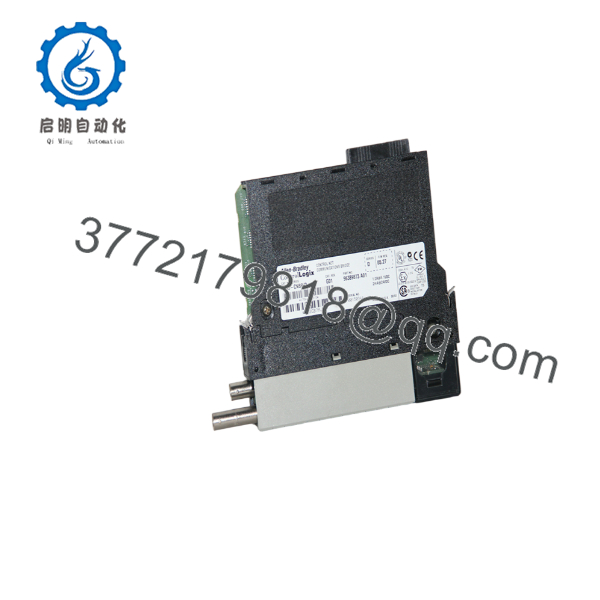
1756-CNBR
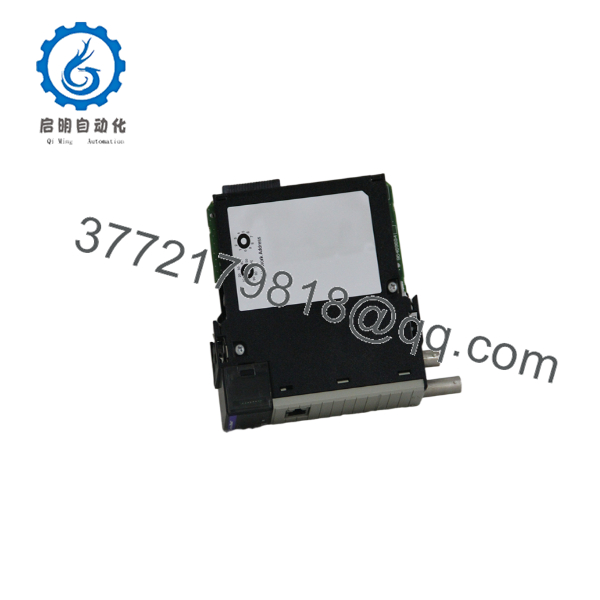
1756-CNBR
Installation & Configuration Guide
1.Stage 1: Pre-Installation (Prep & Safety):Isolate rack power, wear static protection, and verify rotary node addresses.
- Enforce strict Lock-Out/Tag-Out (LOTO) protocols on the targeted ControlLogix chassis power supply.
- Wear a grounded Electrostatic Discharge (ESD) wrist strap secured to unpainted enclosure frame steel.
- Inspect the rotary node address switches on the top side of the 1756-CNBR card; set the two-digit address (01 to 99) to match your RSNetWorx for ControlNet network configuration.
2.Stage 2: Removal:Safely disengage coaxial cables and extract the module from the slot.
- Label and disconnect the two RG-6 coaxial cables from BNC ports A and B on the front faceplate.
- Disconnect any RJ45 programming cables attached to the NAP port.
- Depress the upper and lower module retention tabs on the 1756-CNBR casing.
- Pull the module horizontally straight out of the chassis slot to prevent bending or stressing backplane bus pins.
3.Stage 3: Installation (Clone & Seat):Verify switch settings, seat hardware, and secure media connections.
- Double-check that the replacement 1756-CNBR node switches exactly match the address of the unit being replaced.
- Align the module circuit board with the chassis card guides for the target slot position.
- Slide the card firmly into the chassis until the top and bottom latches snap securely onto the chassis rail.
- Connect coaxial cables to BNC Port A and BNC Port B (ensure locking collars are fully twisted into place).
4.Stage 4: Power-On & Testing:Apply power, observe initialization text, and verify RSNetWorx schedule.
- Re-energize the ControlLogix chassis power supply.
- Monitor the 4-character alpha-numeric display on the front panel as it cycles through self-test routines and displays the active node address (e.g.,
A#05). - Verify that the OK LED turns solid green and media LEDs (A and B) illuminate green.
- Verify via Studio 5000 / RSNetWorx for ControlNet that the scheduled network keeper recognizes the node without requiring a full network reschedule.
Firmware/Software Versions & Upgrade Notes
- Software Compatibility: Programmed and managed using Studio 5000 / RSLogix 5000 and RSNetWorx for ControlNet. Ensure the firmware major and minor revision levels specified in your Studio 5000 I/O Configuration tree match the physical firmware stored on the module.
- Series Differences (1756-CNB vs 1756-CNBR): The “R” suffix in 1756-CNBR explicitly designates support for Redundant Media (dual BNC connectors for Channel A and Channel B). While a 1756-CNBR can operate on a single-media network (Port A only), replacing a 1756-CNB (non-redundant single BNC) with a 1756-CNBR requires updating the module catalog entry in RSLogix 5000.
- Firmware Upgrade Considerations: Upgrading module firmware via ControlFLASH across an active ControlNet network carries risk. Network packet interruptions during a flash cycle can corrupt the card’s bootloader. Always perform firmware flash updates locally with the module installed in a dedicated test rack using the NAP port or direct backplane connection.
Frequently Asked Questions (FAQ)
Why is this New Surplus 1756-CNBR priced higher than refurbished cards but lower than OEM list?
Our pricing reflects the market value of acquiring verified, un-used OEM inventory from global industrial reserves. Refurbished units are cheap because they rely on harvested cards exposed to high thermal wear and mechanical stress on BNC terminals. New Surplus provides 100% factory operating lifespan and network reliability without the high markup or extended lead times of OEM legacy list orders.
Are these 1756-CNBR modules genuinely new?
Yes. Every 1756-CNBR unit is original Allen-Bradley stock, completely unused, with zero backplane socket pin wear, pristine BNC connections, and original housing. Packages are opened only inside static-controlled ESD cleanrooms for physical inspection and automated test-rack validation prior to shipment.
What is the purpose of the NAP port on the front faceplate?
The NAP (Network Access Port) is a temporary RJ45 diagnostic interface used to connect a programming terminal running RSNetWorx or Studio 5000 directly to the ControlNet network without breaking the coaxial cable loop. It is for temporary configuration and troubleshooting only, not for permanent Ethernet infrastructure.
What does a “MEDIA A ERR” or “MEDIA B ERR” message on the front display mean?
This indicates that the bridge card is detecting packet errors, signal attenuation, or a physical disconnection on that specific coaxial channel. Common causes include loose BNC connectors, incorrect 75-ohm cable termination, damaged RG-6 quad-shield cable, or faulty 1786-TPR tap assemblies.
What warranty coverage comes with this New Surplus bridge module?
We provide a comprehensive 1-Year replacement warranty (depending on your service agreement level). If the unit experiences any hardware malfunction during normal operational use, we immediately dispatch a replacement unit directly from our dedicated strategic buffer stock.



