
 WhatsApp: +86 16626708626
 Email:
  Phone: +86 16626708626
Description
3. Key Technical Specifications
| Parameter | Specification Value |
| Catalog Part Number | 1756-EN2T |
| Manufacturer | Allen-Bradley (Rockwell Automation) |
| Compatible Architecture | Allen-Bradley ControlLogix (1756 Chassis System) |
| Communication Rate | 10/100 Mbps full or half duplex (Auto-negotiating) |
| Network Interface | Single RJ45 Category 5e/6 twisted-pair copper port |
| TCP/IP Connections | 128 connections |
| Logix Connections | 256 connections (CIP messaging and I/O control) |
| Packet Rate (I/O) | Up to 25,000 packets/sec (I/O) / 1,280 packets/sec (HMI/MSG) |
| Backplane Current Draw | 1.0 A @ 5.1 V DC, 3 mA @ 24 V DC |
| Thermal Dissipation | 5.1 W maximum |
| Operating Temperature | 0°C to +60°C (32°F to 140°F) |
| Rotary Switches | 3 rotary switches for hardware IP address assignment |
4. Product Introduction & Supply Chain Strategy
The Allen-Bradley 1756-EN2T is a high-performance EtherNet/IP communication bridge module engineered for ControlLogix rack architectures. Designed to handle real-time I/O data, CIP Motion, and explicit messaging, it bridges the backplane to copper Ethernet infrastructure, eliminating network bottlenecks between control systems and field devices.
This product is a Brand New Surplus unit. It is not used, not pulled from a decommissioned plant, and not refurbished. All modules undergo rigorous quality verification to ensure OEM-level reliability.
Securing the 1756-EN2T as New Surplus protects plant operations against unplanned downtime. Standard legacy modules like the older 1756-ENBT offer substantially lower packet-per-second capabilities and connection limits. Purchasing verified New Surplus 1756-EN2T hardware provides maximum network throughput and original factory reliability while bypassing lead times and avoiding the risks of degraded capacitors or worn RJ45 ports found in refurbished parts.
5. Installation & Configuration Guide
Stage 1: Pre-Installation (Prep & Safety)
- Open the main incoming AC power breaker feeding the ControlLogix rack and apply Lock-Out/Tag-Out (LOTO).
- Attach a grounded anti-static wrist strap connected to the enclosure frame ground terminal.
- Set the three rotary switches on the module front panel to the desired static IP address (e.g., set to
192for192.168.1.192) or leave at999for DHCP/BOOTP configuration. - Verify the integrity of the RJ45 industrial Ethernet cable and connector latch.
Stage 2: Removal
- Unlatch and disconnect the Ethernet cable from the front RJ45 jack.
- Push the locking tabs on the top and bottom of the existing 1756 module inward to disengage the chassis lock.
- Slide the card straight out along the chassis guide slots to protect the rear backplane connector pins.
- Store the removed card inside an ESD shielding bag.
Stage 3: Installation (Clone & Seat)
- Align the top and bottom circuit board edges of the 1756-EN2T with the designated chassis card guides.
- Slide the card into the slot until the top and bottom locking tabs engage the chassis frame with a firm click.
- Re-insert the RJ45 Ethernet cable until the retention clip clicks securely into place.
Stage 4: Power-On & Testing
- Restore power to the 1756 chassis power supply.
- Observe the front LED indicators:
OKshould turn solid green, andNETshould illuminate green once linked to the network. - Open Studio 5000 Logix Designer / RSLinx Classic to verify online communication, slot assignment, and IP address status via BOOTP/DHCP or static assignment.
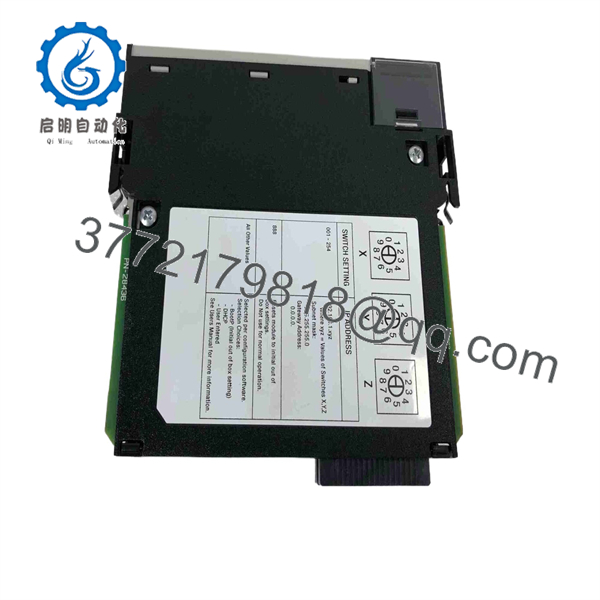
1756-EN2T
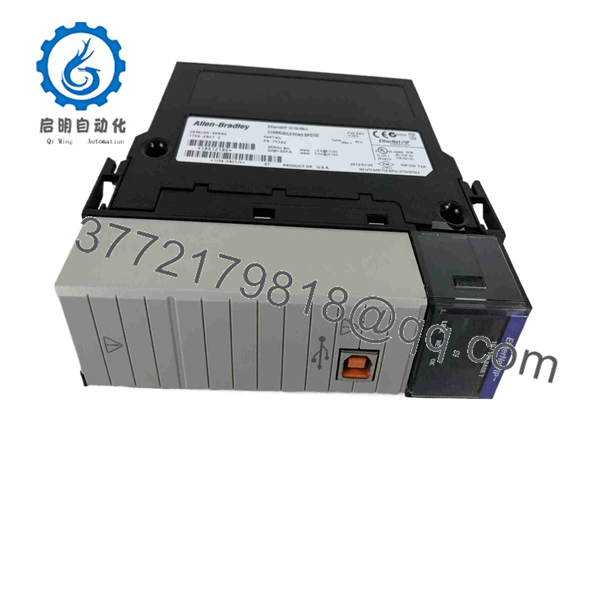
1756-EN2T
6. Firmware/Software Versions & Upgrade Notes
The 1756-EN2T features flash-upgradeable firmware to maintain compatibility with modern Logix control environments.
- Software Compatibility: Compatible with Studio 5000 Logix Designer / RSLogix 5000 across all active ControlLogix controller revisions (L6x, L7x, L8x).
- Firmware Flashing: Update firmware using Rockwell’s ControlFLASH or ControlFLASH Plus tools via EtherNet/IP or backplane bridging.
- Network Capacities: Replaces older 1756-ENBT cards directly in hardware configuration profiles while increasing TCP/IP connection capacity from 64 to 128 connections.
7. Frequently Asked Questions (FAQ)
Q: Is this 1756- module brand new or has it been pulled from a decommissioned cabinet?
A: This product is a Brand New Surplus unit. It is not used, not pulled from a decommissioned plant, and not refurbished. All modules undergo rigorous quality verification to ensure OEM-level reliability.
Q: Can I replace an older 1756-ENBT module with a 1756-?
A: Yes. The 1756- is a drop-in functional upgrade for the 1756-ENBT, offering twice the connection capacity (128 TCP/IP vs 64) and significantly higher packet handling performance.
Q: How do I assign an IP address using the rotary switches?
A: The rotary switches set the last octet of the IP address on a 192.168.1.xxx subnet (e.g., setting 1–2–3 assigns 192.168.1.123). Setting switches to 999 enables dynamic IP configuration via BOOTP/DHCP.
Q: Does this module support Ethernet Device Level Ring (DLR) topologies?
A: No. The single-port 1756- does not natively support DLR topology. For ring topologies, refer to the dual-port 1756-EN2TR module.
Q: What warranty applies to this New Surplus module?
A: We back this card with a full 1-year functional replacement warranty from the date of shipment, ensuring continuous system protection and zero process downtime.



