
 WhatsApp: +86 16626708626
 Email:
  Phone: +86 16626708626
Description
Key Technical Specifications
| Parameter | Specification |
|---|---|
| Catalog Number | 1756-ENBT |
| Product Family | ControlLogix |
| Communication Protocol | EtherNet/IP |
| Module Type | Ethernet Communication / Bridge Module |
| Ethernet Ports | 1 × RJ45 |
| Ethernet Speed | 10/100 Mbps |
| Ethernet Medium | 802.3-compliant shielded or unshielded twisted pair |
| Maximum TCP Connections | 64 |
| Maximum CIP Connections | 128 |
| Backplane Current | 700 mA @ 5.1 V DC; 3 mA @ 24 V DC |
| Power Dissipation | 3.7 W |
| Isolation Voltage | 30 V continuous, basic insulation |
| Operating Temperature | 0 to 60 °C |
| Storage Temperature | -40 to 85 °C |
| Relative Humidity | 5–95%, noncondensing |
| Chassis Location | Any ControlLogix chassis slot |
| Slot Width | 1 slot |
| Lifecycle | Discontinued |
Rockwell Automation specifies the 1756-ENBT as a 10/100 Mbps EtherNet/IP communication module with one copper RJ45 interface. The module supports 64 TCP connections and up to 128 CIP connections, with a 700 mA @ 5.1 V DC backplane current requirement.
Product Introduction
The Allen-Bradley 1756-ENBT is a ControlLogix EtherNet/IP communication module used to connect ControlLogix controllers and chassis-based systems to Ethernet networks. It provides one 10/100 Mbps copper RJ45 interface and supports TCP/IP and EtherNet/IP communications for controller, I/O, messaging, and other networked automation applications.
The 1756-ENBT is now a legacy component. Rockwell Automation discontinued it on December 31, 2021 and identifies the 1756-EN2T as its functional replacement. Existing systems can continue using the ENBT where firmware, connection capacity, network architecture, and maintenance requirements remain suitable.
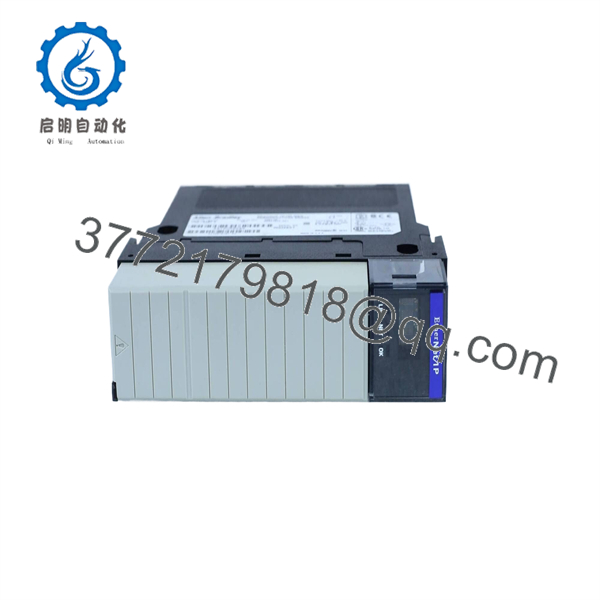
1756-ENBT
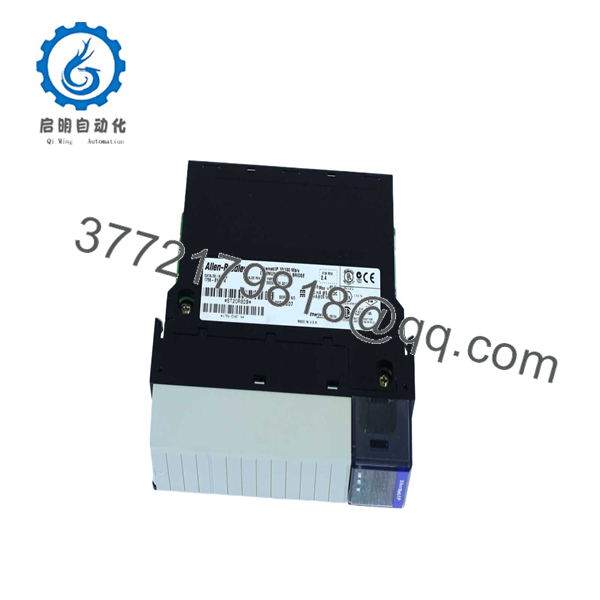
1756-ENBT
Installation & Configuration Guide
Stage 1 — Pre-Installation and Safety
- Confirm the module label reads 1756-ENBT and record the Series and firmware revision.
- Verify that the ControlLogix chassis has adequate backplane capacity. The ENBT draws approximately 700 mA at 5.1 V DC and 3 mA at 24 V DC.
- Document the existing IP address, subnet mask, gateway, module slot, controller connections, and Ethernet topology.
- Back up the Logix project before modifying the communication configuration.
- Record existing EtherNet/IP connection assignments and devices communicating through the module.
- Inspect the RJ45 port, module connector, and chassis backplane for contamination or physical damage.
- Estimated time: 20–30 minutes.
WARNING: Do not assume that replacing an ENBT with an EN2T is a simple hardware swap. The EN2T has different connection capacity and product behavior, so the project and network configuration should be reviewed before substitution.
Stage 2 — Module Removal
- Place the controlled process in a safe operating state.
- Follow the site’s electrical isolation and LOTO procedure where applicable.
- Record the Ethernet cable connection and module slot.
- Disconnect the RJ45 Ethernet cable.
- Release the 1756-ENBT from the ControlLogix chassis.
- Remove the module without stressing the backplane connector.
- Inspect the replacement module for bent connectors, corrosion, cracked housing, or evidence of previous repair.
- Estimated time: 15–30 minutes.
Rockwell’s installation documentation identifies the ENBT as a chassis-mounted ControlLogix module and provides procedures for module installation and replacement.
Stage 3 — Installation and Configuration
- Insert the 1756-ENBT into the designated ControlLogix chassis slot.
- Secure the module according to the ControlLogix installation procedure.
- Reconnect the Ethernet cable to the RJ45 port.
- Restore power according to the approved plant procedure.
- Assign or verify the module’s IP address using the applicable Rockwell configuration method.
- Verify the subnet mask and gateway settings.
- In Studio 5000 / RSLogix 5000, confirm the Ethernet module configuration matches the installed hardware.
- Verify the configured module revision against the actual ENBT firmware.
- Confirm all downstream EtherNet/IP devices and communication paths.
- Estimated time: 30–60 minutes.
The ENBT installation documentation covers IP-address assignment through rotary switches and BOOTP/DHCP configuration, as well as hardware installation and Ethernet communication-driver setup.
Stage 4 — Power-Up and Testing
- Confirm the module status indicators after power-up.
- Verify the assigned IP address.
- Check Ethernet link/activity status.
- Confirm that the controller recognizes the communication module.
- Verify EtherNet/IP connections to remote I/O and other networked devices.
- Check for connection timeouts, duplicate IP-address conditions, or persistent network faults.
- Verify HMI/SCADA communications where applicable.
- Monitor the network during normal machine operation.
- Record the replacement module’s catalog number, Series, firmware revision, and serial number.
- Estimated time: 30–90 minutes.
Commissioning note: A green link indicator does not establish that the application is communicating correctly. Validate the complete communication path from the ControlLogix controller through the ENBT to the target EtherNet/IP device.
Frequently Asked Questions (FAQ)
1. What is the Allen-Bradley 1756-ENBT used for?
The 1756-ENBT provides EtherNet/IP communication for ControlLogix systems. It connects the ControlLogix backplane to a 10/100 Mbps Ethernet network and supports controller, I/O, and messaging applications.
2. How many Ethernet ports does the 1756-ENBT have?
The module has one copper Ethernet port supporting 10/100 Mbps communication. Rockwell specifies 802.3-compliant shielded or unshielded twisted-pair Ethernet cabling.
3. How many connections does the 1756-ENBT support?
Rockwell specifies 64 maximum TCP connections and 128 maximum CIP connections. CIP connections can be allocated to explicit or implicit applications within the module’s supported connection capacity.
4. Is the 1756-ENBT discontinued?
Yes. Rockwell Automation discontinued the 1756-ENBT on December 31, 2021. Rockwell identifies the 1756-EN2T as its functional replacement.
5. Can I replace a 1756-ENBT with a 1756-EN2T?
The 1756-EN2T is the Rockwell-designated functional replacement, but it should not be treated as a blind drop-in replacement. The supports up to 128 TCP and 256 CIP connections, compared with 64 TCP and 128 CIP for the ENBT, and its power requirements are different. Review the Logix project, firmware, connection configuration, and chassis power budget before migration.
6. What should I verify when purchasing a used 1756-ENBT?
Verify the exact catalog number, Series, firmware revision, connector condition, chassis connector condition, and power-up status. For a production spare, request an Ethernet communication test rather than relying solely on a visual inspection. Because the product has been discontinued, confirming the installed firmware against the existing ControlLogix project is particularly important.
7. Is the 1756-ENBT suitable for a new ControlLogix project?
It is generally better treated as a legacy replacement part rather than a preferred component for a new design. Rockwell has discontinued the ENBT and identifies the 1756- as its functional replacement. For an existing machine where the ENBT configuration is already validated, a tested spare can still be useful for maintenance inventory.



