
 WhatsApp: +86 16626708626
 Email:
  Phone: +86 16626708626
Description
Key Technical Specifications
| Parameter | Value |
| Catalog Number | 2711-K5A2 |
| Display Type | Blue Mode Monochrome Liquid Crystal Display (LCD) |
| Display Size | 5.5-inch diagonal (120 x 60 mm viewable area) |
| Resolution | 256 x 128 pixels |
| Input Method | Keypad (10 Configurable Function Keys F1–F10, Numeric Keypad, and Navigation Keys) |
| Communication Port | DH-485 Communication Port (8-pin RJ45 connector) |
| RS-232 Printer Port | Yes (9-pin D-sub RS-232 for serial printing/logging) |
| Input Voltage | 85–264 VAC (47–63 Hz) |
| Power Consumption | 45 VA maximum |
| Internal Memory | 170 KB Application Flash Memory |
| Backlight Life | 100,000 hours typical (replaceable backlight bulb catalog 2711-NC11) |
| Enclosure Rating | NEMA 12, 13, 4X (Indoor use only), IP65 |
Product Introduction & Supply Chain Strategy
The Allen-Bradley 2711-K5A2 PanelView 550 is a legacy human-machine interface (HMI) built for rugged industrial environments. Featuring a high-contrast 5.5-inch blue mode monochrome LCD and a durable tactile membrane keypad (with dedicated F1–F10 function keys and a full numeric pad), it communicates directly with SLC 500, MicroLogix, and PLC-5 control systems over DH-485 networks.
Because Rockwell Automation has fully retired the standard PanelView 550 line, finding direct replacements during an operational breakdown can be challenging. Selecting factory-sealed New Surplus over worn, refurbished units eliminates common failure modes such as non-responsive keypads, dim or flickering backlights, and cracked mounting bezels. Stocking a verified 2711-K5A2 unit on-site avoids costly plant downtime and bypasses immediate, high-cost HMI application re-engineering.
Installation & Configuration Guide
Stage 1: Pre-Installation (Prep & Safety)
- Lock-Out/Tag-Out (LOTO): Isolate and lock out the AC power branch circuit supplying the control cabinet cutout before starting installation.
- Cutout Dimension Check: Ensure panel cutout dimensions match the standard PanelView 550 cutout (140 mm H x 241 mm W / 5.53 in H x 9.5 in W). Clean away metal shavings and dust around the cutout lip.
- Gasket Inspection: Confirm the rear sealing gasket is seated properly in the bezel channel to guarantee a tight NEMA 4X / IP65 seal against moisture and dust.
Stage 2: Removal
- Unplug the 8-pin RJ45 DH-485 network cable and any RS-232 printer connector from the rear of the terminal.
- Disconnect the AC power wiring block (Line, Neutral, and Ground) from the terminal header.
- Loosen and remove the mounting clamps around the perimeter, then push the failed terminal gently forward through the panel cutout.
Stage 3: Installation (Clone & Seat)
- Insert the new 2711-K5A2 unit into the panel cutout from the front of the cabinet.
- Install the self-locking mounting clamps around the unit frame, tightening them evenly in an alternating pattern to 10 in-lbs (1.13 N·m) of torque. Do not overtighten to prevent warping the bezel.
- Connect Line, Neutral, and Earth Ground wires securely to the AC terminal block.
- Plug the DH-485 communication cable into the primary 8-pin RJ45 port.
Stage 4: Power-On & Testing
- Apply AC power and monitor the boot sequence on the monochrome screen.
- Verify the terminal runs self-diagnostics and enters the terminal Configuration Screen or boots directly into the runtime program.
- Test key tactile response by pressing function and numeric keys, and confirm active node communication with the connected PLC.
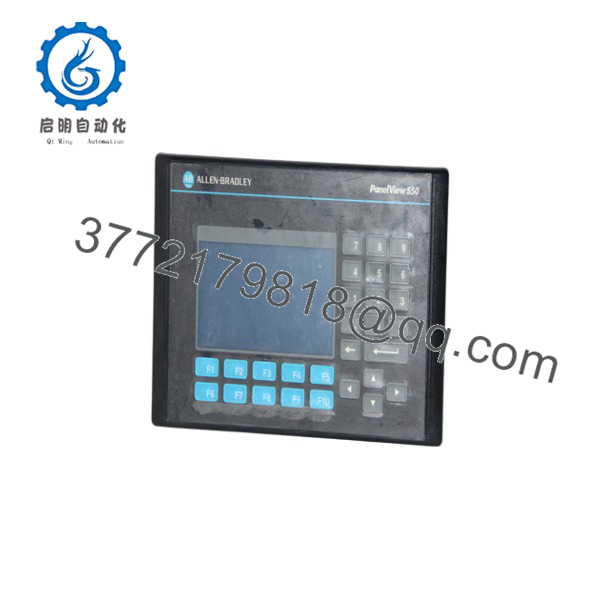
2711-K5A2
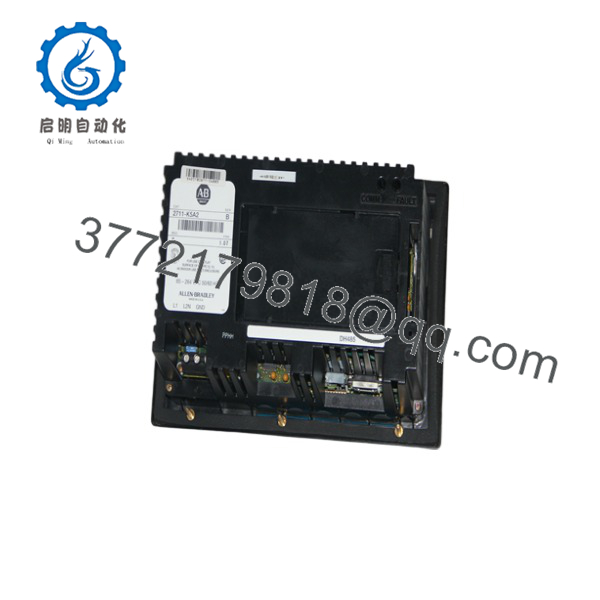
2711-K5A2
Firmware/Software Versions & Upgrade Notes
- Software Environment: Programmed using PanelBuilder32 software (version 3.80 or higher recommended).
- Application File Transfer: Upload or download
.PVA/.PVRapplication files via PCMCIA memory card (using a supported ATA card with 2711-NM216 retaining cap) or directly using a 1747-UIC USB-to-DH-485 interface converter. - Firmware Alignment: Ensure the terminal firmware revision (FRN) matches or exceeds the major revision set in your PanelBuilder32 project to avoid transfer errors or graphic display faults.
Frequently Asked Questions (FAQ)
Is this 2711-K5A2 guaranteed to be New Surplus and not refurbished?
Yes. This unit is 100% Brand New Surplus stock in original OEM packaging. It has never been installed in an industrial enclosure, exposed to environmental contaminants, or subjected to key membrane or display repairs.
Why should I choose New Surplus over a refurbished PanelView 550 terminal?
Refurbished PanelView 550 terminals often suffer from hardened key membranes that lose tactile feedback, weakened backlights, and worn terminal screws. Choosing New Surplus ensures full 100,000-hour backlight life, factory-fresh keypad response, and long-term operating reliability.
What is the difference between the 2711-K5A2 and 2711-B5A2?
The K in 2711- indicates Keypad Only input (no touchscreen). The B version (2711-B5A2) is a Dual Input unit featuring both a keypad and a touchscreen. The 2711- is ideal for applications where physical key tactile feedback is required.
Can I load the application program directly from an existing unit?
Yes. If the existing unit still powers on, you can upload the runtime .PVA file to a PC using PanelBuilder32 via a 1747-UIC converter, or pull the file using a supported PCMCIA memory card inserted into the rear slot.
What warranty protection is included with this New Surplus HMI?
We back this 2711- New Surplus terminal with a comprehensive 1-year replacement warranty. Each unit undergoes strict visual inspection, connector verification, and anti-static packaging before shipment.



