
 WhatsApp: +86 16626708626
 Email:
  Phone: +86 16626708626
Description
Key Technical Specifications
| Parameter | 2711-K6C9 Specification |
|---|---|
| Manufacturer | Allen-Bradley / Rockwell Automation |
| Product Family | PanelView Standard 600 |
| Catalog Number | 2711-K6C9 |
| Operator Input | Keypad |
| Display | Color |
| Display Size | 5 in. |
| Resolution | 320 × 234 pixels |
| Communication | RS-232 / DH-485 |
| Printer Port | RS-232 printer |
| Nonvolatile Memory | 240 KB |
| RAM | 170 KB |
| Power | AC |
| Configuration Software | PanelBuilder32 |
| Product Status | Legacy / discontinued |
| Migration Family | PanelView Plus |
Rockwell’s migration documentation confirms that the 2711-K6C9 is an AC-powered PanelView Standard 600 keypad terminal and maps it to a PanelView Plus migration configuration using the 2711P-K7C4A8 terminal with a 2711P-RN6 communication module. This should be treated as a migration reference rather than a drop-in replacement.
Important Communication Note
The “-9” suffix is important. The 2711-K6C9 uses RS-232 (DH-485) rather than EtherNet/IP, DH+, DeviceNet, or ControlNet. Rockwell’s technical data explicitly identifies this catalog number as an RS-232 DH-485 terminal.
Do not select a DF1 driver simply because the physical interface is RS-232. Electrical interface and communication protocol are separate specifications.
For application transfer, Rockwell documentation states that DH-485 terminals use the communication port for application upload/download.
Product Introduction
The Allen-Bradley 2711-K6C9 PanelView 600 is a legacy operator interface intended for machines and process equipment built around Allen-Bradley PLC architectures that use DH-485 communication. Its keypad interface is appropriate for applications where operators need fixed-function navigation, numeric entry, status indication, alarm acknowledgment, and command selection without relying on a touchscreen.
The principal procurement issue today is not basic functionality but lifecycle compatibility. Rockwell has migrated the PanelView Standard family toward PanelView Plus platforms, and the 2711-K6C9 itself is no longer a current-generation terminal.
For a running legacy machine, an original or properly tested replacement can therefore be preferable to an immediate redesign when the existing PanelBuilder32 application and DH-485 architecture must remain unchanged.
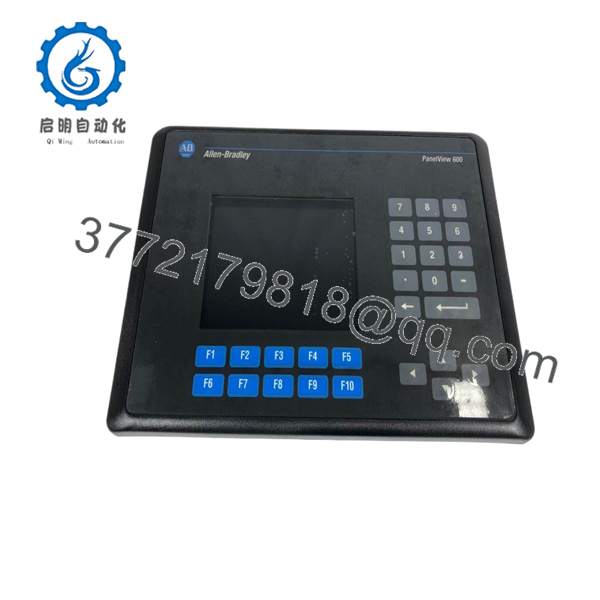
2711-K6C9
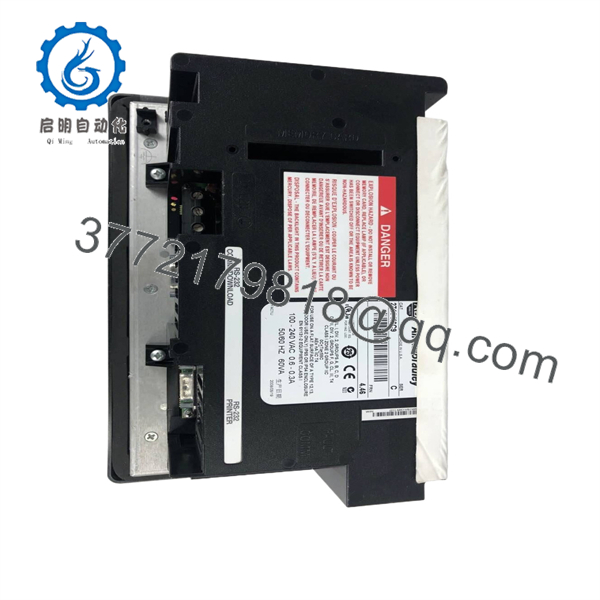
2711-K6C9
Installation & Configuration Guide
Stage 1 — Verify the Existing Hardware
Estimated time: 10–20 minutes
- Record the complete catalog number from the terminal nameplate.
- Confirm that the replacement is , not a visually similar 2711-K6C2, K6C3, K6C5, K6C8, or K6C20.
- Record the terminal Series and revision.
- Confirm that the machine uses DH-485 communication.
- Verify the existing AC supply before connecting the replacement.
- Back up the existing PanelBuilder32 application before removing the installed terminal.
Warning: A PanelView 600 with a similar enclosure can use a completely different communication protocol. Do not substitute by appearance alone.
Stage 2 — Prepare the Application and Communication Path
Estimated time: 20–60 minutes
- Locate the original PanelBuilder32 project.
- Verify the target terminal configuration.
- Record the DH-485 node address and baud-rate settings.
- Confirm the PLC address and network topology.
- Use the appropriate DH-485 communication hardware for the engineering workstation.
- Confirm that the cable and communication adapter match the existing terminal interface.
Rockwell’s documentation identifies the 2711- as an RS-232 DH-485 terminal, so the communication path must preserve that protocol.
Stage 3 — Replace the Terminal
Estimated time: 30–60 minutes
- Place the machine in a safe state.
- Remove AC power and apply the site’s lockout/tagout procedure.
- Label all communication and power connections.
- Remove the existing PanelView terminal.
- Inspect the panel cutout, gasket, connectors, and wiring.
- Install the replacement 2711-.
- Reconnect the communication and printer interfaces as required.
- Restore power only after checking the wiring.
Warning: Do not assume that a visually compatible PanelView Plus terminal can be installed without mechanical, electrical, and application changes.
Stage 4 — Commission and Test
Estimated time: 30–90 minutes
- Power the terminal.
- Confirm that the display initializes correctly.
- Verify keypad operation.
- Check DH-485 communication.
- Confirm PLC data updates.
- Test operator commands.
- Test alarm display and acknowledgment.
- Verify numeric-entry fields.
- Confirm all required screens.
- Record the installed Series and hardware revision for future spare-parts procurement.
Acceptance criterion: The replacement should communicate with the existing control system and execute the required operator functions without modifying PLC logic unless the migration project specifically requires it.
Frequently Asked Questions
Is the Allen-Bradley 2711- obsolete?
Yes. The 2711- belongs to the legacy PanelView Standard 600 family and is no longer a current-generation Rockwell Automation HMI. Third-party industrial inventory sources also identify the catalog number as discontinued.
For an existing machine, availability will therefore generally depend on new surplus, unused old stock, refurbished, or professionally tested used inventory.
What communication protocol does the 2711- use?
The 2711- uses RS-232 (DH-485). It should not be confused with PanelView 600 variants supporting DH+, DeviceNet, ControlNet, DF1, or EtherNet/IP.
Does the 2711- have Ethernet?
No. The original 2711- is a legacy serial/DH-485 PanelView terminal. Ethernet functionality should not be assumed based on its RS-232 connector or on newer PanelView product families.
Can I replace a 2711- with a PanelView Plus terminal?
Potentially, but it is not a direct drop-in substitution. Rockwell provides migration documentation that maps the 2711- to a PanelView Plus configuration. The newer platform uses different hardware and software architecture, so application conversion, communication-module selection, panel dimensions, power requirements, and commissioning must be reviewed.
What software was used to program the 2711-?
The legacy PanelView Standard family was configured using PanelBuilder32. It should not be treated as a FactoryTalk View ME terminal. A FactoryTalk View ME runtime file is not a direct replacement for the original PanelBuilder32 application architecture.
What should I verify before buying a replacement?
At minimum, verify:
- Exact catalog number:
- Series/revision
- AC power requirement
- Display condition and backlight
- Keypad condition
- DH-485 communication operation
- Application memory/application transfer capability
- Physical mounting condition
- Whether the unit is new surplus, used, or refurbished
- Warranty offered by the supplier
For legacy HMI procurement, Series and communication protocol are more important than cosmetic similarity.
Is a refurbished 2711- acceptable for production use?
It can be, provided the supplier performs meaningful functional testing. Request confirmation of display operation, keypad operation, DH-485 communication, application transfer, power-up behavior, and backlight condition rather than relying only on a visual inspection.



