
 WhatsApp: +86 16626708626
 Email:
  Phone: +86 16626708626
Description
Key Technical Specifications
| Parameter | Value |
|---|---|
| Catalog Number | 6181P-15TPXP (also listed as 6181P-15TPXP/E) |
| Product Family | VersaView 1500P Integrated Display Computer |
| Display Size | 15-inch (color) |
| Display Type | Color active-matrix TFT with analog resistive touchscreen (antiglare) |
| Resolution | 1024 × 768 pixels (XGA), 16.7M colors |
| Input Methods | Touchscreen (resistive); optional PS/2 keyboard and mouse |
| Processor | Intel Core Duo U2500, 1.2 GHz (dual-core, 2 MB L2 cache, 533 MHz FSB) |
| System Chipset | Intel 945GME + ICH7-M |
| Memory | 1 GB DDR2 (dual-channel), 2 DIMM slots, max 4 GB |
| Storage | 40 GB 2.5-in SATA HDD (rotating media); optional CompactFlash bootable |
| Graphics | Integrated Intel GMA 950 (shared system memory) |
| Expansion Slots | 1 × half-length PCI slot |
| Optical Drive | Slim DVD-RW / CD-RW (removable media) |
| Ethernet | 2 × 10/100/1000 Mbps RJ-45 ports |
| Serial Ports | 2 × RS-232 (DB9) |
| USB Ports | 5 × USB 2.0 (4 rear, 1 front) |
| Parallel Port | 1 × DB25 parallel port |
| PS/2 Ports | 1 × PS/2 keyboard, 1 × PS/2 mouse |
| Video Output | 1 × DVI-I (dual-mode DVI/VGA) |
| Audio | Line in / line out / microphone |
| Input Voltage | 90–264 V AC, 47–63 Hz (auto-ranging) |
| Power Consumption | ~65 W (typical); 100 W max |
| Operating Temperature | 0 to 50 °C (32 to 122 °F) |
| Storage Temperature | −20 to 60 °C (−4 to 140 °F) |
| Humidity | 5–95% non-condensing |
| Enclosure Rating | NEMA/UL Type 1/4/12, IP66 (front panel) |
| Mounting | Panel mount (bezel: aluminum; stainless steel variant 6181P-15TPXPSS) |
| Dimensions (W × H × D) | ~381 × 305 × 100 mm (15 × 12 × 4 in) |
| Weight | ~10.7 kg (23.6 lb) |
| Operating System | Windows XP Professional for Embedded Systems |
| Certifications | UL, CE, CSA (industrial use) |
Product Introduction
The Allen-Bradley 6181P-15TPXP is a VersaView 1500P integrated display computer with a 15-inch color TFT touchscreen. It combines a PC-class processor (Intel Core Duo 1.2 GHz), 1 GB DDR2 RAM, and a 40 GB SATA HDD with a rugged industrial enclosure for HMI, SCADA, and data logging applications.
This unit is chosen where a full Windows XP embedded platform with FactoryTalk View, RSView32, or custom .NET/C++ applications is needed on a single panel. In field deployments, it’s commonly used on large packaging lines, process skids, and central operator stations where PCI expansion and dual Ethernet are required.
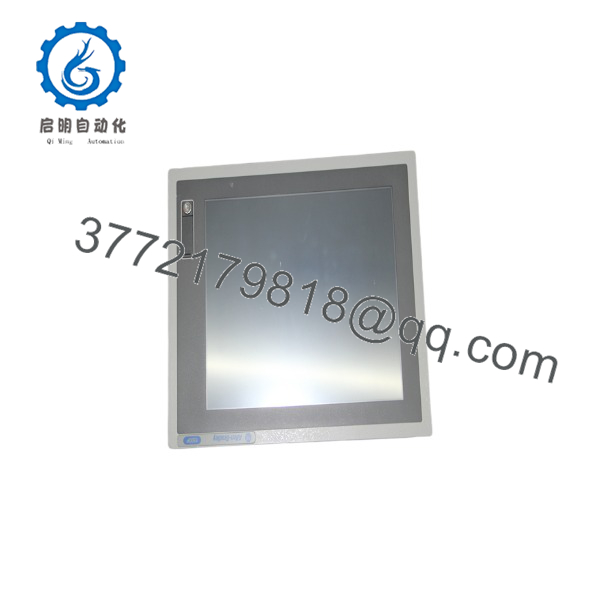
6181P-15TPXP
Troubleshooting Quick Reference
| Symptom | Possible Cause | Relevance to this Part | Quick Check Method | Recommendation |
|---|---|---|---|---|
| No power, no display | AC input missing or internal PSU fault | ✅ High | Measure 90–264 V AC at input terminals; check internal fuse | Fix AC supply and wiring before swapping unit |
| Backlight on but no image | Windows boot failure or storage fault | ✅ Medium | Listen for HDD spin; check BIOS POST; try external monitor via DVI-I | Replace HDD or re-image OS; check RAM seating |
| Touchscreen unresponsive in areas | Overlay damage or calibration issue | ✅ Medium | Run Windows touchscreen calibration; inspect for scratches/cracks | Replace touch overlay/glass if calibration fails |
| Ethernet ports not linking | NIC driver issue or cable/switch fault | ✅ Medium | Check Device Manager; test with known-good cable/switch | Reinstall NIC drivers; replace cable/switch port |
| System runs hot or throttles | Fan failure or dust buildup | ✅ High | Inspect fan operation; check intake/exhaust airflow | Clean filters; replace fan; improve cabinet cooling |
| PCI device not detected | Slot damage or configuration issue | ✅ Medium | Verify PCI card seating; check BIOS resource allocation | Re-seat PCI card; test in another slot if available |
If you’re stuck, send photos of the unit (including rating label), a screenshot of the BIOS or Windows error, and your I/O configuration. We’ll review it before you swap the unit.
Frequently Asked Questions (FAQ)
Q: Is the 6181P-15TPXP hot-swappable?
A: No. The 6181P-15TPXP must be installed and removed with AC power OFF. Hot-swapping can damage the power supply and internal components.
Q: What’s the difference between 6181P-15TPXP and 6181P-15NPXP?
A: Both are VersaView 1500P 15″ PCs. TPXP has a touchscreen; NPXP is non-touch (keypad/mouse only). Choose based on your operator interface requirements.
Q: Can I upgrade the OS beyond Windows XP on the 6181P-15TPXP?
A: Technically yes, but Rockwell only validated Windows XP for Embedded Systems on this hardware. Upgrading to Windows 7/10 may work but is not officially supported and can break FactoryTalk/RSView compatibility.
Q: What software can I run on the 6181P-15TPXP?
A: It ships with Windows XP Pro for Embedded Systems and can run FactoryTalk View SE/ME, RSView32, RSLinx, and custom .NET/C++ applications within the hardware limits (1.2 GHz Core Duo, 1–4 GB RAM).
Q: What condition are these units in, and why is pricing lower than factory?
A: We sell New Original (New Surplus) and Refurbished (tested) units. Pricing is lower because these are surplus or professionally refurbished, and the VersaView 1500P line is discontinued. Each refurbished unit goes through power, display, and I/O tests and comes with a 1-year warranty.
Q: Can I keep my existing application when swapping a failed 6181P-15TPXP?
A: Yes, if the replacement is the same catalog number and you have a full system image or application backup. Restore the image or reinstall the application and verify network and I/O settings.
Q: What is the recommended replacement for the 6181P-15TPXP?
A: Rockwell’s migration path is PanelView Plus 6 / 7 (for HMI-only) or newer VersaView industrial PCs (for full Windows applications). Migration may require application conversion and new network wiring (Ethernet, serial, or PCI-based I/O).



