
 WhatsApp: +86 16626708626
 Email:
  Phone: +86 16626708626
Description
3. Key Technical Specifications
| Parameter | Value |
|---|---|
| Data Rate | 10 Mbps |
| Standards | IEEE 802.3 10Base-FL / FOIRL, Ethernet v1.0 & 2.0 |
| Fiber Connector | ST |
| Host Interface | 15-pin AUI (D-Sub) |
| Optical Wavelength | 850 nm ± 20 nm (multimode) |
| Typical Sensitivity | –32.5 dBm |
| Typical Output Power | –12.0 to –16.5 dBm (fiber type dependent) |
| Link Distance | Up to 2 km (10Base-FL) / 1 km (FOIRL) |
| Status LEDs | TX, RX, Link, Collision, Jabber, Power |
| SQE / Heartbeat | Switch-selectable |
| Operating Temperature | 0 °C to 50 °C |
| Storage Temperature | –20 °C to 60 °C |
| Dimensions (approx.) | 6.9 cm × 4.2 cm × 1.93 cm |
| Weight | Approx. 57 g (2.0 oz) |
4. Product Introduction
The Allied Telesis AT-MX40FST-05 is a compact 10 Mbps fiber optic micro transceiver from the CentreCOM series. It converts a standard AUI port on a network interface or DTE into a multimode fiber ST connection, supporting IEEE 802.3 10Base-FL and FOIRL standards.
This unit is commonly used in legacy industrial Ethernet installations that still rely on AUI-based equipment and need the noise immunity and distance of fiber. Direct AUI attachment, six status LEDs, and a selectable SQE test make it a straightforward drop-in replacement for aging fiber media converters in existing 10 Mbps networks.
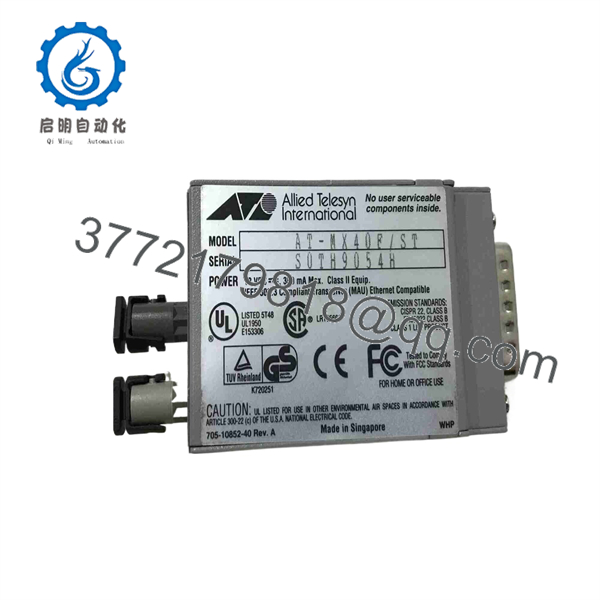
AT-MX40FST-05
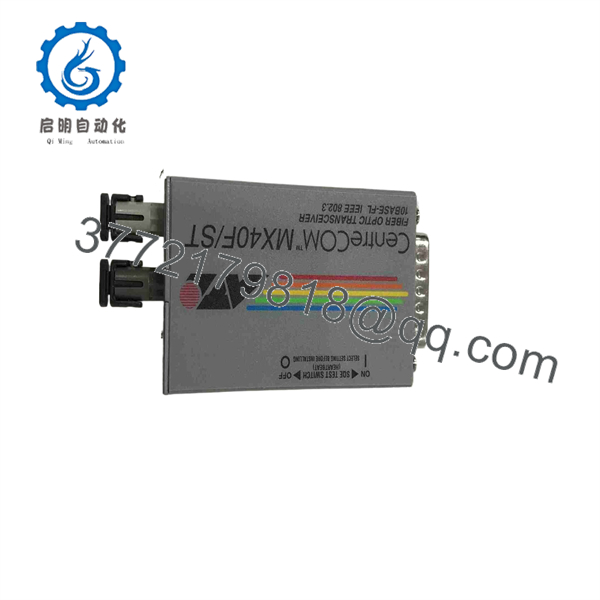
AT-MX40FST-05
5. Troubleshooting Quick Reference
| Symptom | Possible Cause | Relevance to this Part | Quick Check Method | Recommendation |
|---|---|---|---|---|
| No Link LED | Fiber break, wrong polarity, or power issue | ✅ High | Verify TX/RX fiber polarity; check Power LED | Swap TX/RX fibers; confirm AUI power |
| Power LED off | No power from AUI port | ✅ High | Measure AUI voltage or try known-good host | Check host AUI power pin before replacing unit |
| Continuous Collision or Jabber | Faulty transceiver or cable loop | ✅ High | Disconnect fiber and observe LEDs | Replace unit if LEDs stay abnormal |
| Intermittent Link | Dirty ST connectors or marginal fiber | ✅ Medium | Clean ST ferrules; check optical power budget | Clean connectors; verify fiber condition |
| SQE / Heartbeat problems | Switch setting mismatch with host | ✅ Medium | Toggle SQE switch and retest | Match SQE setting to host requirements |
If the issue continues, note all LED states, confirm fiber type and length, and provide host equipment details to technical support.
6. Frequently Asked Questions (FAQ)
Q: Is the AT-MX40FST-05 still manufactured?
A: No. It is a legacy 10 Mbps product. New-surplus and tested refurbished units remain available for maintaining existing AUI-to-fiber installations.
Q: What is the difference between the ST and SM versions?
A: The AT-MX40F/ST-05 is multimode (850 nm, ST connectors). The AT-MX40F/SM-05 is single-mode and supports longer distances (up to approximately 14 km). Confirm your fiber type before ordering.
Q: Does it require an external power supply?
A: No. Power is supplied directly through the AUI connector from the host DTE or network interface.
Q: Can I use it with modern Gigabit equipment?
A: No. This is a 10 Mbps device only. It is intended for legacy 10Base-FL / FOIRL networks.
Q: How do I set the SQE (heartbeat) function?
A: A small switch on the unit enables or disables SQE. Default is usually disabled. Check your host documentation and set the switch accordingly.
Q: What fiber cable should I use?
A: Multimode fiber with ST connectors. Typical core sizes are 50/125 µm or 62.5/125 µm. Keep total link length within the 10Base-FL or FOIRL limits.
Q: Why choose a tested refurbished unit?
A: These compact transceivers are no longer in production. Fully tested units restore fiber connectivity on legacy AUI equipment quickly and carry a warranty, avoiding long lead times for scarce new-surplus stock.



