
 WhatsApp: +86 16626708626
 Email:
  Phone: +86 16626708626
Description
Key Technical Specifications
| Parameter | Specification |
|---|---|
| Manufacturer | Alstom |
| Product family | ALSPA MD2000 |
| Base part number | 029.144456 |
| Product type | Operator panel / operator keyboard |
| Control system | ALSPA MD2000 |
| Primary function | Local drive operation and monitoring |
Variant /05 |
ALSPA MD2000 operator panel |
Variant /06 |
PS02 BZB-3 operator panel |
| Communication | Dedicated MD2000 interface |
| Display/interface | Operator control interface; verify exact revision |
| Mounting | Verify cabinet/panel mounting arrangement |
| Supply voltage | Verify exact variant documentation |
| Connector pinout | Verify exact suffix and hardware revision |
| Operating temperature | Do not rely on generic reseller data |
| Dimensions | Verify against the physical panel/revision |
| Weight | Verify against exact assembly |
| Lifecycle | Legacy / discontinued equipment family |
EU Automation currently catalogs MD2000 / 029.144456/05, while other industrial inventories identify 029.144456/06 as PS02 BZB-3.
A separate industrial spare-parts catalog identifies the unsuffixed 029.144456 as an Alstom operator keyboard, reinforcing the identification of the part family.
Compatibility warning: Do not treat /05 and /06 as automatically interchangeable. The suffix may identify a hardware or panel revision. Confirm the installed unit’s complete marking before procurement.
Product Introduction
The Alstom 029.144456 is an operator control panel associated with the ALSPA MD2000 drive platform. It provides the local operator interface used for operating and monitoring compatible drive equipment. Industrial spare-parts records identify the component as an operator keyboard/control panel rather than a standalone PLC or power module.
The main replacement concern is revision matching. Existing inventories identify /05 and /06 versions, with the /06 unit specifically described as PS02 BZB-3. For a legacy drive installation, verify the complete part number, panel revision, connector arrangement, and physical dimensions before substituting another 029.144456 variant.
Installation & Configuration Guide
Stage 1: Pre-Installation Preparation
Estimated time: 15–30 minutes
⚠️ Safety First: Place the ALSPA drive system in the approved maintenance state. Isolate hazardous power according to the site LOTO procedure and verify the drive DC bus has discharged before opening the equipment.
Tools Required:
- ESD wrist strap
- Multimeter
- Appropriate screwdriver set
- Wire labels
- Smartphone/camera
- Panel-removal tools as required
Data Backup:
- Record the complete existing panel part number.
- Photograph the front panel and rear connector arrangement.
- Record the suffix, such as
/05or/06. - Photograph all cables before disconnection.
- Record any configured operator parameters stored locally.
- Retain the original panel until the replacement is fully tested.
Stage 2: Removing the Old Panel
Estimated time: 15–30 minutes
- Confirm the drive is electrically isolated.
- Verify the DC bus is discharged.
- Remove the panel cover or retaining hardware as applicable.
- Label the communication/control cable.
- Disconnect the connector without pulling on individual conductors.
- Release the panel mounting hardware.
- Remove the operator panel straight from its mounting position.
- Inspect the connector, cable, and panel cutout for damage.
⚠️ Do not force the connector. Legacy control-panel connectors can become brittle after years of thermal cycling.
Stage 3: Installing the Replacement
Estimated time: 15–30 minutes
- Verify the replacement marking against the removed unit.
- Confirm whether the unit is 029.144456/05 or 029.144456/06.
- Compare the rear connector and mounting arrangement.
- Inspect the replacement for cracked plastic, damaged keys, corrosion, or contamination.
- Connect the original interface cable.
- Secure the panel mechanically.
- Confirm that no cable is pinched behind the panel.
- Reinstall the protective cover.
Self-Checklist:
- Complete part number verified
/05or/06suffix verified- Connector matches
- Panel mechanically secured
- Cable strain relieved
- No visible PCB or connector damage
Stage 4: Power-On & Functional Testing
Estimated time: 20–45 minutes
- Restore control power according to the maintenance procedure.
- Observe the panel during startup.
- Confirm display/keypad initialization where applicable.
- Verify communication with the drive.
- Confirm drive status and fault information are displayed.
- Test available operator keys without enabling the motor.
- Verify parameter display/navigation.
- Clear only documented test faults.
- Perform a controlled start command after all safety interlocks have been confirmed.
- Verify speed/reference commands and displayed feedback.
⚠️ Do not test the start command with the driven machine in an uncontrolled state. A functioning operator panel can issue real drive commands.
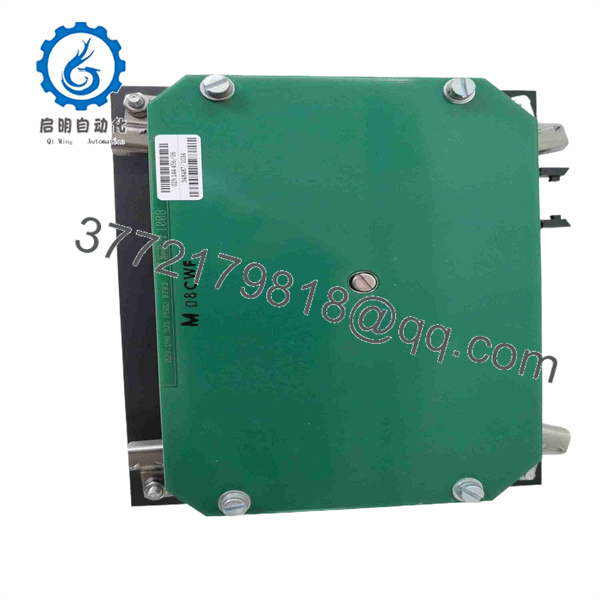
029.144456
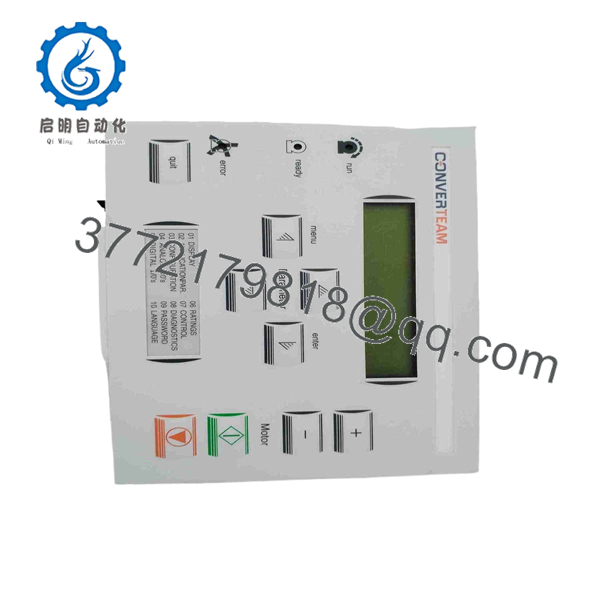
029.144456
Frequently Asked Questions (FAQ)
What is Alstom 029.144456?
It is an ALSPA operator control panel/operator keyboard. Multiple industrial parts databases associate this number with the drive family.
Is 029.144456/05 the same as 029.144456/06?
They belong to the same 029.144456 family, but they should not be assumed electrically or mechanically interchangeable. Current records separately identify /05 and /06, with /06 specifically described as PS02 BZB-3.
Is 029.144456 a PLC module?
No. Available records identify it as an operator interface/control keyboard for the ALSPA system, not a PLC CPU or general-purpose I/O module.
Will replacing the panel erase the drive parameters?
A physical operator-panel replacement does not normally erase the drive’s stored control parameters. However, the replacement should be tested for communication and correct parameter access before the machine returns to service.
Can I use a used 029.144456?
Yes, provided the exact variant is compatible. Used /06 units are currently listed as removed from working environments, while /05 units are also available through industrial spare-parts suppliers.
For used equipment, inspect the keypad, display, connector, housing, and PCB before installation.
Is the ALSPA obsolete?
The ALSPA is a legacy drive platform, and 029.144456 is primarily encountered through industrial spare-parts channels. Current inventory listings include used and surplus examples rather than normal new-production distribution.
What should procurement verify before ordering?
Provide the supplier with:
- Complete part number: 029.144456
- Suffix: /05, /06, or other
- Existing panel photographs
- Rear connector photograph
- drive model
- Panel revision, if marked
- Required condition: Factory Sealed, New Surplus, Used, or Refurbished
For this part, the suffix is critical. Ordering only by the base number creates unnecessary compatibility risk.



