
 WhatsApp: +86 16626708626
 Email:
  Phone: +86 16626708626
Description
3. Key Technical Specifications
| Parameter | Value / Specification |
| Module Type | Combined Input/Output Plug-in Eurocard |
| Backplane Interconnect | High-density DIN 41612 multi-pin connector |
| Logic/Control Voltage | Typically 24 V DC system standard (nominal) |
| Channel Count | Multi-channel discrete isolated matrix (dependent on rack configuration software) |
| Isolation | Optocoupler isolation between field loops and internal processing bus |
| Form Factor | Standard rack-mount PCB card with front-panel pull handles |
| Status Indicators | Front-panel LEDs for channel state and card health diagnostics |
| Power Consumption | Low-power logic board design directly fed from backplane rails |
| Operating Temperature | 0 to +60 °C |
| Storage Temperature | −25 to +85 °C |
4. Product Introduction
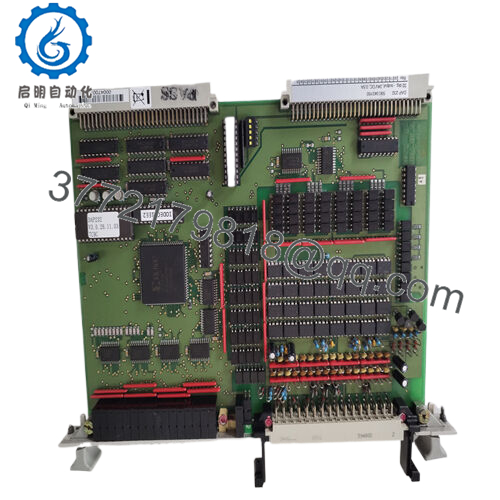
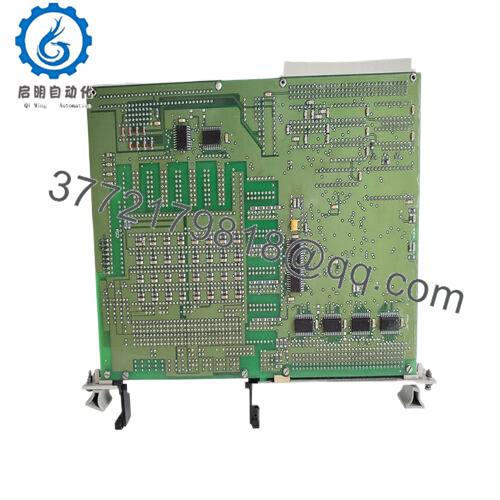
The Alstom SA46623.B is a specialized, rack-mounted input/output plug-in module designed for legacy industrial control systems, substation automation, and heavy utility plant networks. Engineered during the Alstom/Cegelec era, this rugged electronic card acts as a high-reliability hardware interface between low-voltage processing logic and high-energy field sensors, switches, and actuators.
Industrial maintenance teams rely on the SA46623.B to maintain uptime in critical infrastructure installations where system migration is not yet planned. Its heavy-duty circuit board trace geometry and opto-isolated inputs ensure excellent noise immunity, preventing voltage surges originating from the factory floor or power switchyard from propagating down the main system backplane and crashing the central processor.

- SA46623.B
5. Troubleshooting Quick Reference
| Symptom | Possible Cause | Relevance to this Part | Quick Check Method | Recommendation |
| Card Status LED off; missing from rack configuration | Loss of logic voltage from backplane or failed onboard regulator | ✅ High | Check the main rack power supply output voltages. Pull the card and visually inspect for burnt paths near the DIN backplane pins. | If rack power is healthy, the card’s internal power rail is dead. Replace the card. |
| Specific input channel fails to update in logic | Blown field-side optocoupler due to a high-voltage field transient | ✅ High | Measure field voltage directly at the card terminals when the sensor is closed. If 24 V is present but internal status is dark, the channel is dead. | Swap the SA46623.B card with a tested spare unit. Trace field loops for inductive surges before powering up. |
| Intermittent communication drops across entire rack | Corroded or bent backplane connector pins on the card | ✅ High | Shut down the rack, slide out the module, and inspect the DIN 41612 gold-plated connector pins for signs of oxidation or mechanical misalignment. | Clean the pins with electronic contact cleaner or straighten bent pins. Replace if mating sockets are damaged. |
| Outputs fail to trip field relays | External wet-wet loop voltage supply fuse is blown | ❌ Low | Test for appropriate field wetting voltage (typically 24 V or 48 V) at the common field terminal blocks. | If no voltage exists outside the card, check external system fuses and circuit breakers rather than replacing the module. |
Note: For complex configuration tracing or legacy system mapping questions, capture a clean screenshot of the active hardware diagnostic matrix before pulling the card for replacement.
6. Frequently Asked Questions (FAQ)
Can I plug or pull the SA46623.B card while the rack power supply is turned on? No. This legacy hardware generation does not support true hot-swapping functionality. Pulling the module while the backplane is fully energized can induce voltage transients across the logic lines, risking data corruption on the main processing bus or causing adjacent cards in the same sub-rack to trip on fault errors. Always kill power to the sub-rack before executing a replacement.
We need exact firmware or revision matching. What does the “.B” suffix signify? The “.B” suffix identifies the specific hardware component revision level designated by Alstom during manufacturing. This usually denotes a minor PCB modification, such as updated trace layouts, components with higher thermal tolerances, or altered noise-filtering capacitors. Review your original system manual; while “.B” variants are often backwards-compatible with standard “SA46623” slots, verifying exact physical pinout alignments on your backplane blueprint is a recommended safety step.
Why should we purchase New Surplus inventory instead of attempting a field component repair? These multi-layer boards contain surface-mounted components and opto-isolators that age under continuous heat load. Attempting a manual solder repair on a single failed channel often subjects nearby legacy silicon components to thermal stress, which can lead to unexpected secondary failures weeks later. Replacing the module with a thoroughly tested New Surplus card restores the hardware lifecycle baseline across all channels simultaneously.
How should this card be stored if we buy it now as an emergency spare? Store the SA46623.B in a climate-controlled environment within its sealed anti-static (ESD) protective bagging. Avoid spaces subject to high ambient humidity or temperature fluctuations, which can degrade the gold finish on the backplane connection interface over time. No regular battery-maintenance cycling is required for this card since it does not contain onboard volatile memory cells.



