
 WhatsApp: +86 16626708626
 Email:
  Phone: +86 16626708626
Description
3. Key Technical Specifications
- Manufacturer: Alstom
- Model: SCN804D
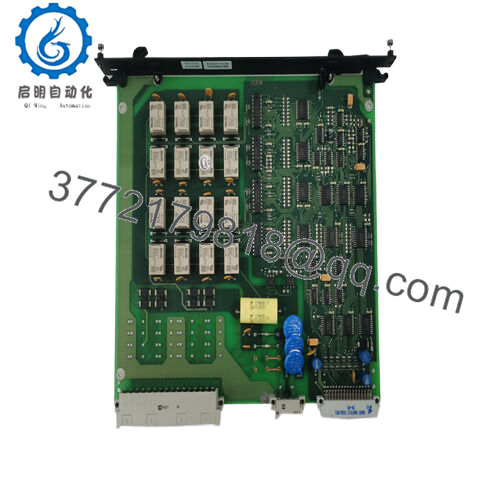
- Product Type: Measurement Interface Module
- Related Modules: SCN604A / SCN606 compatibility references appear in market listings; verify exact system configuration before replacement.
- Main Function: Interface and acquisition of measurement signals within Alstom control architectures
- Application: Industrial automation, power systems, legacy control platforms
- Design: Modular plug-in control card format
- Communication / Interface: System-dependent; verify rack controller and I/O configuration
- Weight: Approx. 2.5 kg reported by multiple industrial spare listings
- Installation: Rack-mounted industrial control cabinet installation
- Condition Availability: New unused, surplus, and refurbished units are available depending on supplier stock
- Lifecycle Status: Discontinued / legacy spare component according to aftermarket listings
4. Product Introduction
The Alstom SCN804D is a Measurement Interface Module used in legacy Alstom industrial control systems. It provides signal interface functions between measurement devices and the control platform, supporting applications where existing Alstom automation hardware remains in operation.
This module is mainly sourced for maintenance replacement and system restoration projects. Before installation, confirm the complete part number, rack position, associated SCN modules, wiring allocation, and controller configuration.

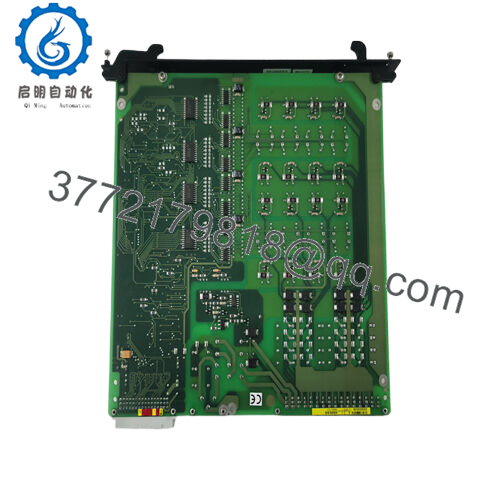
- SCN804D
5. Installation & Configuration Guide
Stage 1: Pre-Installation Preparation (Approx. 10 minutes)
⚠️ Safety First
- Notify operations about the maintenance activity.
- Confirm the controlled process is in a safe condition.
- Apply lockout/tagout procedures.
- Remove cabinet power.
- Wait for stored energy discharge.
Tools Required
- ESD wrist strap
- PH1 screwdriver
- Digital multimeter
- Wire labels
- Smartphone/camera for documentation
Data Backup
- Record the existing SCN804D rack position.
- Photograph:
- Module label
- Rack location
- Connector layout
- Adjacent modules
- Document:
- Channel assignments
- Measurement signal types
- Alarm configuration
Stage 2: Removing the Old Module (Approx. 10 minutes)
- Open the control cabinet.
- Verify power isolation.
- Label all field wiring.
- Disconnect connectors carefully.
- Release module retaining hardware.
- Pull the module straight out.
⚠️ Inspection Note
- Inspect the backplane connector.
- Check for bent pins, contamination, or oxidation.
- Keep the original SCN804D until the replacement passes testing.
Stage 3: Installing the New Module (Approx. 15 minutes)
- Wear ESD protection before handling the replacement.
- Verify:
- SCN804D part number
- Hardware revision
- Connector condition
Configuration Clone (Critical)
- Install in the same rack position.
- Match:
- Wiring termination
- Channel assignment
- Hardware settings if present
- System addressing
- Insert the module into the rack guide.
- Ensure full seating.
- Secure the locking mechanism.
- Reconnect all terminals.
Self Checklist
[ ] Correct SCN804D installed
[ ] Rack position confirmed
[ ] Wiring matched
[ ] Connectors secured
[ ] Configuration recorded
Stage 4: Power-On & Testing (Approx. 30 minutes)
Pre-Power Check
- Verify supply voltage.
- Check wiring polarity.
- Confirm no short circuits.
Power-On Steps
- Energize the control rack.
- Check module status indicators.
- Verify controller recognition.
- Check system diagnostics.
- Validate measurement inputs.
- Confirm alarms and control signals.
⚠️ Troubleshooting Note
- Module not detected: Check backplane connection and module compatibility.
- Incorrect measurement values: Verify signal wiring and channel configuration.
- Communication fault: Confirm controller configuration and module addressing.
6. Frequently Asked Questions (FAQ)
Q1: Can I hot-swap the Alstom SCN804D?
No. Unless the specific Alstom system documentation confirms hot replacement, remove power before exchanging the module. Legacy rack modules share backplane connections, and removing them under power can create faults or damage connectors.
Q2: Is the Alstom SCN804D obsolete?
The SCN804D is treated as a legacy Alstom spare module. Aftermarket suppliers list it as discontinued by the manufacturer, with availability mainly through remaining inventory and refurbishment channels.
Q3: Is the SCN804D new original or refurbished?
Confirm the exact condition before purchase.
Typical supply categories:
- New Original / New Surplus: Unused OEM inventory.
- Factory Sealed: Original packaging condition.
- Refurbished (tested): Previously used module inspected and function tested.
Request serial number photos and test records for critical control applications.
Q4: What modules are related to the SCN804D?
Market references commonly associate the SCN804D with SCN604A and SCN606 modules. Compatibility depends on the installed Alstom control system, so verify the existing configuration before replacement.
Q5: What should I verify before ordering SCN804D?
Check:
- Exact model number
- Existing rack type
- Controller platform
- Wiring diagram
- Measurement channel assignment
- Hardware revision
A similar Alstom module may not be a direct electrical replacement.
Q6: Will replacing SCN804D erase my control program?
The module normally does not contain the complete application logic. However, measurement configuration, I/O mapping, and controller parameters must be backed up before replacement.
Q7: What inspection should be completed before installation?
Recommended checks:
- Part number verification
- Serial label inspection
- Visual inspection for corrosion or repair marks
- Connector inspection
- Power-up diagnostic test
- Signal input verification
For critical systems, request a functional test report before installation.



