
 WhatsApp: +86 16626708626
 Email:
  Phone: +86 16626708626
Description
Key Technical Specifications
- Bus Interface: Standard PCI (not PCI Express — that role is filled by the newer PCIE1500S7)
- Communication Port: 1x PROFIBUS port
- Supported Protocols: Siemens S7 protocol, MPI, PPI, PPI+ (this model is scoped to Siemens S7-family communication, unlike the sibling PCU1500PFB card which adds DP Master and FDL/S5 support)
- Onboard Processor: Dedicated communication processor handles protocol polling and frame management independently of the host PC’s CPU, so the SCADA/HMI application isn’t burning cycles on fieldbus polling
- Configuration Tool: APPLICOM Console / PCCONF utility, used to define card, protocol, and equipment configuration and generate the initialization files
- Card Addressing: Supports up to 8 cards per PC (numbered 1–8), each with up to 4 channels (numbered 0–3)
- Typical SCADA/HMI Integration: Wonderware InTouch (via SuiteLink), GE Cimplicity, and other OPC/DDE-capable packages that support the applicom driver
- Firmware/Software Version Noted on Used Units: V4.0.1 has shown up on inspected secondary-market units — confirm the version on the specific unit you’re buying, since driver compatibility can shift between major versions
- Manufacturer Lineage: Originally Applicom International, acquired into Woodhead Industries, now under Molex — expect the card silkscreened or labeled under either the Applicom or Woodhead brand depending on production date
Note: We don’t have a single authoritative datasheet with power draw, PROFIBUS baud rate range, or operating temperature specifically for the PCI1500S7 (as opposed to its PCI Express sibling). The PCIE1500S7 datasheet lists a PROFIBUS communication speed of 9.6 kbps to 1.5 Mbps — treat that as a reasonable point of reference for the same protocol family, not a confirmed spec for this exact PCI card, and verify against your original documentation or Molex/Woodhead support before relying on it for design purposes.
Product Introduction
The Applicom PCI1500S7 is a PCI-bus communication card built to give a Windows PC direct PROFIBUS access to Siemens S7-family PLCs using the S7 protocol, MPI, PPI, or PPI+. It carries its own onboard processor, so the polling and frame-management overhead for the fieldbus connection doesn’t compete with your SCADA or HMI application for CPU cycles — a meaningful advantage back when this card was current, and still relevant if you’re maintaining a system that depends on it today.
This is legacy PCI-bus hardware, not PCI Express. If you’re replacing a failed card in an aging industrial PC, that’s exactly the slot type you need — but if you’re building a new machine, check whether a PCI slot is even available before ordering, since most current motherboards have moved on entirely.
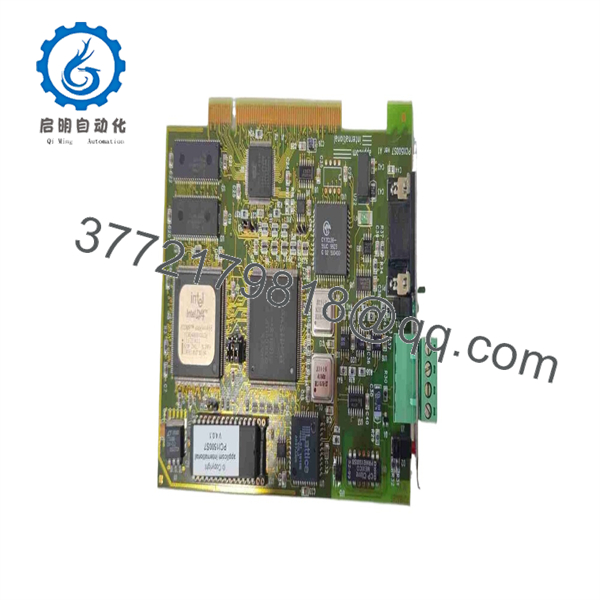
PCI1500S7
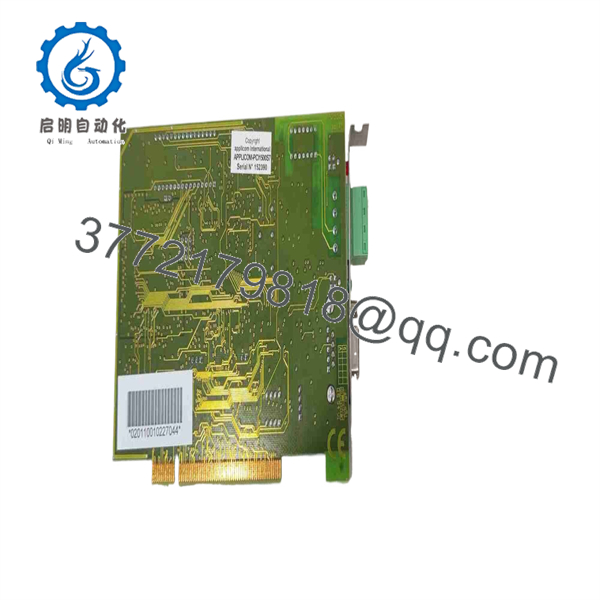
PCI1500S7
Troubleshooting Quick Reference
| Symptom | Possible Cause | Relevance to this Part | Quick Check Method | Recommendation |
|---|---|---|---|---|
| Card doesn’t appear in Windows Device Manager at all | Physical seating issue, PCI slot fault, or driver not installed before hardware | ✅ Moderate | Reseat the card, try a different PCI slot, confirm driver was installed per the applicom install sequence (software before hardware) | If it still doesn’t enumerate in a known-good slot with drivers pre-installed, the card is a stronger suspect |
| Card is visible in Windows but the applicom Console won’t detect it or shows a fault | Card number jumper conflict (if multiple cards installed) or corrupted configuration | ❌ Low | Check the card number jumper setting — cards must be numbered consecutively starting at 1 | Usually a configuration issue, not a hardware fault |
| SCADA/HMI application can’t read PLC data over the PROFIBUS/S7 link | PLC-side addressing, cabling, or protocol mismatch (MPI vs. PROFIBUS vs. PPI) | ❌ Low | Confirm the PLC’s actual communication mode and that it matches what’s configured in the applicom Console | Frequently a PLC-side configuration or cabling issue rather than a card fault |
| Intermittent communication drops under load | PROFIBUS cable/termination issues, or a marginal PC power supply | ❌ Low | Check bus termination resistors and try the card in a different PC if possible | Points to the network or host PC before the card itself |
| Card physically damaged, scorched, or connector pins bent | ESD event, mishandling, or age | ✅ High | Visual inspection of the card and PROFIBUS connector | Replace the card — don’t attempt to repair visible physical damage |
| Works on one PC but not another with identical software | Driver version mismatch or OS compatibility issue | ❌ Low | Confirm the applicom driver/software version matches what the failing PC has installed and is OS-compatible | This is very often a software/OS compatibility issue, not a hardware fault |
If none of these checks resolve it, contact technical support with the card’s exact silkscreen/label details (Applicom vs. Woodhead branding), the software version shown in the applicom Console, and a description of your PLC-side configuration.
Frequently Asked Questions (FAQ)
Is this a new unit or used surplus? This unit is sold as New Surplus — genuine Applicom/Woodhead stock pulled from decommissioned systems or excess inventory, not fresh off a current production line (this card is legacy hardware and isn’t in current manufacture). It’s been tested for card enumeration and basic communication before listing. Ask if you want more detail on the specific unit’s test history.
Does this card work in a modern PC? Only if your PC still has a standard PCI slot, which most current motherboards no longer include. If you’re building or refreshing a machine and need this functionality, look at the PCIE1500S7 (PCI Express version) instead — same protocol scope, different bus interface. Don’t assume a “PCI Express x1” slot will accept this card; they’re mechanically and electrically different.
What’s the difference between this and the PCU1500PFB card? The PCU1500PFB adds PROFIBUS DP Master and FDL/S5 protocol support on top of what the PCI1500S7 offers. The PCI1500S7 is scoped specifically to S7 protocol, MPI, PPI, and PPI+ — if you need general PROFIBUS DP master functionality rather than S7-family communication specifically, the PCU1500PFB is the correct part, not this one.
Will my SCADA software still support this card? It depends on your software version and OS. This card has a long install base with Wonderware InTouch (via SuiteLink) and GE Cimplicity, among others, but driver support tends to lag behind current Windows releases for legacy PCI hardware. Confirm your applicom driver version is compatible with both your OS and your SCADA package before you commit — we can help you cross-check if you tell us what you’re running.
Can I run more than one of these cards in the same PC? Yes — the applicom architecture supports up to 8 cards per PC, each numbered 1 through 8 via a jumper setting, with up to 4 channels per card. Just make sure the card numbers are set consecutively and don’t conflict with any other applicom cards already installed.
Do you provide the installation software/driver with this? Ask us directly — driver and Console software availability depends on what’s included with this specific unit and what Molex/Woodhead currently makes available for legacy applicom hardware. Don’t assume install media is included unless we’ve confirmed it.
What’s the warranty on a surplus card like this? Standard warranty terms apply to functional failures found after receipt within the coverage window — ask for the specific term at checkout, since surplus/legacy hardware like this typically carries a shorter warranty than a current-production part would.



