
 WhatsApp: +86 16626708626
 Email:
  Phone: +86 16626708626
Description
Key Technical Specifications
| Parameter | Value |
|---|---|
| Manufacturer | Applied Materials |
| Part Number | 0190-15779 |
| Product Family | V6U/DSP |
| Product Type | VME Motion Controller |
| Bus Architecture | VME |
| Primary Function | Motion control |
| Application | Applied Materials semiconductor equipment |
| Controller Architecture | V6U/DSP |
| Equipment Integration | Machine-specific VME control system |
| Firmware | Equipment/revision dependent |
| Replacement Compatibility | Must be verified against installed controller |
| Condition | Supplier-specific; verify before purchase |
Available industry listings identify 0190-15779 as an Applied Materials V6U/DSP VME Motion Controller.
There is conflicting secondary-market information for this part number: another listing describes 0190-15779 as a Schumacher CFAC pneumatic controller, while a separate listing describes it as a DC power supply. Those descriptions conflict with the V6U/DSP VME-controller identification. I would therefore verify the physical label and board assembly before publishing electrical specifications or claiming a direct replacement.
Product Introduction
Applied Materials 0190-15779 is identified by multiple industrial automation parts sources as a V6U/DSP VME Motion Controller used in Applied Materials semiconductor manufacturing equipment. The controller belongs to the equipment’s VME-based control architecture and is associated with motion-control functions.
Because public documentation for this exact part is limited and secondary listings disagree on its function, engineers should verify the board label, revision, connector layout, VME slot assignment, and machine configuration before replacement. Do not substitute a similarly numbered AMAT board based only on an online catalog description.
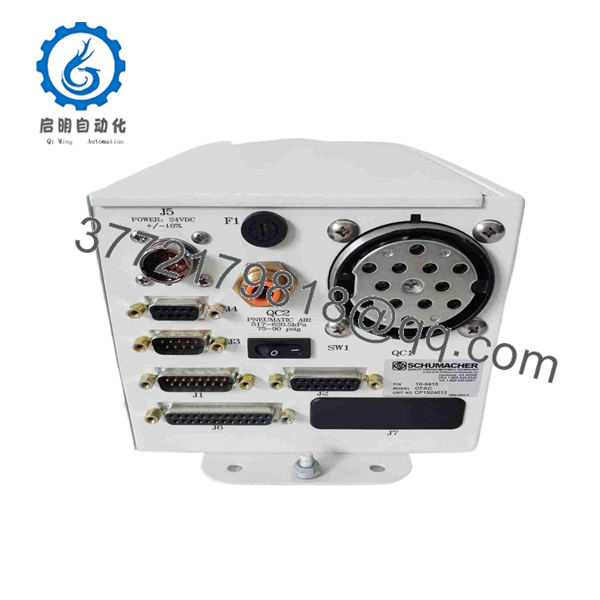
0190-15779
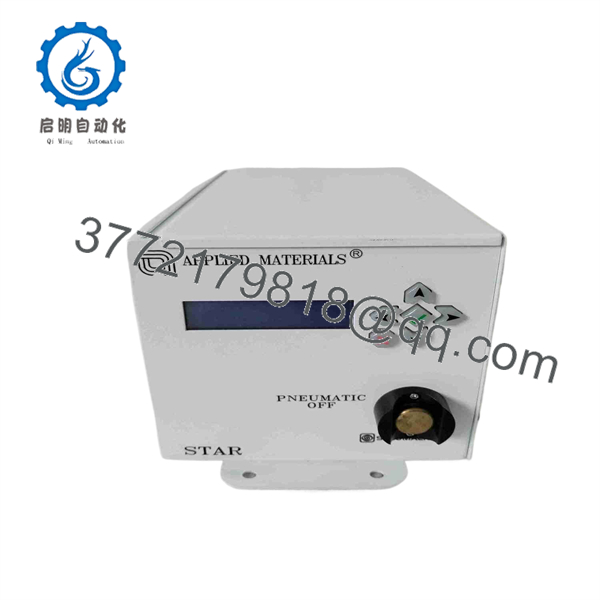
0190-15779
Installation & Configuration Guide
Estimated replacement time: 30–60 minutes for a straightforward board swap. Full machine commissioning may take longer.
Stage 1: Pre-Installation Preparation
⚠️ Safety First
- Notify operations and establish the approved maintenance window.
- Put the semiconductor tool into its approved maintenance state.
- Lock out/tag out electrical power before removing the VME board.
- Follow the equipment-specific shutdown procedure.
- Allow internal power supplies to discharge according to the OEM procedure.
Tools Required
- ESD wrist strap
- ESD-safe work surface
- Phillips screwdriver
- Digital multimeter
- Connector labels
- Smartphone or camera
- Equipment service documentation
Data Backup
Before removing 0190-15779:
- Record the complete part number.
- Photograph the board label and all revision markings.
- Photograph the VME rack and slot position.
- Photograph front-panel connectors and cable routing.
- Record the existing firmware/software revision where accessible.
- Back up machine configuration using the approved AMAT service procedure.
- Do not assume a replacement controller contains the same firmware or configuration.
Stage 2: Removing the Old Module
- Verify electrical isolation.
- Remove the applicable VME rack cover or enclosure panel.
- Photograph the installed board before touching it.
- Label connected cables if necessary.
- Disconnect connectors carefully.
- Release the board’s retaining hardware.
- Pull the board straight out of the VME slot.
- Inspect the VME backplane connector for contamination, bent contacts, or mechanical damage.
- Place the removed board in an ESD-safe bag.
⚠️ Keep the original board until the replacement has completed functional testing.
Stage 3: Installing the New Module
- Establish ESD protection.
- Verify the replacement label shows 0190-15779 and the correct revision.
- Compare the replacement board with the original.
- Verify connector locations and board dimensions.
- Confirm the intended VME slot.
- Align the board with the VME card guides.
- Insert the board evenly without excessive force.
- Engage the retaining hardware.
- Reconnect cables according to the photographs and equipment documentation.
- Verify every connector is fully seated.
Self-Checklist
- Part number verified
- Board revision checked
- VME slot verified
- Connector positions verified
- Cables secured
- Retaining hardware locked
- Original board retained
Stage 4: Power-On & Testing
- Perform a final visual inspection.
- Confirm no tools or foreign objects remain inside the rack.
- Restore power according to the machine startup procedure.
- Observe the controller’s startup/diagnostic indicators.
- Check the VME system for initialization errors.
- Verify controller communication with the machine control system.
- Check motion-axis status and encoder feedback.
- Confirm no new hardware or communication alarms appear.
- Run the OEM-approved axis or mechanism diagnostic.
- Perform a controlled motion test before returning the tool to production.
⚠️ Do not immediately run a production wafer. First establish that controller initialization, axis feedback, limits, interlocks, and homing functions operate correctly.
Frequently Asked Questions (FAQ)
1. What is Applied Materials 0190-15779?
Multiple industrial automation parts listings identify 0190-15779 as a V6U/DSP VME Motion Controller for Applied Materials equipment.
2. Is 0190-15779 definitely a VME motion controller?
That is the identification I would use with a qualification note. Several listings support the V6U/DSP VME Motion Controller description, but other secondary-market listings assign entirely different functions to the same number.
For a critical spare, verify the actual board photograph and label before purchasing.
3. Can I replace 0190-15779 with another V6U/DSP board?
Not automatically. VME boards that appear mechanically compatible can have different firmware, DSP configuration, I/O assignments, axis mappings, or machine-specific revisions.
Match the complete part number and revision, then verify compatibility against the equipment documentation.
4. Can this board be hot-swapped?
Do not assume so. Unless the specific Applied Materials equipment documentation explicitly authorizes powered VME-board replacement, power down and electrically isolate the equipment first.
VME mechanical compatibility does not establish hot-swap capability.
5. Will removing 0190-15779 erase the machine configuration?
Removing the physical controller does not necessarily erase the machine’s configuration, but the replacement may require firmware, parameters, axis configuration, or other machine-specific data.
Back up the configuration before removing the original controller.
6. Is 0190-15779 obsolete?
I would not label it definitively obsolete from the available evidence. It is an older-generation AMAT VME component and appears primarily through specialized secondary-market inventory. Availability and support should therefore be checked against the specific AMAT tool.
7. What condition should I request?
For production-critical equipment, specify one of these conditions explicitly:
- Factory Sealed
- New Original / New Surplus
- Refurbished and Tested
Do not accept “used” or “tested” without asking what was actually tested. For a VME motion controller, request photographs of the PCB, connectors, labels, revision markings, and any test report available.
8. What information should I provide before ordering?
Provide the 0190-15779 part number, AMAT equipment model, tool serial number, existing board revision, VME slot location, and clear photographs of the installed board.
That information is particularly important here because public secondary-market listings contain conflicting descriptions for 0190-15779.



