
 WhatsApp: +86 16626708626
 Email:
  Phone: +86 16626708626
Description
Key Technical Specifications
| Parameter | Specification |
| Manufacturer | Autronica Fire and Security |
| Part Number | BSD-100 |
| System Compatibility | AutroSafe Interactive Fire Alarm System (BS-100 / BS-60 series) |
| Loop Channels | 2 Independent Detection Loops (Loop A & Loop B) |
| Maximum Addresses per Module | Up to 128 addressable field devices (detectors, call points, I/O units) |
| Operating Voltage | 24 V DC (Supplied via system backplane bus) |
| Current Consumption | Nominally 50 mA (Idle, loop unloaded) |
| Loop Protocol | Autronica Proprietary Interactive Detector Protocol |
| Loop Isolation | Integrated short-circuit isolators on loop outputs |
| Operating Temperature | −10 °C to +50 °C (+14 °F to +122 °F) |
| Storage Temperature | −40 °C to +70 °C (−40 °F to +158 °F) |
| Relative Humidity | Max. 95% non-condensing |
| Dimensions & Weight | Standard AutroSafe eurocard footprint, approx. 0.35 kg |
Product Introduction & Supply Chain Strategy
The Autronica BSD-100 is a dual loop driver module designed for AutroSafe interactive fire detection systems. It controls up to 128 addressable field devices across two detection loops, processing real-time sensor data and maintaining continuous fault monitoring for marine, offshore, and industrial facilities.
Because Autronica has phased out older AutroSafe board revisions, securing this module as New Surplus is a critical risk-mitigation strategy. Purchasing factory-sealed surplus eliminates the severe reliability hazards of worn, second-hand fire cards while insulating your facility against sudden line shutdowns and regulatory compliance failures caused by EOL part shortages.
Installation & Configuration Guide
1.Pre-Installation (Prep & Safety):Isolate power and document existing setup.
- Place the fire alarm panel in Maintenance/Test mode and inform central monitoring.
- Execute Lock-Out/Tag-Out (LOTO) on the main 24 V DC and standby battery power feeds.
- Put on a grounded ESD wrist strap connected to panel chassis ground.
- Photograph all wiring connections, terminal designations, and DIP switch settings on the existing BSD-100 card before touching any connections.
2.Removal:Protect backplane pins during extraction.
- Unclip and carefully disconnect the loop wiring terminal blocks from the front panel. Do not pull directly on individual wires.
- Unscrew the top and bottom retaining screws securing the card to the panel rack.
- Gently pull the card straight out along its guide rails. Avoid twisting or applying angled force to prevent bending the rear backplane connector pins.
- Place the old card directly into an ESD-shielded bag.
3.Installation (Clone & Seat):Verify dip switches and seat card firmly.
- Unpack the New Surplus BSD-100 card inside the ESD-protected area.
- Check the hardware address DIP switches on the new board and set them to match the original card photograph taken in Stage 1.
- Align the card with the card guide rails inside the AutroSafe rack.
- Slide the card smoothly inward until the backplane connector contacts the bus, then apply firm, steady thumb pressure to seat the card completely.
- Tighten the retaining screws and reattach the terminal blocks.
4.Power-On & Testing:Validate loop health and verify LEDs.
- Reconnect panel main power and battery backup lines.
- Verify the power LED on the BSD-100 illuminates solid green without fault indication.
- Check the panel display to confirm the module is recognized at its configured address without loop communication errors.
- Test at least one smoke detector or manual call point on both Loop A and Loop B to verify active event processing.
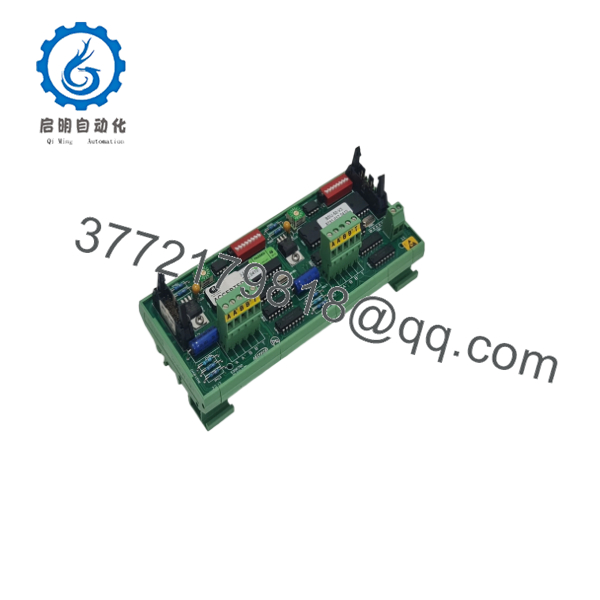
BSD-100
Firmware/Software Versions & Upgrade Notes
- Recommended Module Revision: Ensure your BSD-100 hardware index matches the main panel motherboard generation (e.g., BS-100 main board firmware v2.4 or higher).
- Protocol Consistency: The is built specifically for Autronica’s classical protocol series. If your site uses newer AutroSafe 4 systems requiring the BSD-310 or BSD-330 protocol series, the will not establish a communications handshake.
- Firmware Downgrade Risk: Never flash legacy panel software over a newer revision board without verifying EEPROM layout compatibility. Mismatched firmware can corrupt the onboard loop driver logic, causing spurious loop open-circuit faults or unrecoverable system halts.
Frequently Asked Questions (FAQ)
Is this module truly new, or is it a pull from a decommissioned panel?
This product is a Brand New Surplus unit. It is not used, not pulled from a decommissioned marine vessel or plant, and not refurbished. All modules undergo complete quality verification, remaining in original anti-static packaging until final inspection to guarantee OEM-level reliability.
Why does New Surplus cost more than refurbished options on the market?
Our pricing reflects the investment required to source and maintain pristine, un-aged New Surplus stock globally. Refurbished fire protection cards frequently suffer from degraded electrolytic capacitors, weakened relay contacts, and thermal fatigue. While a refurbished card saves money upfront, a single false alarm or system failure on a vessel or plant can trigger tens of thousands of dollars in downtime and safety fines.
The Autronica is an obsolete part. How do you guarantee functionality?
Every unit in our inventory undergoes strict, non-destructive incoming verification under our SOP quality protocol. We inspect backplane pins under magnification for insertion wear, check PCB traces for heat discoloration, verify firmware DIP configurations, and confirm full anti-static protection throughout storage.
Can I hot-swap the card while the panel is live?
No. Hot-swapping fire alarm loop modules is extremely hazardous. Inserting or removing the card while the 24 V DC backplane is energized can cause voltage spikes that damage the module’s microcontrollers or blow loop isolators on adjacent cards. Always isolate panel power before extraction or insertion.
Does the retain loop mapping logic when powered down?
The handles real-time loop polling, signal isolation, and device communications, while the overall loop configuration map is maintained by the main AutroSafe system controller. However, the hardware address set via the onboard DIP switches must match the panel’s configuration database for the replacement card to be recognized instantly upon boot.



