
 WhatsApp: +86 16626708626
 Email:
  Phone: +86 16626708626
Description
Key Technical Specifications
| Parameter | Value |
|---|---|
| Manufacturer | Bachmann electronic GmbH |
| Model Number | CM202 |
| Order Number | 00009698-00 |
| Product Series | Bachmann M200 control system |
| Product Type | CAN/CANopen fieldbus interface module |
| CAN Interface Count | 2 independent CAN interfaces |
| Supported Networks | Up to 2 independent CAN networks per module |
| Module Capacity per Controller | Up to 4 CM202 modules per M200 controller |
| Maximum CAN Networks per Controller | Up to 8 |
| Protocol Support | CANopen, J1939, NMEA 2000, and application-defined proprietary CAN protocols |
| CANopen Roles | NMT MainDevice or NMT SubDevice, configurable independently per interface |
| CANopen Standard | CiA DS 301 |
| Device Configuration Support | CiA DS 405 |
| CAN Interface Speed | 10 Kbaud to 1 Mbaud |
| Maximum Nodes | Up to 64 nodes per CAN bus |
| CAN Connectors | Two 9-pin D-sub female connectors |
| Signal and Pin Assignment | CiA DS 102 / DS 4 |
| Electrical Isolation | 500 V galvanic isolation from controller system interface |
| Short-Circuit Protection | Yes, on both CAN connections |
| Network Monitoring | Node Guarding and Heartbeat monitoring |
| Process Data Objects | 128 TxPDO and 128 RxPDO |
| SDO Capacity | 4 server SDOs and 64 client SDOs |
| Firmware | Reloadable flash firmware |
| Current Consumption | 320 mA at 5 V DC |
| Operating Temperature | −30 to +60 °C |
| Storage Temperature | −40 to +85 °C |
| Operating Humidity | 5–95% RH; condensation capability depends on the exact version and environmental classification |
| Certifications | CE, cULus, CCC; marine approvals listed include DNV, LR, ABS, and BV |
| Cold-Climate Variant | CM202 CC, order number 00016404-00 |
| Replacement Requirement | Verify CM202 versus CM202 CC, controller model, firmware, CANopen role, baud rate, node configuration, connector wiring, and termination scheme |
Bachmann identifies CM202 as a CAN interface module for the M200 control system. It provides two galvanically isolated, short-circuit-proof CAN connections that may operate as two independent networks or be electrically linked through DIP-switch settings for daisy-chain wiring.
Product Introduction
Bachmann CM202 , order number 00009698-00, is a dual-channel CAN/CANopen communications module for Bachmann M200 controllers. It gives one M200 controller two independently configurable CAN interfaces for distributed CANopen devices, J1939 equipment, NMEA 2000 networks, and application-specific CAN communications.
The supports 10 Kbaud to 1 Mbaud operation, master or slave roles per network, and 500 V galvanic isolation from the controller system interface. It is used where wind turbines, marine systems, machine automation, energy controls, and distributed I/O need dependable CAN communications.
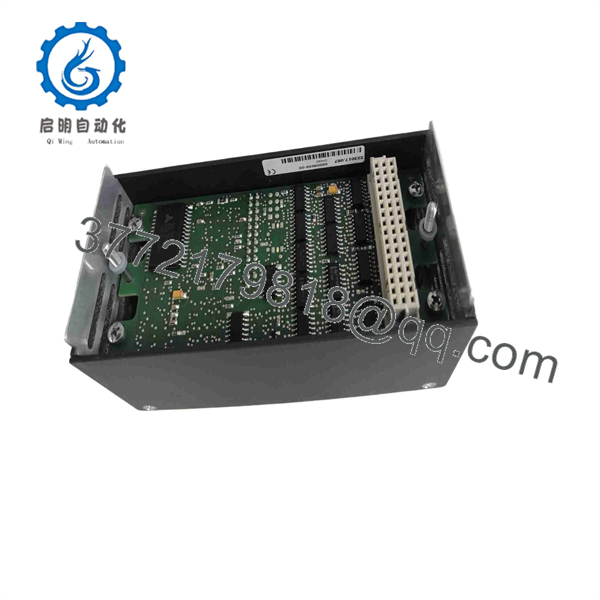
CM202
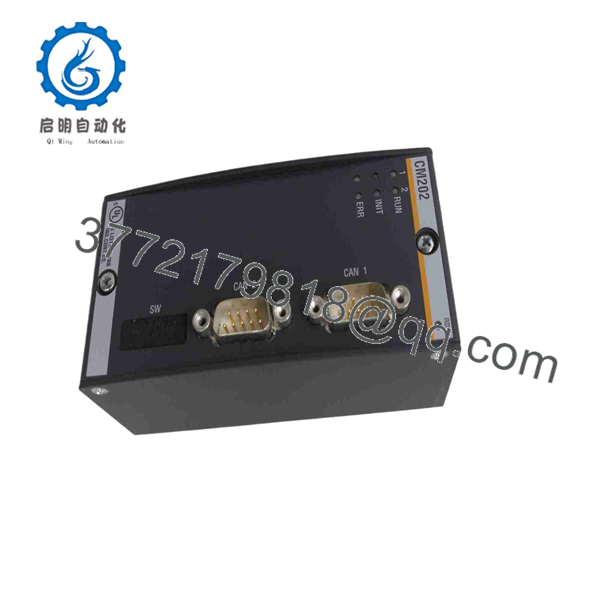
CM202
Troubleshooting Quick Reference
| Symptom | Possible Cause | Relevance to This Part | Quick Check Method | Recommendation |
|---|---|---|---|---|
| is not detected by the M200 controller | Module not seated, controller supply problem, incompatible hardware/firmware, damaged backplane connection | ✅ High | Power down under the approved procedure; reseat ; inspect module connector; check diagnostics and whether adjacent modules are recognized | Verify controller power, rack condition, and software compatibility before replacing . |
| No CAN devices communicate on either port | configuration missing, controller application stopped, module fault, incorrect bus wiring, missing common CAN reference | ✅ High | Check status and SolutionCenter diagnostics; verify the application is running; inspect both DB9 CAN connections and network wiring | Confirm configuration and physical bus continuity before replacing the module. |
| One CAN network works but the other fails | Wrong port configuration, damaged cable, incorrect baud rate, failed remote node, termination error on one segment | ✅ Medium | Compare settings for CAN port 1 and port 2; check bus voltage and continuity; test the failed port with a known-good cable and node | Diagnose the affected network separately. The two ports are independently configurable. |
| CANopen nodes show timeout or heartbeat loss | Incorrect bitrate, duplicate node ID, missing termination, excessive cable length, shield/ground fault, failed node | ✅ Medium | Use SolutionCenter diagnostics; verify node IDs, bitrate, heartbeat settings, termination resistance, and cable routing | Correct bus configuration and field wiring first. Do not replace just because nodes time out. |
| CANopen master cannot start nodes | Module set as SubDevice, wrong NMT configuration, EDS file issue, incompatible device profile, application logic error | ✅ High | Review each port’s NMT role in SolutionCenter; confirm EDS file and CiA device profile; check NMT command and error history | Configure the port as the intended MainDevice and validate the device configuration. |
| CAN bus errors rise during operation | Poor shielding, loose DB9 connector, damaged cable, stub too long, incorrect termination, electrical noise | ✅ Medium | Inspect connector retention and cable route; verify 120 Ω termination at the two physical bus ends; review CAN error counters | Correct the bus topology and grounding. Replace only if errors persist with a known-good test network. |
| Network fails after a replacement module is installed | Different firmware, incorrect DIP-switch position, missing configuration, swapped ports, wrong baud rate or node role | ✅ High | Photograph old DIP-switch positions; compare firmware and SolutionCenter configuration; verify which cable belongs to each CAN port | Restore the documented configuration before commissioning. Do not rely on factory defaults. |
| Daisy-chain installation fails | DIP switches not set to link interfaces, improper external wiring, termination placed in the wrong location | ✅ High | Check the DIP-switch setting and confirm the intended topology against the wiring drawing | Use the correct switch setting only when the system design calls for electrical connection between both CAN interfaces. |
| Intermittent communications after cabinet vibration or temperature change | Loose backplane seating, cracked solder joint, cable strain, corroded connector, environmental exposure | ✅ Medium | Inspect module seating, mounting, and DB9 screw locks; monitor diagnostics while flexing only external cabling under approved procedures | Correct mechanical and cable issues first. Replace the module if the fault follows in a controlled swap test. |
❗ DIP-switch warning: The two CAN interfaces can operate independently, but Bachmann states that DIP switches can electrically connect both interfaces for station-to-station daisy-chain cabling. Take a clear photo of the old switch positions before removal. A replacement left at factory defaults can split a network that previously passed through the module.
❗ Bitrate warning: Every device on a given CAN segment must use the same bitrate. Do not change from 250 Kbaud to 500 Kbaud without verifying every node, cable length, termination, and application setting. A single unmatched node can flood the network with errors.
❗ Termination warning: Use 120 Ω termination only at the two physical ends of a CAN bus. With power removed, measure approximately 60 Ω between CAN_H and CAN_L on a correctly terminated two-end network. About 120 Ω usually means one terminator is missing; much lower than 60 Ω can indicate extra termination or a wiring fault.
❗ Node-ID warning: Duplicate CANopen node IDs cause difficult, intermittent-looking faults. Record every device address before replacing or commissioning a module. This is one of the most common mistakes on a rushed field repair.
❗ Shielding and grounding warning: The interfaces are galvanically isolated from the controller system interface, but field wiring still needs the specified shield and reference treatment. Do not bond shields at random points. Follow the machine, turbine, marine, or site grounding drawing.
❗ ESD warning: Use a grounded wrist strap when installing the module and avoid touching the connector contacts. I have seen a technician install a communications module after walking across a dry control room floor; the controller booted, but one port became intermittent later. Use ESD controls.
Keep these checks in mind and you will save yourself 90% of typical rework time. If the issue remains unresolved, provide technical support with photos of the label, controller rack position, DIP-switch settings, DB9 connector wiring, SolutionCenter diagnostics, CAN bitrate, node list, topology drawing, and measured termination resistance.
Frequently Asked Questions
What is the Bachmann ?
Bachmann is a dual-channel CAN/CANopen interface module for the Bachmann control system. It gives an controller two CAN connections that can run as independent networks or, where the design requires it, be electrically linked using DIP-switch settings for daisy-chain topology.
The standard order number is 00009698-00. Bachmann also lists a cold-climate CC variant under order number 00016404-00.
How many CAN networks can support?
One supports two CAN interfaces and can run two independent CAN networks. Bachmann permits up to four modules in one controller, for a total of up to eight CAN networks per controller.
The actual system limit also depends on controller capacity, application design, firmware, network traffic, and the connected devices.
Does support CANopen master and slave operation?
Yes. Each connection can be configured independently as a CANopen NMT MainDevice or NMT SubDevice. Bachmann lists CANopen support including Node Guarding and Heartbeat monitoring, plus API access for SDO, LMT, LSS, and emergency messages.
Before replacement, document which port acts as master, which devices are assigned to it, their node IDs, EDS files, heartbeat settings, and application configuration.
What CAN bus speed does the support?
supports CAN communication rates from 10 Kbaud to 1 Mbaud. The selected bitrate must match every device on the same CAN segment. Maximum practical cable length and node count decrease as bitrate increases.
Do not assume the system is 1 Mbaud because the module supports it. Many field networks use lower speeds to accommodate cable length, topology, noise environment, or installed device limitations.
Is compatible with J1939 or NMEA 2000?
Yes, Bachmann states that J1939 and NMEA 2000 are supported through the J1939SRV software module. The module can also support proprietary CAN protocols implemented by the application program.
Do not purchase based solely on physical CAN compatibility. Verify that the required controller software, licensed function modules, application program, and message database are available for the target system.
Can I hot-swap a Bachmann ?
Do not hot-swap it unless the exact system documentation and your approved site procedure explicitly allow it. Removing a live fieldbus module can drop communications to remote I/O, drives, safety-adjacent equipment, turbine subsystems, or marine control devices.
Shut down or place the controlled equipment in an approved safe state, isolate power as required, record all diagnostics, photograph switch positions and cable locations, and verify that the installation cannot create unsafe machine behavior.
Is the same as CC?
No. The CC is a cold-climate version and has a different order number. Do not substitute it without verifying environmental requirements, documentation, and cabinet conditions. The standard is rated for −30 to +60 °C operation, while the CC version is intended for more demanding cold-climate use.
Why is a New Surplus cheaper than factory supply?
New Surplus inventory can originate from unused project spares, turbine-control upgrades, panel-builder overstock, cancelled projects, distributor inventory, or warehouse releases. Lower pricing usually reflects secondary-market sourcing, shelf age, or an obsolete project stock position rather than a functional defect.
For a New Original / New Surplus , request:
- Actual photos showing
and order number00009698-00 - Confirmation that the module is standard , not CC
- Photos of both DB9 connectors, backplane connector, front label, and DIP-switch area
- Hardware and firmware revision, if visible
- Clear condition statement: Factory Sealed, New Original / New Surplus, or Refurbished (tested)
- Warranty duration, return terms, available quantity, and actual dispatch lead time
What testing should a supplier complete before shipment?
A competent supplier should use a documented test process:
- Inbound inspection and traceability: Verify the Bachmann model label, order number, serial number, hardware revision, source documents, and OEM markings. Inspect for corrosion, altered labels, cracked DB9 housings, bent connector pins, damaged contacts, rework marks, heat discoloration, or UV yellowing.
- Power-on and backplane test: Install the in a compatible Bachmann controller test rack. Confirm controller recognition, normal module status, stable current draw near the specified 320 mA at 5 V DC, and no abnormal heat.
- Dual-port communications test: Connect each CAN interface to a known-good CAN/CANopen test network. Validate independent operation of both ports across representative bitrates such as 125 Kbaud, 250 Kbaud, 500 Kbaud, and 1 Mbaud where the test system supports them.
- CANopen role test: Configure each port as NMT MainDevice and NMT SubDevice in turn. Confirm node discovery, SDO communication, PDO exchange, Node Guarding or Heartbeat monitoring, and diagnostic visibility in Bachmann SolutionCenter.
- Isolation and protection verification: Confirm communication stability under approved test conditions and inspect for unexpected coupling between ports. Do not perform destructive short-circuit or high-voltage tests outside the OEM-approved process.
- Load and thermal test: Run both CAN networks with representative message traffic for more than 24 hours where the test bench permits. Monitor error counters, dropped frames, controller diagnostics, communications stability, and enclosure temperature.
- Final QC and packaging: Require inspector sign-off, connector protection, ESD-safe packaging, foam or bubble wrap, heavy-duty corrugated boxing, and a dated QC-passed label. SolutionCenter screenshots, test photos, and a test report should be available upon request.



