
 WhatsApp: +86 16626708626
 Email:
  Phone: +86 16626708626
Description
Key Technical Specifications
| Parameter | Value |
|---|---|
| Manufacturer | BACHMANN electronic GmbH |
| Model | DPM200 |
| Reported Part Number | 00010555-00; verify from physical label |
| Product Type | PROFIBUS DP communication module |
| Controller Platform | BACHMANN M200 system |
| Primary Protocol | PROFIBUS DP |
| PROFIBUS Version | DP-V0 |
| Operating Modes | DP master, DP slave, or combined DP master/slave |
| Supported Transfer Rate | 9.6 Kbaud to 12 Mbaud |
| Shared Process-Data Memory | 8 kB |
| Data Consistency | Consistency lock for process-data image access |
| Maximum Modules per Controller | Up to 3 DPM200 modules |
| Fieldbus Isolation | Galvanic isolation between PROFIBUS interface and controller |
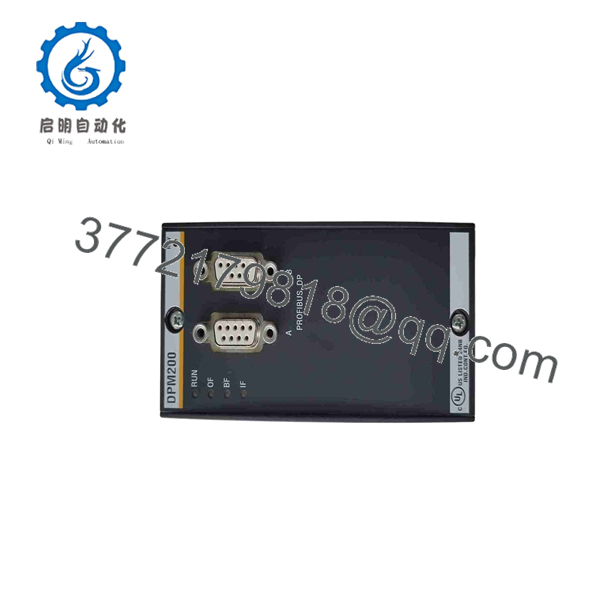
| Bus Connections | Two internally bridged PROFIBUS connections for loop-through wiring |
| Controller Communication | Backplane interface to BACHMANN M200 controller |
| Fieldbus Topology | Standard PROFIBUS RS-485 line topology; use approved repeaters or optical links where required |
| Network Termination | Required at both physical ends of each RS-485 PROFIBUS segment |
| Installation | M200 controller/backplane-mounted communication module |
| Lifecycle Status | Verify current lifecycle status, firmware support, and availability directly with BACHMANN before shutdown-critical procurement |
BACHMANN identifies the DPM200 as a PROFIBUS DP fieldbus module for the M200 controller that can operate as a DP master, DP slave, or combined master/slave. BACHMANN lists up to three DPM200 modules per M200 controller, a 9.6 Kbaud to 12 Mbaud transfer-rate range, 8 kB shared memory for the process-data image, and a consistency lock for data access.
Product Introduction
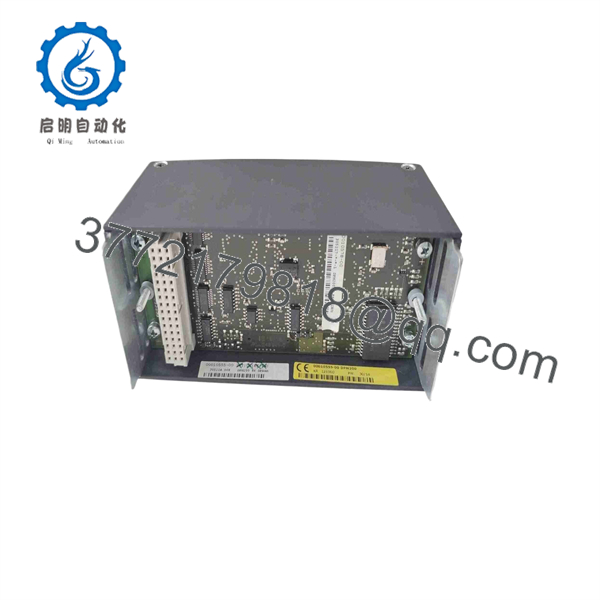
The BACHMANN DPM200 is a PROFIBUS DP communication module for M200 automation controllers. It exchanges cyclic process data between the controller and distributed I/O, drives, motor-control centers, remote PLC stations, turbine-control equipment, and other PROFIBUS DP devices. The module can act as a DP master, a DP slave, or both, allowing one controller to participate in multiple control-network roles.
The DPM200 is a network interface, not an I/O card. A replacement must match the controller hardware, PROFIBUS role, project configuration, GSD files, station address, network baud rate, cable shielding, termination position, and process-data mapping. Replacing it without preserving those details can turn a simple spare swap into a full network outage.
DPM200
DPM200
Troubleshooting Quick Reference
| Symptom | Possible Cause | Relevance to This Part | Quick Check Method | Recommendation |
|---|---|---|---|---|
| Entire PROFIBUS DP segment is offline | Lost bus power, broken trunk cable, missing termination, master controller fault, wrong baud rate, failed | ⚠️ Medium | Check controller and diagnostics first. Inspect both physical ends of the RS-485 segment for active termination. Measure PROFIBUS cable continuity and verify shield bonding. | Verify termination, cable integrity, and master status before replacing . A whole-segment outage is often a network infrastructure fault. |
| One remote I/O station is offline | Bad drop cable, incorrect station address, device power loss, duplicate address, failed slave, connector issue | ❌ Usually low | Check the slave-device LEDs and 24 V DC supply. Verify its configured address and inspect its PROFIBUS connector and cable. Compare PLC diagnostics with the affected station address. | Troubleshoot the slave and its local cable first. The is unlikely to be defective if other DP stations remain healthy. |
| Intermittent PROFIBUS faults during motor starts | Poor cable shield, improper grounding, damaged cable, incorrect termination, EMI, loose connector | ❌ Usually low | Review fault timestamps against VFD, contactor, or motor starts. Inspect shield terminations and connector screws. Use a PROFIBUS tester to check signal quality and reflections. | Correct shielding, bonding, routing, and connector issues. Keep PROFIBUS cable separate from high-current motor conductors. |
| is not recognized by the controller | Module not seated, wrong rack position, backplane issue, controller firmware mismatch, failed module | ✅ High | Power down under approved procedure. Inspect module contacts, backplane connector, latching, and controller hardware configuration. Reinstall the module firmly in the intended slot. | If the controller still does not detect a correctly seated , test with a known-good compatible module or escalate for controller/backplane diagnosis. |
| Bus goes down immediately after replacement | Incorrect DP address, missing project configuration, wrong mode, wrong baud setting, termination moved, mismatched firmware | ✅ High | Compare old and replacement module configuration, project settings, controller role, station address, and physical bus connector settings. Restore the original configuration from backup. | Do not commission by trial and error. Match master/slave mode and project data exactly before reconnecting the production segment. |
| reports bus fault but devices have power | Open A/B conductors, reversed PROFIBUS polarity, no master token, duplicate address, incorrect baud rate | ⚠️ Medium | Verify connector pinout and A/B polarity using the system wiring documentation. Check for a master station and inspect diagnostics for address or parameterization errors. | Correct cable polarity and configuration. Do not swap A/B wires randomly across the network. |
| Cyclic data values are stale or inconsistent | Process-data mapping mismatch, controller task issue, wrong GSD file, slave configuration mismatch, memory consistency handling issue | ⚠️ Medium | Compare configured input/output byte mapping in the project with the device GSD configuration. Monitor raw process data and application variables at the same scan. | Restore the approved hardware configuration and verify data-consistency handling before replacing the module. |
| Communication works at low speed but fails at 12 Mbaud | Excessive cable length, poor connectors, improper topology, missing termination, noisy installation | ❌ Low | Measure segment length and check installed topology against PROFIBUS guidelines. Test signal quality with a certified PROFIBUS diagnostic tool. | Correct physical-layer design or reduce baud rate only after engineering approval. High-speed PROFIBUS is unforgiving of poor cable installation. |
| Two networks interfere with each other | Duplicate address, shared configuration error, incorrect gateway setup, cable cross-connection | ⚠️ Medium | Label and trace each fieldbus segment. Confirm module roles, network addresses, and project assignments. Verify that connectors are not cross-patched. | Use clear bus segmentation, documented addresses, and separate configuration records for each . |
| Replacement module causes a controller stop or network diagnostic storm | Wrong module type, incompatible firmware, corrupted configuration, bad backplane contact, incorrect role assignment | ✅ High | Record all controller logs before and after replacement. Compare module label, firmware, configuration backup, rack layout, and DIP-switch or jumper settings if present. | Restore the original module if safe to do so, then validate compatibility before installing a replacement. |
❗ PROFIBUS warning: One missing terminator can take down an entire segment. Termination belongs at the two physical ends of the RS-485 trunk only. Do not enable termination at every device, and do not leave the far end open.
❗ Shielding warning: I have seen a PROFIBUS segment run perfectly until a large motor started. The real cause was a shield pigtail and an unbonded connector shell, not the . Use proper 360-degree shield termination, maintain separation from motor cables, and verify cabinet bonding before replacing hardware.
If the fault remains unresolved, provide technical support with diagnostics, label and firmware data, network topology, station address list, GSD versions, PROFIBUS tester report, cable photos, connector termination settings, and the controller project configuration.
Frequently Asked Questions
What is the BACHMANN ?
The BACHMANN is a PROFIBUS DP communication module for the automation system. It lets an controller exchange cyclic process data with PROFIBUS DP devices and can be configured as a DP master, DP slave, or combined master/slave module.
What PROFIBUS speed does support?
BACHMANN lists a supported PROFIBUS communication range from 9.6 Kbaud to 12 Mbaud. The correct speed depends on the installed network design, cable length, device capability, topology, and existing project configuration. Do not change baud rate on a live production network without a documented commissioning plan.
How many modules can one controller use?
BACHMANN states that an controller can use up to three modules. Each module must have a defined role, network configuration, process-data map, and physical PROFIBUS segment.
Can work as both a PROFIBUS master and slave?
Yes. The can be operated as a DP master, DP slave, or a combined master/slave module. That flexibility is useful where an controller must control distributed I/O as a master while also presenting selected data to another master system.
Does provide I/O points?
No. is a communication module, not a physical digital or analog I/O card. It carries data between the controller and external PROFIBUS DP devices. The actual I/O points belong to remote I/O stations, drives, valve islands, motor-control devices, or other PROFIBUS slaves connected to the network.
Can I replace with any PROFIBUS DP master?
No. A generic PROFIBUS master is not a direct replacement. The must match the BACHMANN hardware platform, controller backplane, firmware, project configuration, and application process-data mapping. A migration to another PROFIBUS interface is possible only as an engineered system change.
Can I hot-swap the ?
Do not assume hot swapping is allowed. Isolate or place the system into an approved maintenance condition before removal. Pulling a fieldbus module can stop cyclic updates, trigger remote I/O faults, trip a process interlock, or cause drives to enter communication-fault behavior. Follow the maintenance procedure and the plant’s change-control process.
Will I lose controller programming when replacing ?
The application program typically resides in the controller, not in the itself. But the communication configuration, GSD files, station addressing, process-data mapping, and bus role settings are essential. Back up the project and record all bus settings before replacement.
Why does the have 8 kB shared memory?
BACHMANN specifies 8 kB shared memory for the PROFIBUS process-data image. This memory holds data exchanged between the controller application and fieldbus network. The consistency-lock mechanism helps prevent the application from reading partially updated multi-byte process data.
Why is a New Surplus cheaper than OEM-distributed stock?
New Surplus modules can come from unused project spares, system upgrades, panel-builder inventory, maintenance stores, or distributor overstock. Lower price does not establish compatibility or authenticity. Request exact-unit photos, Part Number 00010555-00 confirmation, firmware/revision details, connector condition, packaging condition, written warranty, and a functional communication test report.
What testing should a supplier perform before shipping a refurbished ?
Request visual inspection for connector damage, corrosion, missing labels, or rework marks; controlled insertion into a compatible system; controller recognition; PROFIBUS DP master/slave communication testing at a documented baud rate; process-data read/write verification; galvanic-isolation check where test methods permit; and a written QC report. A bench test does not replace final site validation with the correct GSD files, network topology, field devices, shielding, and application program.



