
 WhatsApp: +86 16626708626
 Email:
  Phone: +86 16626708626
Description
Key Technical Specifications
| Parameter | Specification |
|---|---|
| Manufacturer | Bachmann electronic GmbH |
| Model | TCO216-C |
| Manufacturer Item No. | 00008673-00 |
| Module Type | CAN Slave Temperature Input/Output Module |
| Temperature Inputs | 16 |
| Thermocouple Types | J or K, selectable per input |
| Measuring Range | 0 °C to +500 °C / +800 °C, configurable |
| Input Resolution | 12 bit |
| Linearization | Polynomial according to DIN IEC 584 |
| Cold Junction Compensation | 0 °C to +133 °C for Type K |
| Sampling Period | 16 ms |
| Sensor Break Detection | Yes |
| Digital Outputs | 24 |
| Output Voltage | 24 VDC |
| Output Current | 0.5 A/channel; maximum 1 A/channel |
| Total Output Current | Maximum 12 A |
| Switching Frequency | Maximum 500 Hz at 1 kΩ resistive load |
| Short-Circuit Protection | Yes |
| Supply Voltage | 18–34 VDC |
| CAN Transfer Rate | 10 kbit/s to 1 Mbit/s |
| CAN Connection | 2 × 9-pin D-sub female |
| CAN Protocol | CANopen; CiA DS 301 / DS 401 |
| CAN Node ID | 1–254 |
| Operating Temperature | 0 °C to +60 °C |
The current Bachmann datasheet confirms the 16 thermocouple channels, 24 digital outputs, 12-bit resolution, 16 ms sampling period, 18–34 VDC supply, and output-current specifications. Earlier Bachmann system documentation additionally identifies the CANopen interface as supporting up to 1 Mbit/s with two 9-pin D-sub connectors.
Product Introduction
The Bachmann TCO216-C is a compact, stand-alone CAN slave module combining 16 thermocouple inputs with 24 digital outputs. Each temperature channel accepts either Type J or Type K thermocouples, with configurable measurement ranges up to 500 °C or 800 °C. Sensor-break detection is included for temperature-input monitoring.
The module communicates through CAN/CANopen and can be installed on EN 50022-compatible backplanes. Its 24 digital outputs provide 24 VDC switching capability, making the TCO216-C suitable for distributed temperature-control applications where temperature acquisition and discrete actuator control are handled through one remote I/O node.
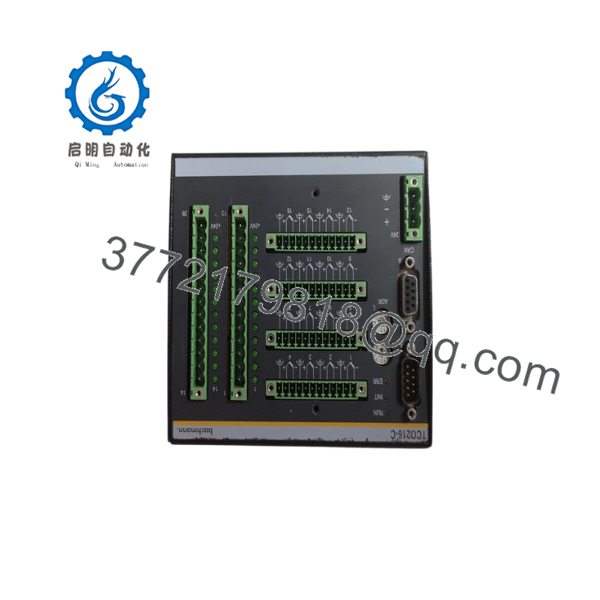
TCO216-C
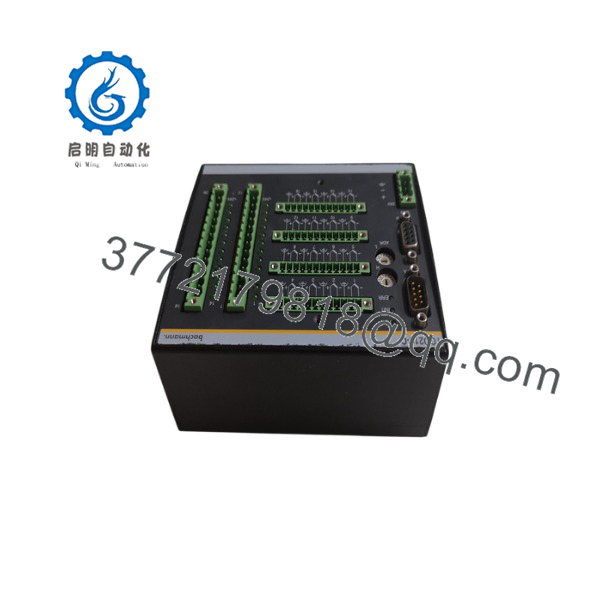
TCO216-C
Installation & Configuration Guide
Stage 1 — Pre-Installation Preparation (~5 minutes)
- Apply LOTO procedures and isolate the relevant machine or process.
- Verify the replacement marking: Bachmann TCO216-C / 00008673-00.
- Photograph the existing CAN wiring, thermocouple terminals, output wiring, and switch settings.
- Record the CAN node ID and baud-rate settings.
- Back up the controller’s CANopen configuration.
- Prepare an ESD strap, multimeter, wire labels, and appropriate screwdriver.
⚠️ Do not assume that a TCO208-C is electrically equivalent. The TCO208-C has 8 thermocouple inputs and 12 digital outputs, whereas TCO216-C provides 16 and 24 respectively.
Stage 2 — Removing the Existing Module (~5 minutes)
- Disconnect the 18–34 VDC supply.
- Confirm that the digital outputs have reached a safe state.
- Label each thermocouple and digital-output connection.
- Disconnect the CAN connectors without pulling on the cable.
- Record the CAN termination arrangement.
- Release the module from the EN 50022 mounting system.
- Inspect the connectors and mounting rail for damage.
Keep the removed module until the replacement has passed the functional test.
Stage 3 — Installing the Replacement (~5 minutes)
- Confirm the TCO216-C model and item number.
- Install the module securely on the designated EN 50022 mounting arrangement.
- Reconnect the CAN bus using the original network topology.
- Restore the recorded CAN node ID and baud-rate settings.
- Reconnect each thermocouple to its corresponding channel.
- Verify thermocouple polarity and sensor type.
- Reconnect the 24 VDC digital-output circuits.
- Check that the total output load remains within the specified limits.
⚠️ The supports both J and K thermocouples, but the selected sensor type is configurable per input. Incorrect thermocouple selection can produce a plausible-looking but incorrect temperature value.
Stage 4 — Power-On & Testing (~10–15 minutes)
- Verify supply polarity and measure the DC supply before energizing.
- Apply 18–34 VDC power.
- Check the module’s status LEDs.
- Confirm CAN communication with the controller.
- Verify the node ID and baud rate.
- Confirm all 16 temperature channels are recognized.
- Inject or simulate known temperature values where practical.
- Check sensor-break detection.
- Test each digital output with the connected equipment in a safe state.
- Confirm that the controller receives the expected CANopen process data.
For a replacement in an operating machine, test the temperature channels individually before enabling automatic control. A wiring error on a thermocouple can be harder to detect than a completely missing signal because the controller may still receive a valid-looking temperature value.
Frequently Asked Questions (FAQ)
Q1. What is the Bachmann ?
The is a stand-alone CAN/CANopen temperature I/O module providing 16 thermocouple inputs and 24 digital outputs. It belongs to Bachmann’s TCO2xx-C family of distributed CAN modules.
Q2. What thermocouples does support?
It supports Type J and Type K thermocouples, selectable individually by input. The documented measurement range is configurable to 0–500 °C or 0–800 °C depending on the application and sensor type.
Q3. How many digital outputs does have?
The provides 24 digital outputs. The standard output current is 0.5 A per channel, with a maximum of 1 A per channel. The specified combined output current is maximum 12 A.
Q4. What communication protocol does use?
The module operates as a CAN/CANopen slave. Bachmann documentation identifies CAN transfer rates from 10 kbit/s through 1 Mbit/s, with two 9-pin D-sub CAN connectors. The documented CANopen profiles include CiA DS 301 and DS 401.
Q5. What is the supply voltage for ?
The specified supply range is 18–34 VDC. The module’s digital outputs operate at 24 VDC.
Q6. Can replace a TCO208-C?
Not as a simple channel-for-channel assumption. Both belong to the same TCO2xx-C family and share the same basic CAN temperature-I/O concept, but provides 16 temperature inputs and 24 outputs, while TCO208-C provides 8 inputs and 12 outputs. The application configuration and field wiring must therefore be checked before substitution.
Q7. What is the Bachmann part number?
Bachmann documentation identifies 00008673-00 as the manufacturer item number for . When purchasing a replacement, use both the visible model designation and the manufacturer item number to reduce the risk of receiving a different hardware variant.



