
 WhatsApp: +86 16626708626
 Email:
  Phone: +86 16626708626
Description
Key Technical Specifications
| Parameter | Specification |
|---|---|
| Manufacturer | Beckhoff |
| Model | CX1500-M310 |
| Product Type | PROFIBUS master fieldbus connection |
| Fieldbus | PROFIBUS DP, DP-V1, DP-V2 (MC) |
| Data Transfer Rate | 9.6 kbaud to 12 Mbaud |
| PROFIBUS Interface | 1 × 9-pin D-sub socket |
| Maximum Bus Devices | 125 slaves |
| Maximum Data per Slave | 244 bytes input/output/parameter/configuration/diagnostic data |
| CPU Interface | ISA Plug-and-Play |
| DPRAM | 2 kB |
| Maximum Power Loss | 1.8 W |
| Dimensions | 38 × 100 × 91 mm |
| Weight | Approx. 190 g |
| Operating Temperature | 0 to +55 °C |
| Storage Temperature | -25 to +85 °C |
| Relative Humidity | 95%, non-condensing |
| Protection Rating | IP20 |
| Driver Compatibility | TwinCAT 2 |
| Approvals | CE, UL |
The CX1500-M310 is a single-channel PROFIBUS master. Beckhoff states that up to 125 PROFIBUS slaves can be connected, with deterministic fieldbus communication possible through the CX system.
The module communicates with the CX CPU through an ISA/PC/104 system-bus interface with 2 kB DPRAM. Its PROFIBUS connection uses a 9-pin D-sub interface.
Product Introduction
The Beckhoff CX1500-M310 is a PROFIBUS master module for CX10x0 Embedded PC systems. It provides PROFIBUS DP, DP-V1, and DP-V2 (MC) communication at rates from 9.6 kbaud through 12 Mbaud, supporting up to 125 connected slave devices.
The module integrates with TwinCAT System Manager and can be added or replaced through the CX system’s PC/104 architecture. Beckhoff specifies TwinCAT 2 compatibility for the CX1500-M310 driver, which is an important consideration when maintaining legacy CX10x0 installations.
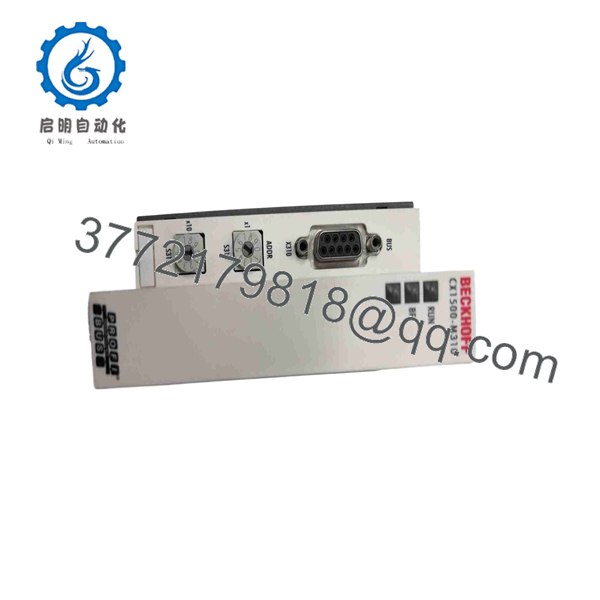
CX1500-M310
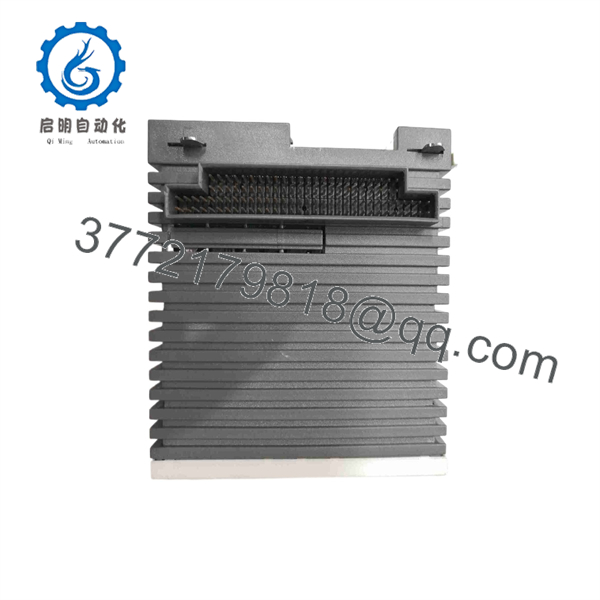
CX1500-M310
Installation & Configuration Guide
Stage 1 — Pre-Installation Preparation
Estimated time: 15–30 minutes
- Place the controlled machine in a safe operating state.
- Notify operations and apply the site’s LOTO procedure.
- Isolate power to the CX system.
- Wait at least 5 minutes for stored electrical energy to dissipate.
- Verify the absence of hazardous voltage.
- Wear an ESD wrist strap when handling the module.
- Photograph the PROFIBUS connector, address settings, status LEDs, and adjacent CX modules.
- Record the existing PROFIBUS configuration and slave addresses.
- Back up the TwinCAT project before removing the module.
⚠️ Confirm that the replacement is specifically CX1500-M310, not CX1500-B310. The M310 is the PROFIBUS master connection, while the B310 is the slave version.
Stage 2 — Removing the Existing Module
Estimated time: 10–15 minutes
- Confirm that the CX system is electrically isolated.
- Disconnect the PROFIBUS cable from the 9-pin D-sub connector.
- Record the module address/configuration settings.
- Release the module from the CX system.
- Remove the CX1500-M310 carefully from the PC/104 system-bus connection.
- Inspect the mating connectors for contamination or mechanical damage.
- Keep the original module until the replacement is fully commissioned.
Stage 3 — Installing the Replacement
Estimated time: 15–20 minutes
- Verify the replacement marking: .
- Compare the hardware revision with the removed module.
- Install the module onto the CX system’s PC/104 interface.
- Ensure that the module is fully seated.
- Reconnect the PROFIBUS cable.
- Confirm the PROFIBUS termination arrangement.
- Verify the configured station/master settings.
- Inspect the complete assembly before applying power.
Stage 4 — Power-On & Testing
Estimated time: 30–60 minutes
- Energize the CX system.
- Observe the status indicators.
- Open the existing TwinCAT System Manager configuration.
- Verify that the is detected.
- Confirm the PROFIBUS master configuration.
- Scan or verify the configured PROFIBUS slaves.
- Check slave diagnostic and communication status.
- Verify process-data mapping against the existing PLC program.
- Test representative inputs and outputs.
- Save the verified configuration and perform a controlled machine test.
Beckhoff’s commissioning procedure uses TwinCAT System Manager to identify the , scan connected PROFIBUS boxes, inspect PROFIBUS status and diagnostics, and link I/O signals to PLC variables.
⚠️ A common replacement error is treating a missing PROFIBUS slave as a failed master. First check the slave address, GSD/configuration data, PROFIBUS cable, termination, and slave operating state. Beckhoff specifically recommends checking cabling and slave operating mode when devices are missing from a scan.
FAQ
1. What is the Beckhoff ?
The is a PROFIBUS master fieldbus connection designed for Beckhoff CX10x0 systems.
2. What PROFIBUS protocols does it support?
It supports PROFIBUS DP, DP-V1, and DP-V2 (MC). The specified transmission range is 9.6 kbaud to 12 Mbaud.
3. How many PROFIBUS slaves can it handle?
The documented maximum is 125 slaves, with up to 244 bytes of input/output, parameter, configuration, or diagnostic data per slave.
4. Is compatible with CX1020?
Yes. Beckhoff and the PROFIBUS product guide identify the as a PROFIBUS master connection for CX10x0, which includes the CX1020 platform.
5. Does work with TwinCAT 3?
Beckhoff specifies the driver as compatible with TwinCAT 2. For a legacy CX10x0 installation, verify the installed TwinCAT version and project architecture before attempting a software migration.
6. Is obsolete?
Beckhoff currently lists the in the service phase. This means it remains relevant primarily for servicing existing installations rather than representing a current-generation product for new system design.
7. Can replace CX1500-B310?
No. The two modules serve different PROFIBUS roles. is the master connection, while CX1500-B310 is the slave connection. Verify the required PROFIBUS topology before ordering a replacement.



