
 WhatsApp: +86 16626708626
 Email:
  Phone: +86 16626708626
Description
3. Key Technical Specifications
| Parameter | Value |
|---|---|
| Product Type | Data Manager I/O Module |
| Part Number | 125760-01 |
| Series | Bently Nevada 3500 Machinery Protection System |
| Primary Function | Rack communication and data management interface |
| Installation | Rear I/O Module for compatible 3500 rack configuration |
| Supported System | Bently Nevada 3500 Monitoring System |
| Communication Role | Transfers machinery monitoring data to host interfaces |
| Mounting | 3500 Rack Rear I/O Assembly |
| Operating Temperature | Refer to installed rack environmental specifications |
| Construction | Industrial-grade PCB with shielded interface connectors |
| Typical Application | Turbines, Compressors, Pumps, Generators |
| Compatibility | Must match the corresponding 3500 front module configuration |
Compatibility Note: The 125760-01 is a rear Data Manager I/O Module intended for specific Bently Nevada 3500 rack configurations. It should always be matched with the appropriate front communication module and rack revision. Verify the complete assembly before replacement to avoid connector or configuration mismatches.
4. Product Introduction
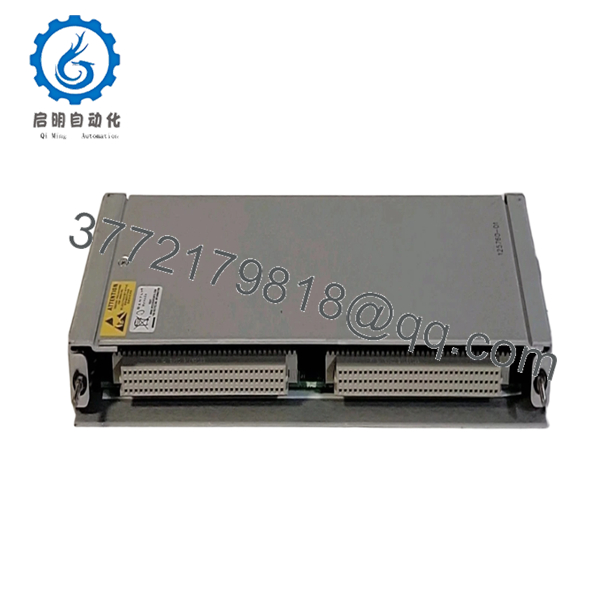
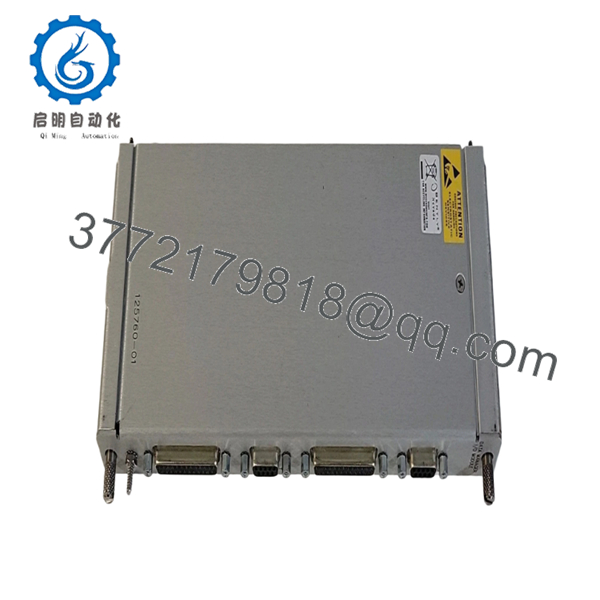
The Bently Nevada 125760-01 is a Data Manager I/O Module used within the Bently Nevada 3500 Machinery Protection System. Installed at the rear of the rack, it provides the physical interface between the rack communication module and external system wiring, supporting machinery condition monitoring and system configuration.
Although it is not part of the machinery protection measurement path itself, the module is essential for reliable communication between the 3500 rack and supervisory software. It is commonly found in turbine, compressor, generator, and process plant monitoring systems where continuous diagnostic data is required.

- 125760-01
- 125760-01
5. Installation & Configuration Guide
Stage 1 — Pre-Installation Preparation (10 Minutes)
⚠️ Safety First
- Notify operations of scheduled maintenance.
- Confirm the monitored equipment is in a safe operating condition.
- Apply Lock-Out/Tag-Out procedures.
- Remove power from the 3500 rack.
- Wait at least 5 minutes before handling electronic modules.
Tools Required
- Grounded ESD wrist strap
- PH1 screwdriver
- Fluke 115 multimeter
- Wire labels
- Smartphone for documentation
- Laptop with 3500 Configuration Software
Data Backup
- Export the rack configuration.
- Record communication settings.
- Photograph all rear I/O wiring.
- Record module part numbers and hardware revisions.
Stage 2 — Removing the Existing Module (5 Minutes)
- Remove the rear wiring cover if installed.
- Label all communication and field cables.
- Disconnect the connectors carefully.
- Release the retaining hardware.
- Remove the I/O module straight from the rack.
Inspect for:
- Bent connector pins
- Damaged terminal connectors
- Dust contamination
- Corrosion
- Loose mounting hardware
⚠️ Retain the existing module until the replacement has completed operational testing.
Stage 3 — Installing the New Module (10 Minutes)
- Wear a grounded ESD wrist strap.
- Verify the replacement part number is 125760-01.
- Confirm compatibility with the installed front communication module.
- Install the rear I/O module evenly.
- Tighten retaining hardware.
- Reconnect all cables according to the documented wiring.
Self-Checklist
- ☑ Part number verified
- ☑ Connector orientation correct
- ☑ Wiring restored
- ☑ Mounting hardware tightened
- ☑ Rear connectors fully engaged
Stage 4 — Power-On & Testing (15 Minutes)
Pre-Power Checks
- Verify rack supply voltage.
- Inspect for connector misalignment.
- Confirm all communication cables are secure.
Startup Procedure
- Energize the 3500 rack.
- Observe normal startup indications.
- Connect using 3500 Configuration Software.
- Verify communication with the rack.
- Confirm all installed monitor modules are recognized.
- Verify data transmission to the host workstation.
- Review the System Event List for communication errors.
⚠️ Troubleshooting Notes
No Rack Communication
- Incorrect rear I/O module
- Loose communication connector
- Damaged Ethernet or serial cable
- Incorrect rack configuration
Configuration Download Failure
- Firmware incompatibility
- Network addressing error
- Incorrect communication parameters
Engineer’s Installation Notes
One of the easiest mistakes to make is assuming every rear I/O module in a 3500 rack is interchangeable. It isn’t. The front communication module and the rear I/O assembly are designed as a matched pair. Before ordering a replacement, verify both the front module model and the rear I/O part number.
Another recommendation is to photograph every rear connector before removal. Even experienced technicians can lose time reconnecting multiple communication cables after a maintenance outage, particularly on racks with several external interfaces.
6. Frequently Asked Questions (FAQ)
Q1. What is the purpose of the 125760-01?
The 125760-01 serves as the Data Manager I/O Module for compatible Bently Nevada 3500 systems. It provides the rear interface that connects the rack communication hardware to external wiring and host systems.
Q2. Can I replace only the rear I/O module?
Yes, provided the replacement has the exact same part number and matches the installed front communication module. Mixing incompatible rear I/O assemblies can prevent successful rack communication.
Q3. Does replacing this module affect machinery protection?
No. The Data Manager I/O Module is part of the communication interface rather than the critical protection path. However, an incorrect installation may interrupt communication with configuration or monitoring software until the issue is corrected.
Q4. Is 125760-01 still available?
Although many Bently Nevada 3500 systems remain in operation worldwide, this part is generally sourced through new-surplus inventory, refurbished stock, or specialized industrial automation suppliers. Availability varies by region and inventory.
Q5. Why should I verify both the front module and rear I/O module?
The rear I/O module is designed for a specific front communication module. Ordering only by the rack model without confirming the rear assembly can result in connector mismatches or unsupported configurations.
Q6. What quality inspections should be completed before shipment?
A professional supplier should complete the following:
- OEM serial number verification
- Anti-counterfeit inspection
- Visual inspection for scratches, corrosion, or repair marks
- Functional testing with a compatible 3500 rack
- Communication interface verification
- Insulation resistance testing (>10 MΩ)
- Hardware identification documentation
- ESD-safe packaging with QC sign-off
Test reports, rack communication screenshots, or inspection photos should be available upon request to verify the module’s operational condition before shipment.



