
 WhatsApp: +86 16626708626
 Email:
  Phone: +86 16626708626
Description
Key Technical Specifications
| Parameter | Value |
|---|---|
| Manufacturer | Bently Nevada |
| Part Number | 163179-01 |
| Product Family | 3500 Machinery Protection System |
| Monitor Type | 3500/60 Temperature Monitor |
| Channel Count | 6 |
| Recorder Outputs | None |
| Input Types | RTD and thermocouple, depending on matched I/O module |
| RTD Capability | 100 Ω platinum RTD, alpha 0.00385 |
| Type K Measurement Range | -18 to +1,370 °C |
| 100 Ω Pt RTD Range | -200 to +850 °C |
| Input Impedance | 10 MΩ per lead input |
| Nominal Power Consumption | Approximately 7 W |
| TC Isolated I/O Isolation | 250 VDC channel-to-channel |
| Operating Temperature | -30 to +65 °C |
| Storage Temperature | -40 to +85 °C |
| Associated I/O Modules | 133819-01, 133827-01, 133835-01, 133843-01, 136711-01, depending on configuration |
| Recorder Output Requirement | Use 3500/61 rather than 3500/60 |
| Rack Architecture | Bently Nevada 3500 |
The 3500/60 monitor accepts temperature inputs through a separately selected 3500/60 I/O module. The OEM documentation lists multiple I/O configurations, including non-isolated RTD/TC, isolated thermocouple, and internal-barrier versions.
Product Introduction
The Bently Nevada 163179-01 is the six-channel front temperature-monitor module for the 3500/60 Machinery Protection System. It processes RTD and thermocouple measurements supplied through the matched rear I/O module and compares measured values against user-configured alarm setpoints. It is the current replacement for the earlier 133811-01 temperature monitor.
The key ordering point is that 163179-01 is the monitor module, not the complete 3500/60 assembly. The rear I/O module must match the sensor type, termination method, barrier requirement, and site wiring. Unlike the 3500/61, the 3500/60 version does not provide six recorder outputs.
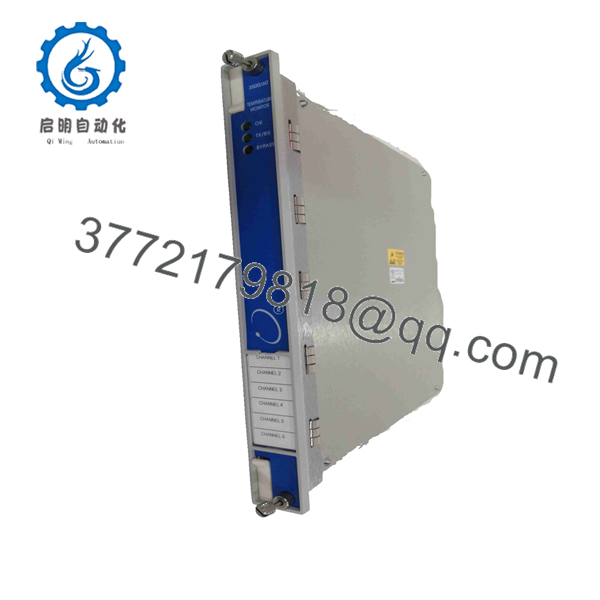
163179-01
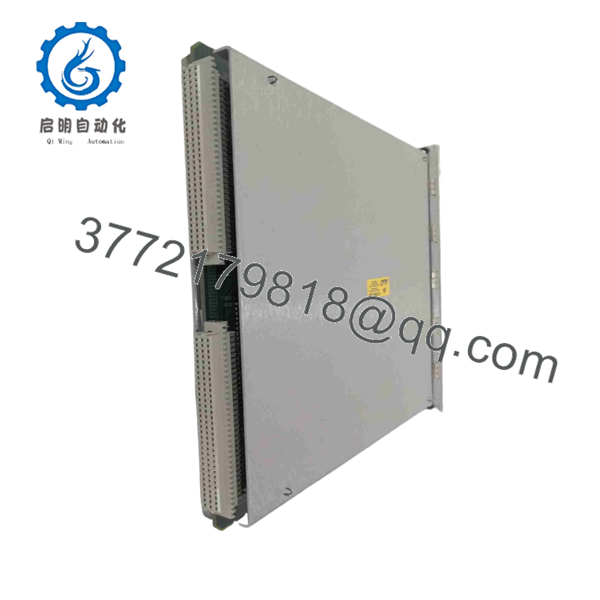
163179-01
Installation & Configuration Guide
Stage 1: Pre-Installation Preparation
Estimated time: 5–8 minutes
⚠️ Safety First: Put the monitored machinery into the approved maintenance state. Follow the plant’s LOTO procedure before removing the 3500 module or disturbing field wiring.
Tools Required
- ESD wrist strap
- Appropriate screwdriver
- Digital multimeter
- Wire labels
- Smartphone or camera
- Approved 3500/60 documentation
Data Backup
- Record the installed monitor part number.
- Confirm the existing module is 163179-01 or the older 133811-01.
- Photograph the front and rear module arrangement.
- Record the companion 3500/60 I/O module part number.
- Document each temperature channel and its sensor type.
- Photograph terminal wiring before disconnecting anything.
- Record alarm setpoints and channel configuration.
- Confirm whether the application requires recorder outputs.
⚠️ The rear I/O module is critical. A 163179-01 can be paired with different I/O configurations. Do not order the monitor alone and assume the existing rear module is suitable without checking it.
Stage 2: Removing the Old Module
Estimated time: 5 minutes
- Place the 3500 rack in the approved maintenance condition.
- Isolate power where required by the maintenance procedure.
- Identify the 3500/60 monitor.
- Verify the part number on the installed module.
- Photograph the module position and adjacent rack modules.
- Release the module retention mechanism.
- Pull the monitor straight out of the rack.
- Inspect the mating connector and rack contacts.
- Keep the old monitor available for comparison.
⚠️ Do not disturb field wiring unnecessarily. The 163179-01 is the monitor module; the sensor wiring normally terminates through the associated rear I/O module.
Stage 3: Installing the New Module
Estimated time: 5–8 minutes
- Verify the replacement part number: 163179-01.
- Confirm that the application is configured as a 3500/60, not a 3500/61.
- Confirm that no local recorder outputs are required.
- Verify the installed rear I/O module.
- Inspect the replacement module for damaged connectors or housing.
- Align the module with the rack slot.
- Insert it carefully without forcing the connector.
- Fully seat the module.
- Secure the retaining mechanism.
Self-Checklist
- 163179-01 verified
- 3500/60 configuration verified
- Companion I/O module identified
- Sensor types documented
- Module fully seated
- Retaining hardware secured
- Existing configuration retained
⚠️ Do not substitute 163179-02 simply because the modules look similar. 163179-02 is associated with the 3500/61 Temperature Monitor, which includes recorder-output functionality.
Stage 4: Power-On & Testing
Estimated time: 10–15 minutes
- Inspect the installation before restoring power.
- Restore rack power using the site’s approved procedure.
- Verify normal 3500/60 module status.
- Confirm that all six configured channels appear correctly.
- Check each RTD or thermocouple reading against the expected process condition.
- Verify the configured sensor type for every active channel.
- Check alarm setpoints.
- Confirm Alert and Danger states operate according to the existing configuration.
- Verify relay logic if the temperature monitor participates in rack-level relay logic.
- Confirm DCS/SCADA temperature values where the 3500 rack is integrated with a host system.
- Record the replacement part number and test results.
⚠️ If a channel reads incorrectly after replacement, check the rear I/O module type, sensor wiring, sensor configuration, polarity for thermocouples, and channel assignment before changing alarm parameters.
Frequently Asked Questions (FAQ)
1. What is Bently Nevada 163179-01?
It is the 3500/60 six-channel Temperature Monitor without recorder outputs. It processes temperature measurements from compatible RTD and thermocouple I/O modules and provides temperature alarm monitoring within the 3500 system.
2. Is 163179-01 a complete 3500/60 temperature monitoring assembly?
No. 163179-01 is the monitor module. A complete working configuration also requires a compatible 3500/60 rear I/O module selected for the actual RTD/TC sensor type, termination arrangement, and agency/barrier requirements.
3. What is the difference between 3500/60 and 3500/61?
The main functional difference is the recorder outputs. 3500/60 does not provide recorder outputs, while the 3500/61 provides six recorder outputs. If your existing system sends six 4–20 mA temperature signals to another control or recording system, verify the monitor type before ordering.
4. Does 163179-01 replace 133811-01?
Yes. Bently Nevada documentation identifies 163179-01 as the 3500/60 Temperature Monitor that replaced 133811-01.
5. Can 163179-01 accept both RTDs and thermocouples?
Yes, but the actual capability depends on the matched I/O module. The 3500/60 architecture includes non-isolated RTD/TC modules and isolated thermocouple versions. Verify the rear I/O part number before connecting a different sensor type.
6. Will replacing 163179-01 erase my temperature configuration?
The monitor replacement should not be treated as a reason to change the existing application configuration. However, document the channel configuration and alarm setpoints before removal. After replacement, verify every active channel and its alarm behavior before returning the machinery to normal operation.
7. What should I verify before ordering 163179-01?
Provide the supplier with the exact 163179-01 part number, existing 3500/60 I/O module number, sensor types, termination arrangement, required agency approval, and whether recorder outputs are required. This prevents the common mistake of ordering the correct-looking front monitor while overlooking an incompatible rear I/O configuration.



